Category Archives: Thursday in the Zone

Gaming-related posts, covering games of my particular interest from the collectible, video, and PC genres.

Mytheria

If you’ve ever liked the style of Magic: the Gathering, but never felt like collecting the cards, here’s a free Flash game for you–Mytheria!

Basic Gameplay

Mytheria is basically a Flash version of Magic: the Gathering, with a few teeny-tiny rules changes. For instance, instead of being able to draw and play mana cards (resources to pay for spells) every turn, you choose at the beginning of your turn whether you want to increase your mana pool or draw a card. Also, you don’t have any “mana cards” to play at all–the mana pool is separate from your deck of cards.


A screenshot of the tutorial stage–you play with a preconstructed deck and much of the gameplay is explained to you through popup text boxes. Vital info for each player is on the right, play area is on the left.


A sample game, with an Aura (permanent spell) in play on the right side, and a creature or two in play on either side. The half-transparent creature on the opponent’s side was used to attack last turn, so it is unavailable to block with (like tapping a creature to attack in Magic).

Now, normally I would go into all the essential rules and know-how in this section, but someone else has already done it, and done it very well, I might add! Thus, I give you the following Mytheria walkthrough that covers most of the basics of gameplay.

However, there is one part that the above guide and the in-game tutorial both leave out: the philosophies and typical gameplay of each color in the game.

The Color Pie: Each Color’s Abilities

Mytheria, like Magic, works off five basic colors. To play Mytheria well, you need to be versed in how each color plays, as well as what type of gameplay you prefer so that you know how to build your own deck when the time comes. (More about building your own deck in the Game Progression section of this article.)

Each color does have combat capabilities, but each color also has its own spin on what it does besides combat (and what it does with creatures). Each color also has a bit of unblockable combat damage and penetrating combat damage (you block, but if there’s damage left over, it gets through to you).

White
Major Creature Type: Soldier

  • Gains life
  • Prevents attacking
  • Has lots of small creatures
  • Enhances creatures with Auras and Modifiers
  • Destroys creatures by paying life
  • Destroys Auras
  • Gives creatures back some Strength
  • Can draw extra cards at beginning of turn

Purple
Major Creature Types: Myrkin, Soldier, Animal

  • Destroys Auras and creatures
  • Weakens creatures
  • Manipulates opponent’s mana pool
  • Gains a tiny bit of life
  • Trades life points for mana
  • Bounces opponent’s creatures back to hand
  • Draws cards
  • Stops opponents from playing cards

Red
Major Creature Type: Soldier

  • Uses lots of little creatures for combat damage
  • Targets opponent and enemy creatures with burn spells
  • Plays very aggressively
  • Gains a teeny bit of life
  • Boosts creatures with both Auras and Modifiers
  • Destroys Modifiers

Blue
Major Creature Type: Robot

  • More focus on “unblockable” damage than other colors
  • Boosts Robots’ strength
  • Sacrifices creatures for life gain
  • Destroys Modifiers
  • Pings creatures
  • Makes opponent ditch cards from hand
  • Brings down opponent’s creature strength

Black
Major Creature Type: Shadow

  • Destroys creatures
  • Damages self in order to damage opponent
  • Effects life loss
  • Trades cards in hand for creature Strength
  • Discards cards
  • Takes away abilities of creatures
  • Trades creature Strength and opponent’s life total for self life total
  • Trades mana for life points

Game Progression

You have to beat each of the prescribed missions first, beginning with the (awesomely detailed) Tutorial and all the way through to the end, to officially “beat” the game. But that doesn’t mean you stop playing!

Deck Builder

After Mission 6 is complete, you unlock the Deck Builder option, which allows you to go in and build your own deck to use on missions. No longer do you have to suffer through playing the all-red decks of the beginning few scenarios; you can build whatever you like to stomp the opponent!

Card Limits

Keep in mind that some cards are limited to how many you can put in your self-built deck. Most have a limit of 5, but some, like Commander J’Ardan and Scythian Elite, can only have 2 or 3 in a deck. With a max of 60 cards allowed in your deck, take time to balance what you’re putting in your deck and remember these limits.

Challenges

You also unlock the Challenges section after you complete Mission 6. Challenges mainly involve defeating opponents playing super-strong mono-color decks, as well as winning a game when you only began with 10 health (or even 1 health!).

Completing challenges allow you to unlock special locked cards in the Deck Builder, which are quite epic cards…but I’ll leave that for you to discover on your own. Have fun!

Play the game: Mytheria

The Choosy Collector

I’m not exactly like most other gamers who focus on collectible pieces. I don’t have an “extras box” or a “trades box” that’s overflowing with figures and/or cards I’m willing to let go of. In fact, I generally peruse other people’s trades boxes and buy from or trade with them. I’m what you might call a “choosy collector.”

What Is a Choosy Collector?

Choosy collectors build their gaming collections solely out of the figures or cards they play. They don’t have extensive collections at all–they may not even have a “trades” box or bin at all. They simply aren’t interested in keeping gaming items that they aren’t actively using.

Choosy Habits

Never Buy Boosters
I rarely buy booster packs, because I’m not guaranteed to get something I want in them–they’re randomized. Instead, I usually buy or trade with other gamers. Saves money and helps other gamers get rid of extras or stuff they won’t play.

Do Research on Which Cards/Figures You’d Like to Get
I also do my research beforehand and only go for the items I KNOW I would love to play. I use services like MTG.com’s Gatherer and HCRealms.com’s Units page to preview items from the newest expansion sets, so that I can figure out what might work best for the decks and teams I plan to play in the near future.

This way, I don’t waste money buying several booster packs just looking for one item in particular, and I don’t junk up my house or my gaming collection storage with items I’m never going to use.

Shop Local Gaming Stores Before Going Online
Lastly, I shop my local comics/gaming store’s singles counter–they buy single figures and/or cards from local gamers, and also open a couple of boosters to supply the counter with new material. This leaves their shelves full of the newest stuff, so I can browse it one at a time. If I’ve done my homework beforehand and know what I’m looking for, I can go right to it; if I’m just looking through their collection of new singles, sometimes I come across cards or figures I didn’t even know existed.

Shopping local means I don’t have to wait for it to be shipped, and I’m helping out my local store while I’m at it.

Why Is Being a Choosy Collector Helpful?

  • Less to carry around–easier on the arms
  • Less to store in my house–the less junk I bring in, the better
  • Less items to dig through if I’m looking for a particular card/figure
  • Generally happier gaming because I’m playing with cards/figures I enjoy

Becoming a Choosy Collector Yourself

If you’d like to become a choosier collector:

  1. Pick out the cards and/or figures you most like to game with, and set them aside.
  2. Sort the rest into boxes, keeping them in as good a condition as you can–you’re looking to trade or sell them to other gamers, after all.
  3. Sell to your fellow gamers as much as you can, or failing that, trade with them for items you’ll love just as much as your existing favorites. Don’t trade for anything you don’t absolutely love–it’ll only exacerbate the collection problem.
  4. If you can’t sell or trade some of your stuff to other gamers, sell to your local gaming shop, or list on CardShark, eBay, iOffer, Craigslist, or similar sites. If you’re really desperate to get rid of it, you can even try sites like Freecycle.
  5. Once you’ve pared down your collection to just your favorites, you can now keep your collection low by only buying the items you absolutely will use in your strategies and nothing else.

Summary

Gaming collections, just like any other collections, can get out of hand very quickly, and you can end up with a junky game closet or even a junky game house. Whittling down to what you play with and nothing else will free you up, and as a choosy collector, you don’t ever have to worry about an overstuffed “trades box” or “extras box” ever again.

Trust me, even as a mildly-OCD hoarder, it’s much easier and more fun to game like this. 🙂

Christmas Glassics: Thursday in the Zone

Today’s Christmas Glassics focuses on the gaming posts I’ve done since July 2011, when I compiled my first Glassics post from this category. Browse this list and see what catches your eye–I literally write about ANYTHING gaming-related, even the littlest Flash game.

General Gaming and Strategy Articles

In this category, I covered basic helpful gaming topics like organizing your collection of gaming stuff, why casual gaming is still valuable. I also spoke about various strategies and playstyles, like spider strategy, high-defense playstyles, and one-track-mind gaming.

Internet Games

Some of my favorite Internet games appeared in my Thursday in the Zone category this time around: Kaboom! (quick reflexes required), Swan Lake Dressup (all ballet costumes), Loops of Zen (like curvy Tetris), and Bride Hair Dresser (easily one of the best “hairdressing” games I’ve ever played).

Console & PC Games

City of Heroes
I covered Empowerment Buffs and how to cope with playing a low-level character this fall and winter, delving into deeper issues that CoH players deal with on a regular basis. This sort of article is directed toward both new players and veteran players alike–they are accessible and yet informative.

Console Games
Pikmin and We Love Katamari, as favorite console games of mine, made it onto my blog for a fresh topic change, after all the more theoretical gaming-related posts I did. I couldn’t leave my favorite offline games out of this blog for long!

Collectible/Tabletop Games

Magic: the Gathering
Articles on building the right mana base, poison counters, and “porting” in a strategy type from another card game appeared this fall and winter. In my example, I switched an old Yu-Gi-Oh! strategy into Magic, in a three-part blog series: figuring out what parts of your strategy can be imported, searching for matching cards, and proxying cards to test strategies. (I still need to actually BUILD this deck, but that will come in time. IRL stuff gets in the way too much.)

HeroClix
My new take on the old Green Lantern Tank strategy was the only HeroClix article I wrote this time around. Methinks I should fix that in the new year. 🙂

Resident Evil: Deck Building Game
I wrote a bit more about the Resident Evil deck building game this fall and winter, since my boyfriend and I spend a good amount of time playing it these days. Item Management was a target for thought-provoking argument, and I also reviewed the Outbreak expansion.

Philosophies/Opinions on Gaming

Turning my insight on my own gaming and my own habits, I wrote more thoughtful pieces on why humans game, what gaming teaches us, and when gaming becomes less fun than it used to be.

Power On

I hope reading these articles will help you get inspired to get back to your own gaming this holiday season, if you have the time to devote to it. It’s fun to feel like a kid again, even if it’s only for 5 minutes…or 90… 😉

The Lowbie’s Survival Kit

For anyone who’s ever made a new City of Heroes character after weeks of playing a high-level character, you know what I’m talking about when I say “the lowbie blues.” Suddenly, you’re playing a character who can’t just zip across a zone in no time, and who can’t just charge into any battle and come out alive on the other side. Lowbies are so named because they are low in levels…and low in just about everything.

I’ve built a lot of characters, and every time I build a new one, I have to remember that I’m not quite as kick-butt as usual. Lowbie characters, especially those under level 10, suffer from the following:

  • Lack of quicker travel powers; Sprint is pretty much it
  • Inventory size restrictions (not being able to carry as many items with you)
  • Not being able to travel everywhere as safely–sometimes parts of Atlas Park are too dangerous to travel alone
  • Fewer attack/defense powers
  • Less hit points/strength

To offset your lowbie’s limitations, I have assembled a Lowbie Survival Kit full of helpful hints (and links to help you learn more).

Use a Booster Pack Travel Power

To help you travel through zones faster (and get to usually-unreachable areas) without having to wait for your typical travel power pools, booster-pack travel powers like Ninja Run, Beast Run, and Steam Jump can help you get around. Ninja and Beast Run both provide extra ground speed; Steam Jump provides 30 seconds of almost-flight time with every usage.

Each of the Booster Packs associated with these powers cost real money, but since they give you the travel power on every character you have (and will ever build), it benefits you in the long-term to buy the packs. You can get Ninja Run by buying the Super Booster IV: Martial Arts pack; Beast Run is available through the Animal Pack, and you can get the Steam Jump power through the Steampunk pack.

Lastly, the free Temporary Power Jet Pack can help you fly if you can’t get hold of the Steampunk Booster Pack.

Enhance All Your Powers with Training Enhancements

Lest you think that Training Enhancements are a waste of your hard-earned influence, let me tell you that at low levels (especially under 10), TEs are great for boosting your powers just enough to get you through. I notice a real difference in gameplay strength when I don’t enhance my lowbies at all, or don’t upgrade their enhancements when they level up.

Be sure to put an enhancement in every power slot you get–it will help your character out so much in the beginning. You can always replace the TEs with real Enhancements later, but they will help you live more successfully through the tough first levels.

And if the prices of TEs are a little rich for your blood, you can search on Wentworth’s to see if anyone’s selling them for a little cheaper, as well as using AE Tickets to purchase them (or selling off items at Wentworth’s so you can afford them).

Shop the Paragon Market for Extra Storage Space

As of issue 21, the Paragon Market is officially open, and is useful for spending your Paragon Points to gain access to game extras.

You can get lots of goodies like extra Character Slots and Respec Tokens, but what will be most helpful for lowbies is to increase your item storage space on your character. Upping the number of Enhancements, Recipes, Salvage, and Vault storage spaces on all characters will help your lowbie out more than you think–suddenly, you have ROOM in those expandable pockets again!

And don’t forget the XP Booster…gives you +25% XP for an hour. Not bad for a lowbie trying to level quickly!

Find and Use Temporary Powers for Attacks, Buffs/Debuffs, and Healing

Craftable Temporary Powers often drop off defeated enemies, as well as being sold through Wentworth’s–check your Recipes section (alongside your Salvage, Inspiration, and Enhancement storage windows) to see if you’ve gotten any Temporary Power recipes.

Temp Powers can be attacks, diversionary tactics, healing/rezzing aids, and even debuffs. The better the power’s effect, the less charges you get, generally. See the full list of buildable Temp Powers, below:

Attacks

St. Louis Slammer (close-combat, 30 uses)

Gabriel’s Hammer (close-combat, 30 uses)

Revolver (ranged, 30 uses)

Envenomed Dagger (ranged, 30 uses)

Hand Grenades (ranged, 18 uses)

Plasmatic Taser (ranged, 24 uses)

Divert Enemy

Ethereal Shift (make yourself un-targetable for 30 seconds, 5 uses)

Backup Radio (call in a special pet to help you fight, 5 uses)

Smoke Flash (distract and Placate foes for a little bit, 10 uses)

Stun Grenades (disorient foes for a little while, 20 uses)

Healing/Rezzing

Med-Pack (heals 1/4 of your max hit points, 10 uses)

Recovery Serum (boosts recovery rate for a short time, 5 uses)

Resuscitator(rezzes an ally, 10 uses)

Buffs & Debuffs

Kinetic Dampener (increases your defense against Smashing and Lethal damage, and improves Energy resistance; # of charges unknown)

Jet Pack (lets you fly for 30 seconds; # of charges unknown)

Power Analyzer Mk III (view Foe Combat Attributes to know what kind of damage they’re weak to; 20 uses)

Use Available In-Game Storage Besides Your Own

If you’re not in a supergroup and don’t have access to salvage racks, enhancement tables, and inspiration holders, then the Vault Reserve and Wentworth’s are going to be invaluable to you.

Vaults are located in Atlas Park, Kings Row, Steel Canyon, Talos Island, and Pocket D. You only start out with 3 spaces in your Vault at level 1, which is why I suggested earlier that you may want to spend Paragon Points to get more storage space early on. But even if you don’t amp up your storage space prematurely, it’s a great way to hold just those few extra items you don’t want to sell yet but don’t have room to keep. (And Vaults are only for Salvage items, not Enhancements or Inspirations, fyi.)

And if your Vault is absolutely slam full of Salvage, or if you have a bunch of Enhancements and Inspirations you need to hold on to, you can actually use your Wentworth Auction Inventory to hold items temporarily. All you have to do is drag and drop the item from your storage space into the Wentworth window to store it, and then don’t put a listing price.

Wentworth buildings are located in Atlas Park, Kings Row, Steel Canyon, and Talos Island–incidentally, almost everywhere there are Vault Reserves. Like the Vaults, you only have a few auction inventory spaces in lowbie levels, but even 1 or 2 spaces can help you hold that Inspiration or Enhancement you don’t have room for.

Play AE Missions and Shop the AE Building

In the Architect Entertainment building, you can play user-created arcs, win tickets (just like at old-school arcades!), and turn those tickets in for in-game prizes. For lowbies, those prizes constitute pretty much a one-stop shop.

With enough tickets, you can buy Salvage to sell at Wentworth’s (or use to build your Temporary Powers), medium and large Inspirations, and even Training and Origin Enhancements, which you likely wouldn’t be able to get at other Stores because it wouldn’t be safe for a lowbie to travel there yet. (Not to mention that money/influence is usually at an all-time low for lowbies.)

These three categories of items are great buys for lowbies, because you can largely pick and choose what you want (except for common Salvage–your choice is randomized). You can also skirt the higher fees for these items at Wentworth’s doing it this way.

(You can also buy all kinds of Recipes at the AE Building, but you’re likely better off trying to buy them on Wentworth’s for influence rather than using AE tickets.)

Empower Your Lowbie Self with Long-Lasting Buffs

Empowerment Buffs are available only to those lowbies who are lucky enough to be in a supergroup with an Empowerment Station. But if you fall into that category, remember the Empowerment Station as a fast and relatively cheap way to get a long-lasting buff.

You only need 1 or 2 pieces of specific salvage to get any of the buffs, whose requirements differ depending on if you’re using an Arcane Station or a Tech Station. Each buff lasts much longer than an Inspiration–more along the lines of Mystic Fortune or Secondary Mutation. You can get buffs that help you with everything from your Run Speed to your Fire Resistance, from your Hold Resistance to your Knockback Increase. Very helpful for little heroes, who could use the extra help!

Summary

These tips on surviving your first few levels, from your gameplay to your in-game amenities, should help you get a good start in City of Heroes. Take it from one who’s been in the “lowbie zone” many, many times–it is a little inconvenient at first, but tips like this make it much easier.

Item Management, Item Schmanagement!


Picture credit: Resident Evil Wikia
For players of the Resident Evil deck building game, Item Management is generally considered an “oldie but goodie,” since it was part of the original Core Set.

Item Management lets you Trash out one Ammo card from your hand and get an upgraded one in your Discard pile to replace it. You can upgrade from a 10-Ammo card to a 20, from a 20 to a Treasure card (provides only 30 gold), or from a 20 to a 30, or from a Treasure to a 30.

It’s one of the only cards that deals specifically with upgrading your Ammo/Gold supply, which is the primary concern for players–once you get your Ammo/Gold in place, you are set up well enough to buy the Actions and Weapons you need to Explore the Mansion safely.

However, there is more to using this card in your strategy than would be apparent at first read. Here are the pros and cons of Item Management:

Pros

  • Does a fair job of automating the upgrading-Ammo process
  • Doesn’t Trash out of your deck upon use, so you use it as often as you need it

Cons

  • Uses up your one default Action per turn
  • Does not interact well with Buying Ammo at the same time you’re Upgrading–you can end up flooding your Inventory with Ammo, like giving an engine too much gas
  • Slows down other Buying action because you have to Trash out Ammo from your hand to use it, leaving you poorer the turn you use it

Item Management Op-Ed: It’s Not as Effective as Other Methods

I have never been able to get Item Management to work well for me. It does not upgrade Ammo as fast as, say, using your regular one-Buy-a-turn and Shattered Memories or Quirk of Fate together; with those cards, you can buy one upgraded Ammo while Trashing out one or two lower-Ammo cards. This thins your Inventory and gets you better Ammo totals per card.

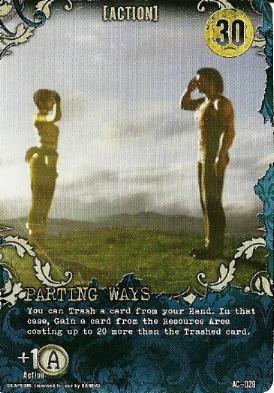
Item Management also does not work as well as using Ominous Battle, which Trashes out one card from your hand after it draws you 3 cards and gives you 10 Gold, nor does it work better than Parting Ways, which Trashes out one card from your hand and Gains you another that costs up to 20 Gold more. Parting Ways, however, is best used for Weapons, since Ammo cards exceed the cost limitations (most Ammo cards upgrade by increments of 30 rather than 20).

From what I can tell, Item Management requires two things to work: one, you must keep a consistently small Inventory, and two, you actually do have to Buy a bit of upgraded Ammo here and there. If you keep trying to change out 10s for 20s instead of 20s for Treasure or 20s for 30s, you’ll be stuck at low Ammo and Gold totals long after the other players are set up. (Trust me, I’ve played plenty a game like that! Frustrating–you’re basically stuck in Neutral for half the game.)

I don’t like the card much because it makes me play on a tightrope of buying JUST ENOUGH Ammo without buying too much. I never know when to stop, and it really screws with my gameplay. But my boyfriend loves Item Management and wouldn’t be without it–somehow, he makes it work. I think it’s the small Inventory size and careful Buys that do it for him.

Why Use It?

This is what I’ve been wondering–with Shattered Memories, Quirk of Fate, Ominous Battle, and Parting Ways available, why bother with Item Management at all?

Possible Ways to Make it Work

All I can see that’s good about Item Management is that you automatically upgrade your Ammo with one Action, rather than doing an Action to Trash out a card and then Buying another one. But it must be handled very carefully, as I noted earlier.

It also works better if you can Buy two Item Managements for your Inventory–having only one in your Inventory simply does not come up often enough to be solely responsible for your Ammo upgrading.

The way I see it, use Item Management if you have a way to do an Action-replenishing Action first (like Reload, Umbrella Corporation, or even Parting Ways/Quirk of Fate if you have to). Then, you aren’t shortchanging yourself on Actions, and you can help yourself out a little bit with card draw, weapon replacement, and/or Inventory-thinning.

Summary

Item Management is not my favorite card, personally, but there are ways you can still use it in the game–players can and do make effective strategies with it. Try it and see if you can master this more difficult of Actions in your next Resident Evil DBG session!

Bride Hair Dresser Game

As one of the only good, true hairdressing games I’ve ever played, Bride Hair Dresser stands out. I was so distressed when the site I had been playing it on apparently closed down, taking this game with it–so I was very happy to find a mirror copy on another site.

Let me take you through it and show you all the imaginative fun you can have with this great Flash game. (Also, it doubles as a way to plan and play with your own wedding hairstyle without having to set foot in a salon first. Woot!)

Basic Gameplay

You start out with a virtual model with long hair, which you can style in thousands of different ways.

Off to the right is your hairstyling stand, with all the tools of the trade at your disposal.

The scissors cut one lock at a time at predetermined lengths; the curlers create spiraled ringlet curls on each lock. The pink bobby pins create a neat topknot-style bun (click multiple times to get more of the hair included into the bun), while the multicolored clips create a messier bun look (again, click multiple times to include more hair in the bun).

The sparkle spray gives a swirling array of glitter all around the model’s head; the dryer blasts the sparkle spray away if you don’t like it. The brush is a complete “Undo” button, taking you back to the default look, and the flatiron gets rid of curls, pins, and clips (but not sparkles, or the cuts you made to the hair).

Lastly, the bottles of color at the bottom of your hairstyling stand lend your model totally different looks–from vampy dark to cotton-candy pink! (By the way, the orange bottle on far right is the default color.)

Simple Styling


You can curl all her hair (including the bangs) with the curlers…

Or you can put it all up into a topknot bun with the bobby pins…

…or even style it all into a messy bun with the clips.

And yes, you can even cut most of her hair off into this pixie-ish ‘do if you like!

Combining Two or More Styling Tools


You can put the four outermost locks into a bun, cut the two remaining locks shorter, and then curl them, for a tidy and perfect look…

…or you can go crazy and curl that short pixie style into this mess of curls…(this look is so much fun!)

…and even combine clips and curls for this more organic look.

Examples of Color


Deep brown, a little shorter, curled and darkly sparkly! (The sparkles come out as different colors depending on the color of the hair.)

Bright green with teal sparkles sets off a neat bobby-pin bun and tiny ringlets curled just behind the ears.

Cutesy purple (sparkly) hair and messy bun, with long curls at the front added for an extra touch of glam.

And Don’t Forget Accessories!


This white/yellow flower veil works well for most “down” hairstyles, but not topknots or messy buns ’cause it gets in the way.

This veil doesn’t get in the way of the higher hairstyles, and it seems to work well for just about every type of style you can create (though it won’t go with every hair color…)

Truly an accessory that works with all the various heights and colors of hair you can get.

This works best with “down” styles as well…and something that isn’t bright green or neon yellow. LOL!

Pretty silverish pearls… ^_^

Silver drop-style jewelry…very delicate!

And to echo the bouquet, flower earrings and a necklace. 🙂

A Mini-Lookbook


Pretty in cotton-candy pink ringlet curls and matching pink veil.


Multi-level teal curls with a tidy bun and white-flowered veil.

Messy red bun with short choppy layers below, and only a bit of flowery jewelry.

Play the Game:

Bride Hair Dresser

(P.S. Happy birthday to me! ^_^)

Forming a Collection Catalog: The Organized Gamer

Buying the pieces of your gaming collection is the easy part of starting to play a game. It’s much harder to keep track of everything you’ve got (and everything you want that you don’t have yet)…especially if you’re like me and have a habit of leaving your room in a mess of sizable magnitude. XD

I’m likely the last person anyone would suspect to be organized when it comes to gaming, given the usual state of my room and my purse. XD But indeed, I keep my gaming collections all divided up and even indexed in a few files on my computer. This article will show you how to build a collection database of your own, using spreadsheet software.

Step 1: Sort Your Collection into Sections

Are you collecting Magic: the Gathering cards? Sort them first by color (White, Red, Artifacts, Hybrid, etc.), or by type (Creature, Enchantment, Instant, etc.). Got a heap of HeroClix cards and figures? Sort them by comic universe (Marvel, DC, Indy), by point values (below 50 points, 50-100 points, etc.), or even by combat values, like range (0 range figures over here, 6 range over here, etc.). Whatever system works for you is best.

Sorting your collection is key–it gets you physically interacting with all of the stuff you have, so that you’ll remember it better when you begin to catalog it all. Through sorting my Magic collection one afternoon, I discovered no less than 20 cards that I had bought and then promptly forgotten about–they were cards I still had on my “want list,” even though I had already bought them months ago!

Now, once you have everything sorted out, don’t just cram it all back together in one box or shelf when you need to put it away for the night. Have several different boxes or dividers for your collection, no matter how big or small it is, so that you don’t ever have to sort it completely out again. Trust me, this saves a lot of time and relieves a lot of frustration when you have to add to, delete from, or edit your collection.

Step 2: Figure Out Which Section is Your Smallest, and Start There

Once you’ve got everything sorted, it’s time to catalog. But you need to determine which section of your collection is the smallest, so you can work with it first.

Why do I say to start with the smallest section? So you don’t get discouraged about the size of the task in front of you–for instance, I started cataloging my section of HeroClix figures over 100 points first because I had so few of them (around 20 at the time). This was a very manageable number to start out with and helped me feel better about trying to tackle it.

Starting with a smaller section also ensures that you can iron out any problems with your cataloging before you get too deep into it to turn back. When I started cataloging my Magic collection, I started with my Black section (the smallest), and quickly discovered that if I was to have a complete catalog, I had to list all the sets that my cards were from, as well as the number of each card I had, the condition it was in, etc. Because I’d started with a small section, I didn’t have much to go back through and add. If I’d started with the White section of my Magic collection, and had to go back and edit it all over again…I probably would have just sat in front of my computer and cried. LOL

Step 3: Begin the Cataloging Process

With your smallest section spread out in front of you (whether it’s miniature figures, cards, etc.), start noting all the important details about each item. Ask yourself: “What do I really need to know about each item?”

This process can take many different forms (and have very different timetables), so I have included three examples of cataloging from my real-life gaming databases.

Exhibit A: Robin’s Magic: the Gathering Trades Collection
With a good bit of my massive collection of M:TG cards sitting useless in boxes at home, I decided to make up a comprehensive database for them so I could remember what cards I had. That way, if anybody asked me if I had certain cards, I could tell them right away without having to search through endless boxes at home.

For my M:TG collection, I noted the following pieces of information about each card I owned:

  • Color
  • Name of card
  • Rarity (Common, Uncommon, etc.)
  • Type of card (Creature, Enchantment, etc.)
  • What expansion set(s) it came from
  • What condition my copies of the card are in
  • How many I have of this particular card

These are the things that I most needed to know, because when people trade for cards, they are usually after a certain expansion set’s printing of the card, and they want it as Near Mint in condition as possible.

The following screenshot shows part of the White section of my M:TG Trades Database:


(click for larger picture) I went with very simple formatting for my Trades Database so far, since I don’t want to flood it with colors and styles it doesn’t need. This would be a good style for a table you will often search with the “Find” function rather than visual search.

Time It Took to Complete: 6 months (because of collection size and health)

Exhibit B: Robin’s Magic: the Gathering Decks
Once I created my Trades Database, I realized that I also needed a way to digitally keep up with the changes I was making to my active M:TG decks. So I turned to Excel once again to create a database for all my active decks’ decklists.

For this project, I needed to know the following:

  • What types of cards were in my deck
  • How many of each named card I was running

Because I only needed to know a few details about the items I was trying to catalog, my decklist spreadsheets are much simpler than my M:TG trades database or my HeroClix database (later in this article). Below are a couple of examples of decklists:


(click for larger picture)This decklist is for my Elvish Piper deck, which has mainly Creatures in it; thus, the Creatures section (closest to top) is the largest.

The four main columns represent how many of each card I’m running. For instance, Elvish Piper herself is in the rightmost column because I’m running 4 of her in the deck, while Silvos, Rogue Elemental is in the leftmost column because I’m only running one of it. This visual arrangement made the most sense to me while cataloging, and it makes it easy to see where I can increase or decrease the number of a certain card I’m running in the deck.


(click for larger picture) This deck has mostly artifacts and creatures, being an Artifact-heavy Life-Gain deck, so the Enchantments, Instants, and Sorceries categories are nonexistent. Here again, I make use of four columns to show how many of each card I’m running.

Time It Took to Complete: 2 days of consistent work

Exhibit C: Robin’s HeroClix Database
My HeroClix collection used to be all jammed together in a fold-out makeup box, which worked okay, but didn’t let me see all the figures I had at one shot. I ended up playing certain pieces over and over again because they were the ones I could most readily find. That left me frustrated–I KNEW I had more figures than just the 30 or 40 I was playing every week! I needed some way to sift through them faster. Thus, the idea for my HeroClix Database came into being.

With my HeroClix collection, I needed to know the following data about each figure I owned:

  • Name
  • Experience Level (Rookie, Experienced, etc.)
  • Point Cost
  • Range Value
  • Targets (# of opponents the figure can target with one attack)Team Symbol
  • Whether they are Flying or Grounded characters
  • Keywords
  • Which of my five HeroClix trays it’s stored in
  • When it was last played
  • Complete dial, with power colors, special powers, and stats

Looks pretty involved, right? Well, when I’m building a team, I don’t always feel like hauling out the whole collection and methodically clicking through each piece I own to find the ones I want to play. This very detailed list helps me know as much about the figure as if I was holding it in my hand!

And if all this detail looks scary, don’t worry. Actually, once you get the hang of it and you’ve done several individual items, it’s not all that bad. Here are two examples of what my HeroClix Database (in Excel) looks like:


(click for a larger picture) This shows a small selection of the figures in my collection ranging from 20 to 34 points. Here, each of the Rookies is denoted with the yellow color behind its info; each of the Experienced figures has blue, etc.

(By the way, the reason Scarab (the only red one) doesn’t have any Keywords listed is because I haven’t gotten off my proverbial posterior to find out what they are yet. XD )


(click for a larger picture) This is a selection from the largest-point-value Clix figures I have (73 points and up). Lot more red (Veteran) and even a silver (Unique) figure listed in this section, because more of the higher-point-cost figures are Veterans or Unique figures.

Time It Took to Complete: 5 months (because of collection size and detail)

In a Nutshell: Cataloging
Determine what you need to know about each item you want to catalog. Is it just a few points, like my M:TG decklists, or are you going for a super-detailed database like my HeroClix one? This will determine how long cataloging takes (it took me 5 months to finish my HeroClix database, versus 2 days for my M:TG decklist), as well as the usefulness of your catalog once you’re done.

Step 4 (optional): Format Your Data

If you want your data to be easily read visually instead of just searched by the “Find…” option, it’s important to format what you have just cataloged. Using color, bold, and italics to good effect, as well as a big enough font size, will ensure that you won’t be cursing yourself months later when you refer back to your database.

With my HeroClix database, I formatted it so that entries could be read left to right along rows. However, when I got to the “dial and stats” portion, I was stymied: how could I combine one row of data on each figure’s basics with four rows of data on its stats?

After a while, I figured it out–the Merge and Center command in Excel is my best friend. Basically, for each character, I took four normal rows and merged them together everywhere that I just needed one row for data, like character name, keywords, etc. Then I left the other part alone so that I could fill in the HeroClix dial stats. Result: a pretty sweet-looking database, if I do say so myself.

Similarly, for my M:TG decklist, I wanted it to be visually easy to read and understand (at least for me), so I used both row names and implied column names to help me sort through each deck. The result is neat and clean without looking like an info overload.

Formatting my data was optional for my M:TG trades collection, however, because I mainly just search it digitally rather than visually. I still wanted it to be readable, but I didn’t have to worry so much about info overload per spreadsheet page.

Summary

Cataloging does not have to be a drag–in fact, once you do it, it can make you freer to do more things with your gaming time than fruitlessly search for things that you know you have but can’t find. If you have a gaming collection of any size, it does make a difference.

I will admit, it is a good bit of work at the beginning and does require a bit of upkeep (adding new, deleting old, editing, etc.), but the payoff (building teams without ever handling a figure, and changing decklists on the fly) is amazing to me. (Plus, it makes my all-too-obvious OCD happy. XD )

Thanksgiving Special: Loops of Zen

While you’re in your tryptophan-induced haze after mounds of turkey, dressing, and more sweet potatoes than you could ever want to see in a year, why not enjoy a game? Loops of Zen is that odd combination of rest and challenge–a peaceful yet thought-provoking game.

Gameplay

It looks and sounds fairly basic and simple: get all the curves, lines, and wavy pieces to link together into a shape that leaves no loose ends exposed. Not all lines need to be connected to the SAME shape–i.e., you could have random curves forming two separate circles and still win the level. To connect the various pieces together, you’ll have to turn them 90 degrees at a time with just a click of your mouse, until the game is satisfied that there are no loose ends remaining.

This, however, is more challenging than it seems, as you get fields of random lines and curves looking something like this:

Somehow, you have to make order out of this chaos. And it CAN be done–just click around, explore various ways to connect the pieces together.

I find that it’s something like a curvaceous form of Tetris, without the time limit. It takes time to plot your next moves, to turn pieces to their best advantage. You may have to form several different shapes before you hit on just the right one, and Loops of Zen does not penalize you for that. It only counts how many levels you completed, not how long you took to beat each level. (I love that about this game!)

A Sample Game in Progress

Below is a series of three pictures showing how I progressed in solving one of the game’s many svelte puzzles:


This is what I started out with. Hmmm…well, there’s a tackle-able mess at bottom right, let’s get that shored up first. But what can I turn to connect all those wonky pieces at top left?


Well, that got some of the randomness from the other side of the picture out of the way. I still have the wonky lines at top left, though.


Kinda looks like two aliens sitting and having a conversation, now! XD But what am I going to do with that random curve at top middle, and that random straight line at bottom middle? Not to mention the “arm” off the left “alien guy” shape. LOL, this gets funnier by the minute!

Bonus Section: The Music

Loops of Zen is kind of unique among Flash games in that it has an absolutely beautiful and appropriate song as its background. The song, “Surrealism” by XGamer, was an instant favorite of mine as soon as I played the game the first time. Its darkly flowing chords in F-sharp minor provide the perfect ambient-trance backdrop for this game, and it’s one of the reasons I enjoy this game so much.

Summary

If you want a Flash game that is utterly different from everything currently out there, I strongly suggest you check this out. It will make you think, and yet it is relaxing, too…perfect for an afternoon with a full belly and a comfortable chair. 😀

Play the game: Loops of Zen

Resident Evil: Outbreak

As the second official expansion set for the Resident Evil deck building game, Outbreak has a lot to live up to; its immediate predecessor, Alliance, set the bar pretty high for cards added to the game’s repertoire. And in most respects, Outbreak does not disappoint.

New to Gameplay: Infection System

Gameplay has not changed very much from the way the Base Set and the Alliance box play…except for one big addition: the Infection system.

Basically, every turn you do not Explore the Mansion, you receive one Infection Counter, in the form of face-down cards dealt from the Infection Deck (new to Outbreak). You can also get infection counters from creatures you happen to face within the Mansion, from other players facing creatures, or even as a side effect of someone playing a card. There are a few ways to get rid of Infection counters, but a whole lot more ways to accumulate them.

When you get 10 Infection counters, you take all the facedown cards you were dealt from the Infection Deck and add them to the deck you’ve been building since you started the current game. You officially become an Infected creature yourself at this point, and all you can do is attack the other players until the game ends.

The Infection System: Pros and Cons

Pros: Makes the game go a lot faster; makes for different levels, challenges, and styles of gameplay (i.e., struggling to keep yourself uninfected, actually trying to defeat the Mansion, or getting completely into the role of the Infected creature and taking out the other players).

Cons: Can’t get rid of counters as easily as you can accumulate them; one more thing to worry about in-game; distracts from original purpose of game; makes characters die a lot faster because you almost have to explore every turn.

My verdict: Infection system is not fun to play, because I like being able to have a decent weapon before I’m forced to explore the Mansion, and I hate having to focus precious game time on getting rid of those stupid counters. But for those who enjoy a faster gameplay or want something different from a typical deck building game, Outbreak does just that.

Amazing New Cards

I like this card especially for the “draw 3 cards” thing…but it’s fun to get 2 free actions, too. Can help you start an Action chain just like Reload did in the Base set.
This is THE way in the Outbreak box to Trash things out of your deck. Also great for Buying stuff without using up your Buy for the turn!
Not a joke card, by any means. You CAN now shoot stuff for mega damage, and it gets better when played at night. I like the situational boost, and I can only imagine the ruckus that the Base Set’s Jill Valentine would cause with this thing. See, she can reach the point where she keeps Explosives weapons instead of having to Trash them after every use, so… 😀

Imagine these two paired with The Merchant (Base Set), or with Gathering Forces (Alliance). Mwahaha. So much card-Gaining action…and SO much damage potential.
Yes, you get +1 Explore (usually, I hate that). But if you draw an Infected creature that is 20 or less health, you can put it back on top of the Mansion. And look–it’s a FREE 10 damage! Take that, Combat Knife.

To Learn More

Resident Evil DBG Wikia (source for Stun Rod and Samurai Edge images)
RE DBG: Outbreak on BoardGameGeek.com

Support for Single- and Serial-Task Gamers

There are people who manage multiple tasks, in life and in games, quite efficiently…and then there’s me. :/ I am not a multi-tasker. In fact, I’m the opposite–a single-tasker, or a serial-tasker, whether I’m living my life or playing a game.

Are You a Gamer Like Me?

I’m perfectly fine when there’s one thing to manage on-screen. Two things is a little like juggling–it’s okay, but not ideal for my concentration. Then you add a third thing, and that gets a little excessive. With four or more things to manage onscreen, I have to quit playing because my head is spinning. Diner Dash, for instance, is a really cool game, and I wish I could master it–but once I get more than two tables to manage, I’m no good. (I wouldn’t last a minute as a real waitress!)

Perfectionist Purgatory: Multi-Task Games

Time management and multiple-task management games are very difficult for me mentally; there are just too many places to look at on the screen, and too many timers to keep up with. Couple that with a touchpad mouse cursor which I have to keep finding onscreen, and the sense that I’m trying to do all this RIGHT and FAST, and I get very bothered. It’s simply too much to focus on, and I end up working very hard instead of relaxing.

A Perfectionist’s Paradise: Single-Task and Serial-Task Games

I focus better on single tasks at which I can excel, rather than doing multiple tasks, which forces me to settle for being “adequate” rather than “perfect.” Games that allow me to master one task or to completely own one skill are much more fun than trying to wrap my head around 12 or 13 at a time.

If I have to do multiple things, chaining them into a single-file line of serial tasks (do this, THEN this, THEN this) works a whole lot better for me, which is why I do better at games like SimCity–first, I build the power plant, THEN the residential areas, THEN the roads, and so on.

I also do better with turn-based games like Magic: the Gathering and HeroClix, though oddly enough, I usually have many small parts of a combo put together rather than fewer big pieces. Not sure why I can manage a battlefield full of Clix…though even then, I sometimes “forget” certain of my pieces exist! I think it’s because I can use one figure to attack, another figure to enhance damage, yet another to reroll a bad roll, etc–there are different single tasks all over the field that activate at different times.

Other Examples of Multi-Task Games and Mechanics

The new Resident Evil box, Outbreak, introduces a mechanic called infection counters, which work like Poison Counters in Magic–if you get 10 infection counters, the game changes drastically for you. You become an Infected creature yourself and spend the rest of the game attacking the other players.

Infection counters in Resident Evil are just as annoying as Magic’s poison counters. It’s another timer to keep up with–every turn you don’t explore the Mansion, you get a counter. If someone Explores and hits a certain couple of creatures, you get a counter even though you didn’t even do anything. Someone else can also give you a counter just by playing one of the other cards from the Outbreak box.

This is a good example of something extraneous I don’t like focusing on as part of a larger game. It’s another task to keep up with, and it makes the game feel like work instead of relaxation. For me and gamers like me who like to focus on one thing at a time, time-management and multi-task games are much more difficult. (One reason I quit Farmville–too much stuff to build, too much stuff to keep up with!)

The Possible Brain Reason Why

I mentioned perfectionism before, but I think my particular aversion to multi-tasking comes from how intensely I pay attention to the tasks I’m on. Once I’m on a task, I zone in very tightly on it. I’ve been known not to hear someone calling me or speaking to me because I’m reading or playing a video game; I’ve also been known not to notice one person who’s trying to talk to me if I’m really listening to someone else. It’s like I’m deaf and blind to everything else–I literally DON’T hear or see other stimuli while I’m working on something; it’s not me being rude or ignorant, but simply very, very focused. (This is why I didn’t make a good teacher. 30 kids to try to help at one time? Not going to happen with my brain set-up. XD)

When you take this mindset into gaming, you can understand why I get overwhelmed by too many rules, too many things to remember, etc., in a game. Too many things to focus on means that nothing gets any attention because I’m getting flustered. A game that allows me to focus on one task or one task at a time is a much more relaxing (and fun) game for me, while it might be too easy for those who multi-task well.

More Online Games for Other Single- and Serial-Task Gamers

Personally tested by yours truly for amount of fun and relaxation. I’ve enjoyed all these games, and I think you will too, if you like your games with a generous dash of intense focus rather than scattered attention everywhere.
Dice Wars
The Sand Game
Loops of Zen
Chain Reaction
Sloyd^3
Flowerseed