A Crash Course on Modal Windows

Up until I read the book on webdesign I reviewed a couple of weeks ago, I had no idea what to call those new pop-up windows that dim the screen behind them so you have to deal with them before you can get back to browsing. Through that book, I learned that they are called “modal windows,” and I was intrigued. I did some research on them, and I found that they are kind of all the rage these days in webdesign.

But what constitutes a modal window, and when should you use them? And, most importantly, when shouldn’t you use them?

Modal Windows: Basically, The Internet Version of a Dialog Box

According to the Wikipedia entry on modal windows, a modal window is any small pop-up box (or “child window”) that a user must interact with before they can carry on with their normal browsing of a website.

You have likely seen these kinds of windows on modern websites before. They can be used to alert users to something they need to fix on a form, allow users to sign up or log in, or to display a gallery of videos or images in larger format. (Most often, I’ve seen them used to report updates to a site, or to advertise a site’s newsletter, social media links, etc.)

How to Make Modal Windows

There are two main ways to create a modal window for your website; WebDesignerDepot shows the HTML5 and CSS3 method, while Queness.com shows the jQuery method. Both are perfectly valid, though the Queness example requires more detailed Javascript/jQuery code knowledge, and the WDD example is on the bleeding edge of code standards at the moment.

Alternatively, you can have a modal window coded for you; here’s a DHTML modal window script/plugin from DynamicDrive, and here’s the TinyBox Javascript modal window script.

When Should You Implement Modal Windows In Your Designs?

According to Smashing Magazine’s article on modal windows, a modal window is great for signup and login forms, as well as site alerts (such as a form being improperly filled out), and enlarged display of images or videos. All of these site functions don’t necessarily need a separate webpage, as this article’s author points out, and so putting the information on an appearing and disappearing window can declutter your page. (Additionally, using modal windows for search functionality is presented as an idea.)

I would add that modal windows could be used quite effectively as part of an online teaching system, i.e., making a one-question-per-window question & answer test, which requires the user to type in an answer and submit it before moving on to the next question, without leaving the screen you’re on. Also, modal windows could be helpful with visual or auditory assistance settings on a webpage, such as increasing font size, adjusting visual contrast, translating the text to another language, or allowing the text to be read aloud.

When Should You Choose Not to Use Modal Windows?

As both the referenced Wikipedia article and the Smashing Magazine article point out, modal windows have faced a good bit of criticism for blocking regular browsing. I know I find it annoying when I’m just surfing along, minding my own business, and then the page suddenly goes dark except for a little window in the middle of the screen that begs for my attention. (That’s one reason I drafted the post about intrusive page alerts.)

The general consensus seems to be that unless your information is absolutely critical to the user, there should not be an unexpected pop-up on your page. (Those of us who came of age in the “drive-by spyware download” age of popups are especially trained to hit the “X” button on any popup they see, so restricting the amount of popups on your page is a good thing.) Thus, modal windows would best be used in user-generated events, such as a user clicking on a “signup/login” link, or a user clicking to “Enlarge Image” or “View Video”, etc.

I would add also that if you’re building a mobile version of your site, you’ll probably want to avoid modal windows on the mobile version. When I’m browsing the Internet on my iPhone, I notice that modal windows either don’t open properly or don’t dismiss properly. (It might be just my big fat fingertips, but I’d wager I’m not the only Internet user with that problem! LOL!)

Summary

While not as annoying as the traditional “popup window,” modal windows should still be used with care; it’s easy to go overboard and risk your users avoiding your site because of all the screen-darkening dialog boxes. However, when properly implemented, they can make site processes easier on you, the designer, as well as sleeker and quicker for the user–a win-win!

Music Theory Fun, part 1: The Grand Staff

It’s wonderful being able to compose your own music or to play and sing familiar songs written by other people. Having composed music since at least the age of seven myself, I thoroughly enjoy crafting and shaping a new piece, nurturing it slowly into life on the piano keys. I also enjoy playing and singing other people’s music by ear, most often by listening to it many times from a CD or digital recording.

But what about writing all your self-created music down, or recreating others’ music from reading it off a page? That’s where music notation comes in, and where you have to make use of something called the grand staff.

The Grand Staff

grandstaff
Image Credit: Piano-Lessons-Made-Simple.com. I used this image as the basis for my example images in this post. (Thank you Photoshop for having a “music note” graphic!)

This is one of the more familiar forms of music notation, using this system of lines and the spaces between the lines.

trebleclef_bassclef
The curvy thing that looks like an “&” is called the treble clef, and it marks where all the notes that are above Middle C should be notated.

The curvy thing with what looks like a “:” out to the side is called the bass clef, and it marks where all the notes that are below Middle C should be notated.

Together, the treble clef group of lines and the bass clef group of lines form the grand staff, joined together by that big curly brace on the left side of the above image. Using the grand staff, you can write notations for any kind of vocal, instrumental, or piano piece.

Which Notes Go Where?

In this notation system, every line and space represents a note on the keyboard. The following graphic shows which notes go in the spaces, which notes go in the lines, and then which notes fall between the treble and bass clefs’ lines.

notelabels
From this diagram, you can see that the bottom space on the treble clef is where you would write an F above middle C, and the bottom line is where you would write an E above middle C, and so on. In the bass clef, the top line is where you would write an A below middle C, and the top space is where you would write a G below middle C, and so on.

To remember which notes go in the lines and spaces, here are the acronyms and memory sentences my music teachers taught me:

  • F A C E = The spaces in the treble clef, bottom to top
  • Every Good Boy Does Fine (EGBDF) = The lines in the treble clef, bottom to top
  • All Cows Eat Grass (ACEG) = The spaces in the bass clef, bottom to top
  • Great Big Dogs Fight Always (GBDFA) = The lines in the bass clef, bottom to top

In between the treble clef’s lines and the bass clef’s lines, you have more room for notation. There’s D above middle C, which hangs below the bottom line in the treble clef, and B below middle C, which sits above the top line in the bass clef…and lastly, Middle C. (I noted Middle C twice in this graphic because it can be written as part of the bass clef or treble clef–it’s kind of like the number 0, sitting in between the positive integers and negative integers in math.)

Identifying Notes in Sheet Music: A Little Self-Quiz

Using the identification chart in the last section, you can start picking out which notes are which, like in the example below:

sample_notation
What are the four notes in this sample? Click the picture to check your answers! (answers will appear in a new window)

Next Week: How Long Do You Hold These Notes?

Next time, we’ll be looking at note time values, also known as “hold this note for one beat, hold this one for four beats,” etc. This is where the rhythm part of music notation comes into play! 🙂

Why “Supernanny” Fails, Internet Meme History, Loops of Zen 3, and Amazing Fact Generator

Atrocious Advice from “Supernanny”
Very well-thought-out critique of the “fast-food-style behavior fix” TV show.

LOL It’s the Attack of the Internet
Find out when all your favorite Internet memes came to be!

Loops of Zen III
The third remix of logical relaxation as a game, and just as much thought-provoking fun as the first two!

Amazing Fact Generator
Amazing facts, all day long, as long as you can still hit the Refresh button!

My Favorite Clix, part 5: Vet Cheetah and Vet Mockingbird

Today, I’m profiling two Clix pieces instead of one, because in most if not all of my games, I play this Cheetah and this Mockingbird together. As two powerful but differently-styled close-combat pieces, they complement each other quite well.

Vet Mockingbird

vetmockingbird
Veteran Mockingbird, #018 out of Sinister. Image credit: HCRealms.com

Keeping in mind that Vet Mockingbird was printed in the mid-2000s, when HeroClix numbers were all traditionally a little lower, she’s an amazing mobile close-combat piece, great for tying opponents’ figures down for a few turns while being able to Leap/Climb away at her leisure. Her 19 defense up close, courtesy of Combat Reflexes plus a natural 17, makes her infuriatingly hard to hit, and the 2 damage with Close Combat Expert can even break through Invulnerability and Impervious.

Her Flurry clicks mid-dial aren’t bad, either (though you won’t break Invulnerability without a Perplex). And her back-dial Leap/Climb helps you get her back to a Medic for a quick heal, which is more likely to happen given her 14 defense last click. Add to all this her free-move Team Ability (Avengers) and her 2 range with double targets, and you have a surprisingly versatile figure for only 34 points.

Vet Cheetah

vetcheetah
Veteran Cheetah, #018 out of Icons. Image credit: HCRealms.com

Where Mockingbird has mobility and versatility, Cheetah has brute force attack and damage. Charging for 5 spaces and using an 11 attack to deal possibly 6 damage with Blades? It’s awesome, and it has happened in my games before. And if she gets hit for 2 damage off top click (which is entirely likely, given that she’s charging into the fray), she can Leap/Climb for 10 spaces, getting her well out of the fight and possibly even back to a Medic.

That Battle Fury on every click used to be only a hindrance, keeping her from being carried and making ranged attacks. Now it helps her avoid being Mind-Controlled as well as ignoring opponents’ Shapechange, which keeps her from being stuck beside an enemy piece, unable to attack. Though she has no team ability and a defense that steadily lowers, her mid-dial attack spike back up to 11 helps offset that. All of this for 55 points, which is rare!

Why I Play Them Together

Ever since I first started playing, pretty much, I’ve had Vet Cheetah and Vet Mockingbird in my collection, and I’ve generally played them together for most of the games. They cover each other’s flaws well; Mockingbird’s lower attack is covered by Cheetah’s higher attack, while Cheetah’s tendency to get locked in place early on is covered by Mockingbird’s generally higher mobility. If you have them attacking the same target on alternating turns, you quickly have a KOed target. And if one of them needs to get away from battle for a heal, the other one can usually take over combat for a little while, thanks to them both having Leap/Climb for much of their dials.

I have tried to play them separately, but I usually find my way back to using them together on the same team. They are both fairly cheap close-combat characters, making them easy to fit onto a team build (together they are only 89 points–a bargain considering all the functionality you get). And somehow, it just makes sense for the two of them to play together, despite not being in the same comics universe. 😀

My Personal Recommendation

If you need a cheap but powerful close-combat character with high attack and damage, you’ll want Vet Cheetah as part of your collection. With a longer dial and higher attack than most pieces of her point cost, she’ll survive longer and even take out higher-cost/higher-strength pieces while she’s surviving. (Trust me on this–I used Vet Cheetah to take out Vet Icons Supes once. It was FUNNY. :D)

However, if you need a cheap, highly mobile tie-up piece who deals surprising damage and is harder to catch than a buttered eel, Vet Mockingbird will serve you well. She doesn’t survive quite as long as Cheetah in intense battle, but then again, with that Leap/Climb, she doesn’t have to stay in battle if she doesn’t want to. 🙂

Jesus’ Identity Confirmed by Scriptural Eyewitnesses

1 John 1:1-3
1 That which was from the beginning, which we have heard, which we have seen with our eyes, which we have looked at and our hands have touched–this we proclaim concerning the Word of life. 2 The life appeared; we have seen it and testify to it, and we proclaim to you the eternal life, which was with the Father and has appeared to us. 3 We proclaim to you what we have seen and heard, so that you also may have fellowship with us. And our fellowship is with the Father and with his Son, Jesus Christ.

Given that “the Word of life” references Jesus, we can see how John sets up Jesus’ identity as both divine and human. Jesus was indeed “that which was from the beginning,” having always existed and being one with God (see the Gospel of John’s opening lines). And yet, Jesus lived on earth in a fleshly body as well, and the disciples could look at Him, see Him, even touch Him; He lived a mortal, human life. He was truly both–God in flesh, God come to earth.

This is what the disciples could “testify” to firsthand–that they saw Jesus live (and die) as a human, but also saw Him rise from the grave, talk to them, and ascend to Heaven some days after. They had eyewitness testimony of their experiences walking alongside Christ, both before and after His crucifixion; they knew only the Messiah, the Savior, could do this. This is what John is joyfully “proclaiming”–the truth of what they all saw. And they share about this experience because they want others to know the reason for their joy. The Savior has come, has died for our sins and risen again, and the gift of salvation is ours to claim if we so choose.

These days, we want more than eyewitness testimonies to believe something; we want scientific studies, empirical data, DNA samples, anything that is concrete and incontrovertible “proof.” All of that scientific innovation is wonderful, and it has its place in our society’s workings. But faith asks that we take a step beyond what is absolutely provable, opening our minds just long enough to admit the idea of God. We may not be able to get a DNA sample from Jesus or measure God’s footprint, but if we even temporarily allow that God exists, we might just be able to grasp what John’s talking about here, and to believe.

My Favorite Computer-Themed LOLCats

Over at I Can Has Cheezburger, one of the enduring caption themes is computers (and other technology of all sorts), and they all make me LOL. I think we can all identify with the cats (or other animals) that express our frustrations or depict our lives as we interact with technology. (And seeing these sentiments alongside cute fluffy animals is a bonus. :D)

Here, I’ve collected my personal favorite computer LOLcats (and a few LOLdogs and LOLanimals). Enjoy!

removecatfromcomputer
Accurate. xD

funny-pictures-cat-is-on-facebook
So THAT’S why I have all those odd friend requests…

it-cat-is-indisposed
Charger cords: the new yarn.

it-kittens
…Just as soon as they quit using it for a jungle gym.

cat_heater
Well, you can tell where the heat output is on THAT computer. LOL

looooooooad
^ My experience with dialup

funny-dog-pictures-commented-lolz
The saddest feeling on the Internets.

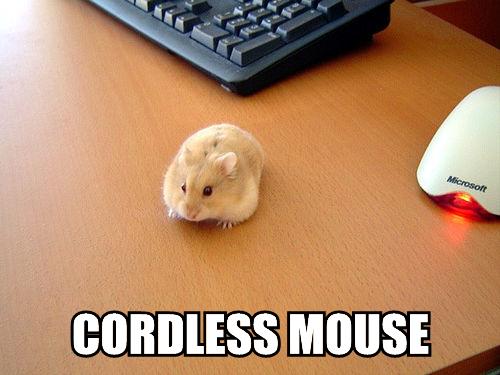
cordless-mouse
“Yes, it’s our newest invention: a mouse that actually looks and feels like a real rodent.”

wirelesscat
“We’re sorry, your Wireless Cat has stopped responding. Please pet to reactivate.”

ergonomic-pug
“NEW and IMPROVED with BARK and WAG functionality, and REAL dog-fur smell!”

funny-pictures-cat-sleeps-on-the-escape-key4
Strange choice of pillow…

computer-rebutt
*snickers at pun*

funny-pictures-infinite-lolcat
And now for your daily mindtrip. 😀

getoffcomputer
Teenagercat’s retort.

funny-pictures-firefox-crash-snow
“Restore session: Yes. Removing snow…Loading…”

cookiesandspam
Because cookies and Spam are his wages for fixing the computer. 😉

funny-pictures-cat-in-printer
This makes just about as much sense as any other printer error I’ve seen.

catscan
Apparently its grayscale printing turns out fluffy, too.

no-any-key
The location of the “Any” key has long been a basis of speculation…

hexcode-colors
xD, fur colors represented in HTML hexcodes. (Yes, yes, I know, I’m a nerd)

computercrash
Aww. 🙂

afk
Marathon gaming sessions can tire a kitteh out!

megacat-processor
Bet that kitty can run some sweet graphics. As long as they’re LOLcats, of course.

i-can-fix-thiz-sorta
Debugging cat is debugging.

sleepingoncomputer
xD This is better than a drunk status update!

battery-level-0
Because naps are recharging time, literally.

pug-popup
Can’t fool me–that little face is guilty!

chex-mailz
LOL, this cat has adopted the “aimlessly browsing Internet” pose perfectly.

kitteh-shutdown
“Please do not try to pick up or feed your kitteh until update process is complete.”

kittygraphix
Freelance graphic designer kitteh is freelancing.

mouse-is-angry-over-restart
How many times did I shout this at Windows Vista? Innumerable times. xD

turnoffandon
Best way to fix any computer. 🙂

Awesome Blog Alert: GeekyPosh.com

geekyposh_side Interested in beauty products? How about home decor? Geeky products and articles more your speed, or do you like to read about pets? How about the occasional post on the Christian life?

If any or all of these subjects strike your fancy, then I recommend GeekyPosh.com as a blog you’ll want to add to your reading list. Run and written by the awesome Jenny, GeekyPosh is like a website version of a super-cool older sister, who is always on the cutting edge of both style and functionality.

Not only that, but Jenny also has written some pretty cool life posts as well; I enjoy her posts about her cats and about her faith, because they make her blog feel more personal and heartfelt. And with just about every article, she includes lots of pictures, making her writing at once more informative and more attractive to the casual viewer. (I could learn quite a lot from that strategy… :D)

I promise Jenny hasn’t paid me to say any of this–I just admire her work and thought more people should know about her blog, since she’s a fellow freelance webdesigner and developer. Go visit! 🙂

When Your Brain Says “No” to Creativity, Try This Instead

If you’re a creative person, you know that usually the mental “juices” flow well. The ideas slide into your brain as fast as a baseball player sliding into home plate, and it seems as if nothing can stop them.

But, inevitably, there are the times you sit in front of your blank canvas, your blank craft table, or your blank Word document and just have no idea what to do. You want to create SOMETHING, but…it’s almost as if your creativity is constipated, for lack of a better analogy. 😛

What do you do? Before now, I’ve often just sat there and tried to make an idea come forth, wasting minutes (or sometimes hours) trying to be creative and feeling utterly useless. But I discovered a trick, quite by accident, that can help you get unstuck pretty quickly: doing housework.

Whaaaaat? Doing HOUSEWORK Makes You Creative?

Well, no, doing housework won’t make you a master of the arts in ten seconds flat. But it does give your brain critical time away from the arduous effort of trying to be creative. In the minutes while you’re cleaning or just straightening a few things out, your brain can relax as you focus on getting these small tasks done.

An example: the other evening, I was finally tackling the kitchen, which had become a little (read: a lot) messy. Wiping down the counters, sweeping crumbs off onto the floor for later pickup with the broom, bagging up trash, unstacking and restacking the dishwasher…I knew it all by rote, and so I could kind of zone out, not particularly thinking of anything.

I was in the middle of finishing the task, sweeping up all the crumbs and randomness on the floor, when I realized I was humming a little melody. And I didn’t have any music playing, nor was it any melody from an established song that I could recall. It seemed that in the 10 minutes since I had begun my kitchen-tidying, my brain had come up with the beginnings of a new composition, without my actively thinking about it at all.

This could have been considered a fluke, except that something similar happened a few days later while I was finally clearing the front porch of last year’s fallen leaves and other detritus. While I was bagging up the trash from the front porch area, I suddenly had an idea for a new character in my novel…it was totally unrelated to what I was doing, but it popped into my head nonetheless.

The Key Here: Relaxing/Refocusing Your Mind

Often, we say we’re relaxing, but our minds are still doing 140 on the mental autobahn. I know at least for me, trying to relax by being in a still, quiet room doing nothing doesn’t really help my brain turn off (see: my 4am actual falling-asleep-time); I lay there jittery, feeling like I should be doing something instead of laying there useless. But, somehow, when I’m doing little tasks like housework, my brain slows down a little, takes its foot off the mental gas, and actually takes a breath for once.

Try this if you feel absolutely stuck in a creative rut and have no ideas. Instead of forcing yourself to keep plugging away and getting nothing accomplished, try doing a little housework, or something less mentally intense. You might find that you clear some mental clutter away as you clean and straighten your physical environment!

ReadWriteThink, Illustrated Cat Poses, Fashion Designer Game, and Words for Feelings

ReadWriteThink
Great website for educators and those who are interested in bettering education.

Cat Poses, Illustrated
The various poses and faces of cats, drawn and colored for our perusal. (I LOLed at “The Butt Stretch” and “Puzz and Chew” [purring while eating].)

Fashion Designer
One of my favorite fashion games–not only a dressup game, but a design game as well!

Words for Feelings
Great tool for finding just the right word to express your character’s feelings.

My Favorite Clix, part 4: Experienced Destiny

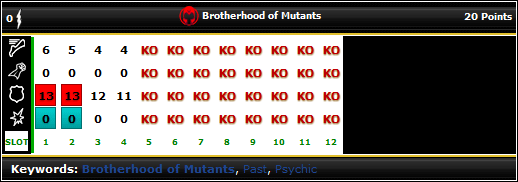
One of my favorite Clix pieces of all time is not one that deals a whole lot of damage. In fact, she’s got 0 damage and 0 attack, and only 6 move and 13 defense at her best. But I love Experienced Destiny for two reasons: Probability Control and Super Senses.

expdestiny
Experienced Destiny, #023 out of Xplosion (and also #029 out of Universe). Image Credit: HCRealms.com
Experienced Destiny is very much a “one-trick pony” kind of figure–in her case, the “one trick” is being a 23-point free-move Prob piece who’s more trouble to kill than she appears to be.

You wouldn’t think Super Senses and Prob would make Exp Destiny so difficult to defeat; I beg to differ. In many games, both casual and tournament, I’ve seen opponents waste so much time going after Destiny while my other pieces systematically tear their teams to shreds–and they simply can’t hit her very often. Either they hit and she Probs them into a miss, or they hit and she Super-Senses out of it. (And the rare times she does get hit, I usually get her back to a Medic for a quick heal. >:D )

True, she can only move 6 spaces, but those are 6 spaces you won’t have to pay an action for, courtesy of Brotherhood of Mutants’ team ability (free move). And true, she’s only got 13 defense, but she shouldn’t be on your front lines of battle anyway. If positioned well on the battlefield, this little figure can make your Clix life a lot easier–and make your opponent’s Clix life lots more difficult. 🙂

Not only is Exp Destiny pretty easy to fit into a team build, but her cheap point cost and simple abilities also enable her to be part of a “pit crew” strategy. (“Pit crew” pieces are purely team-support characters, usually cheap and featuring Support, Outwit, Perplex, or Prob.) Play Exp Destiny with a Paramedic, a Con Artist, and a Rookie Black Panther, and you’ve got one of the cheapest ways to include every major team-support power on your team.

Now, why do I recommend the Experienced over the Rookie, at 20 points? See the Rookie’s dial, below.

rookiedestiny
Rookie Destiny, #022 out of Xplosion (and #028 out of Universe). Image Credit: HCRealms.com

Simple: for 20 points, you get only 2 clicks of Super Senses and Prob, instead of 3 clicks with the Experienced. Saving the 3 points is a fine choice if your team build requires it, but if you’ve got room for 23 points, definitely upgrade–it’s worth it.

My Personal Recommendation

If you’d like to make the best use of Probability Control as a power, it’s best to use a figure that has Prob almost to the exclusion of anything else. Destiny is a prime example. She’s not meant to be an attacker, nor a defender–she’s meant to facilitate the rest of her team’s attacks, and frustrate the opponent’s attempts to attack. You won’t find a cheaper Prob option who keeps Prob for 75% of her dial length!