God’s Requirements in a Nutshell

Jeremiah 7:1-8
This is the word that came to Jeremiah from the Lord: 2 “Stand at the gate of the Lord’s house and there proclaim this message: ‘Hear the word of the Lord, all you people of Judah who come through these gates to worship the Lord. 3 This is what the Lord Almighty, the God of Israel, says: Reform your ways and your actions, and I will let you live in this place. 4 Do not trust in deceptive words and say, “This is the temple of the Lord, the temple of the Lord, the temple of the Lord!” 5 If you really change your ways and your actions and deal with each other justly, 6 if you do not oppress the alien, the fatherless or the widow and do not shed innocent blood in this place, and if you do not follow other gods to your own harm, 7 then I will let you live in this place, in the land I gave your forefathers for ever and ever. 8 But look, you are trusting in deceptive words that are worthless.”

God lays it out pretty straightforwardly here: “Straighten up, do as you’re told, and all will be well. Keep doing what you’re doing, disobeying Me and trying to deceive Me, and I will not refrain from reprimanding you.”

But The people of Judah, unfortunately, were too busy following other local deities, killing, and being cruel, all while paying only halfhearted lip service to God. They were even resorting to repeating useless phrases over and over, as if that alone could garner them righteousness. God could see straight through that deceptive behavior, and so He tells Jeremiah, one of His prophets, to literally lay down the Law with these people. All the people of Judah would have to do is follow what God said–it seems laughably easy!

These days, however, we modern folk find it just about as hard to follow what God says. What He says hasn’t changed any, but our drive to be “in charge of our own lives” hasn’t changed much either. We like to pick and choose what to follow and what to ignore out of convenience and self-serving motives, rather than sticking with God 100%. We all need Jeremiah’s message from God, even those of us who are in church every time the doors open–we all need to be reminded of what God requires of us and how He expects His people to behave.

Sleeping Well: It Makes a Difference

Today, I’ll be doing just a short post to make a point: sleeping is a LOT more important than most of us think. As I have found out from the following personal experience, it’s far more important to daily function…and you’d be surprised how changed you are by just a lack of good rest!

I Slept, but I Did Not Rest

For months, now, I’ve been having a problem sleeping; though my body was absolutely exhausted, my brain never seemed to shut up. I would be uselessly awake until 4 or 5 in the morning, fighting to sleep yet never quite falling under, and then finally would fall asleep just as the sun was beginning to rise, awakening later in the morning (or sometimes in the afternoon).

But even though it seemed like I was sleeping enough hours, I never felt like I’d had enough sleep. My brain whirred even as I slept, producing strange dreams and waking me up every hour or so until it was time to get up again. I shut my eyes and was kind of unconscious for a while, but it was an uneasy, dozing sort of sleep, not restful at all.

Weird Body/Mind Symptoms

During this time, in which this behavior became slowly “the norm” for me, I noticed I had less and less ability to concentrate, was far more irritable than normal, and had absolutely no interest in doing anything I used to love doing. Whatever I happened to be doing at any given time, my brain wanted to be doing something “different,” something more “interesting.” But nothing I tried seemed to quite fit the bill. It almost felt like an oncoming lapse of depression.

Getting my weekly work of blog posts, Sunday school lessons, and housework completed felt nigh on to impossible with this kind of foggy, hateful brain; I was constantly restless and frustrated, and worries about all the things I hadn’t gotten done, which only added to the inability to go to sleep when night came. I didn’t want to start taking sleeping pills for fear I’d get too dependent on them and lose the ability to go to sleep naturally. (I’ve got two pharmacists for parents; I know what such drugs can do!)

The ultimate fail here? I didn’t connect my lack of sleep to my slowly worsening everyday function. I thought, as mentioned before, that I was lapsing back into depression–that’s exactly what it felt like. Plus, one of the symptoms of my depression, historically speaking, has been insomnia…it created a weird loop of logic that I was frankly too tired to explore too far.

The Random Restful Night of Sleep

And then, a few days ago, the storm of unrestful sleep broke, suddenly. I found myself sleepy around 9:00 PM that evening (a true rarity!), and experimentally, I set aside my glasses on the nightstand and turned over onto my side.

Imagine my surprise when I woke up almost 8 hours later, thinking I had only been asleep about 20 minutes or so! It seemed that against all odds, I had finally gotten a full night of sleep which didn’t feel like I was lying there waiting for the alarm to ring. I had fallen into absolute, blissful unconsciousness, without the aid of a single pill.

And the strangest thing?

I had ENERGY. I had FOCUS. I got stuff DONE. And all this before 10:00 AM?! I was shocked. For the last four months, I had been literally unable to peel myself from the bed before 11:00 AM, and that was “early.” I would try to get up and would fall back asleep in the middle of sitting up, in the middle of dressing, etc. But after this random night of inexplicable, restful sleep, it seemed I could actually get up like a normal person.

Not only did I get up, I stayed awake the whole day, and felt much more functional and much more “at myself.” I didn’t lose concentration all the time, I didn’t have to have 3 bazillion tasks going to keep my brain from being painfully bored, and I wasn’t sitting around feeling jittery and frustrated. It was as if someone had pressed “Restart” on my brain.

What Produced This Anomalous Night of Sleep?

Thinking back on it, I did a few things very differently on that fateful evening:

  • I had to charge my smartphone, and the outlet is far away from my bed, so I couldn’t use the phone while in bed
  • I wasn’t using my computer because I (surprise) had finished all my computer tasks for the day
  • Nothing interesting was on TV, so I didn’t have it on
  • I had no food or drinks left in my bedroom
  • I hadn’t drunk anything in about an hour or two, so I wasn’t having to get up to go to the bathroom
  • My bed was actually made up properly (for once, LOL)

In short, I removed all of the normal distractions (food, Internet, TV, bathroom breaks, etc.) and had made the bed as comfortable as possible. Then, I just allowed myself to shut my eyes without worrying that I was going to go crazy with boredom. (Couple that with the fact that I was REALLY exhausted already, and it’s no wonder I fell asleep and stayed asleep!)

Moral of the Story: Remove All Distractions, Get Comfy, and Let Sleep Happen

I’m serious–it really helps. Those are the only factors of my situation I changed, and I got the best sleep I’d had in months. If you’re having any of the distressing symptoms I was having, try doing anything you can to get decent sleep–you might just wake up healed!

Visual Tricks You Can Accomplish with CSS

Time was, if you wanted something visually impressive to appear on your page, you had to use an image. Creative logos, text shadows, graphic designs in the background–you had to be a Photoshop or Paint Shop Pro whiz to make it all happen.

Thankfully, with the wizardry of CSS, you no longer need images for many of these tasks. You can add shadows and outlines to text, give a 3D shadow effect to divs, crop images (or at least make it look cropped), and even create gradients and other lovely design elements with just CSS. See below!

Text-Shadow

textshadow
This example shows off the “text-shadow” property in CSS3, which can give your text a “popping-off-the-page” effect. The shadow can be as long and as wide as you wish, and it can be any color you wish! (Note: this effect works in all major browsers of the latest edition, but IE 9 and earlier don’t support it.)

When you write your CSS rule for this, be sure to follow this order: “text-shadow: h-shadow v-shadow blur color;”. For instance, this is the CSS which makes the above effect:

.shadowedtext {text-shadow: 2px 2px #777777; color: #6b00a2;}

In this case, the text shadow is positioned 2px horizontally away from the text, and 2px vertically away from the text. The shadow is also given a color–#777777, a dark gray. (You don’t necessarily have to specify a “blur” value, but the option is there if you want to use it. It just makes your text shadow a little softer.)

W3Schools Text-Shadow Reference Page

Box-Shadow

boxshadow
See how this box of text “pops” off the screen at you? This is achieved with the “box-shadow” CSS property, which is very similar to the “text-shadow” property in both appearance and execution. It’s just that “box-shadow” works on paragraphs, divided layers, and other larger sections of pages. This works in all major modern browsers.

When you write your “box-shadow” rule’s CSS, follow this order: “box-shadow: h-shadow v-shadow blur spread color inset;”. This is how I’ve constructed the CSS for my example:

.shadowedbox {box-shadow: 10px 10px 5px #888888; background-color: #CCCCCC; padding: 10px; width: 500px;}

Here, I have a shadow which appears 10px away from the box in both directions, and it’s blurred out 5 more pixels to give it a softer edge. I didn’t use the “spread” part of the property, nor the “inset,” but I did give it a dark gray color. (“Spread” affects the size of the shadow; “inset” can turn the drop shadow effect into an inner shadow.)

W3Schools Box-Shadow Reference Page

Gradients (CSS3 Only)

css3gradient
Can you believe this pretty gradient was created just with CSS3? It’s true! And not only can you make a linear gradient, like this one–you can make all sorts of gradients, no image program required!

Though IE doesn’t support this functionality quite yet (as far as I know), most other modern browsers do, and it is fantastic for helping your pages load a little faster and having less images to deal with.

As for explaining how you can create gradients with just CSS, I will defer to Chris Coyier of CSS-Tricks.com, who has created not only a lovely, thorough explanatory article, but also a really neat demo page where you can see all the different types of CSS3 gradients and the corresponding code.

CSS3 Gradients @ CSS-Tricks.com

Text Outline/Stroke

outlinedtext
Oh, how I used to long to know how to get outlined text, even in Photoshop! Long after most of the world had updated to a version of Photoshop/Paint Shop Pro that had the ability to add outlines, or “strokes,” to their text, I was still puttering around in older versions, wondering where the outline setting was.

Thankfully, there are a few pure-CSS ways to make your text pop with outlines (and they can be any color!). Again, I will defer to CSS-Tricks.com for the explanation and further examples–there is an actual property that creates an outline, and then there’s a fun little workaround that actually produced the example above. (Hint: we’ve already seen it at work in this article!)

Adding Strokes to Web Text @ CSS-Tricks.com

Cropping Images (Or At Least Making It Look That Way)
fauxcrop
Look at these two images side by side. Would you believe me if I said these are both the exact same image file, and that simply specifying negative margins made the right image smaller?

Believe it or not, that’s how it was done–and it’s only one of the ways in which CSS can “edit” your images for you. This can be a real time-saver if you’ve got tons of images which all need to be formatted in a specific way when they display on the page (such as thumbnails). Check out CSSGlobe.com’s “faux-cropping” article to find out more about these techniques!

3 Easy and Fast CSS Techniques for Faux Image Cropping @ CSSGlobe.com

Visual Effects: Text Rainbows/Inner Shadows/Other Amazing Things

dragonlabs_rainbows
This lovely text effect was created by only using CSS and Javascript–amazing! (And there are plenty more colorful examples on the demo page!) DragonInteractive has come up with this tidy little way to help us all beautify our text in various ways, available through the following link:

DragonInteractive Labs: Rainbows

Visual Effects: Bokehs

bokeh_css3
Okay, this one requires a little help from jQuery to make this CSS run right, but it’s still a lovely way to incorporate graphic effects without ever having to open an image-creation program. Using the following linked tutorial, you can add as many of these softly blurred, half-opaque “bubbles” to your page as you wish!

Pure CSS3 Bokeh Effect (with some jQuery help) @ MarcoFolio.net

4 Ways to Be a Kid Again (For 5 Minutes)

As a kid, I always thought I had it pretty rough in terms of school responsibilities. That was, of course, before I grew up and found that out in the “real world” lay tons more responsibilities, more than I could have ever dreamed. Being grown-up can be very, very stressful…no wonder we’re all medicated and in therapy these days!

So, instead of trying to medicate our stress away, how about we approach it a little more creatively? How about we access some of that crazy kid energy we used to have? It’s actually still there, if we take the time to tap into it.

Create a Crazy Masterpiece…in MS Paint

Remember when art was fun, not something you worried over? Remember when the coloring of a single page in a coloring book could consume your whole being till it was done? We may not have coloring books for adults, but we have software programs that can stand in.

mspaint_1
Start off by drawing something like this, just wild and crazy lines streaking across the image…

mspaint_2
Then add a little color, whatever color you want and wherever it ought to be…

mspaint_3
Keep going, focusing only on the task at hand, till you either get tired of it or you’re finished! If you get tired of it or want to start anew, no problem; if you finish it and yet don’t want to save it, no worries–kids crumple up drawings and restart all the time. (And who knows, you might just inspire yourself with the random art you create!)

Go Outside for No Reason

Kids always seem to be drawn like magnets toward the outdoors, but as adults, we somehow lose that desire to be out and about as much, especially if it doesn’t have anything to do with our jobs or our more “grown-up” relaxation time. More of us end up staying indoors where the technology (and the to-do lists) reign.

So, how about just going outside, for absolutely no reason other than to be outside? Feel the air temperature, breathe a little easier, and just be open to whatever you discover. “Enjoying the day” doesn’t have to be part of a vacation itinerary, nor does it have to be penciled in on your calendar. It can happen any time, any day you want or need it to happen. For most of us, just taking time to see the actual environment we live in would be a revelation of senses. This is not necessarily about “getting in tune with Nature,” but about experiencing the physical world around us rather than being locked in our own mental world full of deadlines and other “grown-up” stuff.

Make Up a Silly Game

In childhood, almost anything could be made into a game–remember that? We didn’t need hardly anything to create a game of our own, either to play by ourselves or to play with others. Making super-long chains of paper clips to stand in as “jump ropes” (I remember doing that–it was kinda successful, LOL), or wadding up great quantities of paper and rubber bands to make monstrous, lumpy creations that were sort of like baseballs to throw around…and making up rules as you go along, like “You can only jump over the paper-clip chain 3 times, and then you have to toss the paper ball as far as you can.”

These days, it can be hard for us to think about making our own games when so many fun technology-based games exist. But what about turning everyday tasks into little games? Like Mary Poppins said, “in every job there is an element of fun–you find the fun, and SNAP! the job’s a game!” Challenge yourself to Housecleaning Games, where collecting the most trash in the fastest time gets you points–and even more points for collecting it with style. Or turn your daily to-do list into a game where every item is a “level” to be conquered. It doesn’t matter what the game is or what the prizes are–sometimes, the prize can be in the creation of the game itself!

Imagine Something Outlandish

As children, we are taught that imagination is wonderful; as adults, we learn that imagination is “not company policy,” “not the way things are done around here,” etc. Sometimes that can really leave us stymied when it comes to creativity–we constantly self-censor and push aside the most wildly creative impulses as being “too childish.”

So, to let that childlike creativity out to play again, try the following trick: Imagine that a character from your favorite TV show/book/movie is doing something totally and hilariously out of character. Where does that action take him/her? What happens when other characters from the TV show/book/movie see or hear about this? (Here’s my example: Cinderella becomes a punk rocker and writes songs about her stepmother and stepsisters.)

Follow this story out as long as possible, adding details, making it as outlandish and funny as you want. Even when it gets kind of “awkward,” keep pursuing it–this is how you let your inner child free!

Summary

All of these ideas might sound a little silly to us “grown-ups.” But then again, we used to revel in being silly, and we had a whole lot more fun back then. We don’t have to completely give up our adult life, but we can put it aside just for a few minutes, to get back a little childlike joy. Isn’t that worth trying?

Happiness vs. Pleasure, Prom Re-Invite, Lovely Song Covers, and Website Background Patterns

A Happiness Tip from Aristotle
Too often we confuse momentary pleasure with this strange concept called “happiness.” Aristotle (and this article’s writer) help us sort them back out.

Are We Still On for Prom?
A sadly hilarious note between two high school students. (warning, a little language)

Song Covers that Will Give You Goosebumps
Covers of popular songs by unknown artists. You might just discover a new favorite in this mix!

400 High-Quality Background Patterns
Great background patterns for websites of all kinds.

Favorite Magic Cards, part 3: Permanents

I enjoy playing permanents in my M:TG decks, certainly much more than playing one-turn-only spells–I like game effects that continue on past one turn, that help me build up strength, life points, etc. The following twelve cards help me toward that long-term-survival goal:

angelicchorus
Angelic Chorus: Finally, a reward for playing the creatures with huge toughnesses! Indomitable Ancients, anyone?
boonreflection
Boon Reflection: Because gaining single-digit totals of life is paltry. 😀
pristinetalisman
Pristine Talisman: Hmm, tap it to not only get a mana, but gain a life. Fun with Well of Lost Dreams. xD
quietdisrepair
Quiet Disrepair: This is one of those cards you can use to destroy your opponent’s enchantment or artifact, or use on your own stuff to gain a free 2 life every turn. It’s a win-win!
scourgeofthenobilis
Scourge of the Nobilis: Firebreathing and lifelink, together in one creature enchantment!
shieldoftheoversoul
Shield of the Oversoul: I admit it: I play this because of the indestructible ability. Makes Green stompy creatures that much funnier.
steelofthegodhead
Steel of the Godhead: The combo of lifelink and unblockability is AWESOME.
storycircle
Story Circle: Because the Circles of Protection, as cool as they are, are only situational. THIS one covers the board.
sundroplet
Sun Droplet: Because it’s hilarious to watch your opponents grimace as you get back all the life points they knocked from you, one turn at a time.
testofendurance
Test of Endurance: I love this win condition so much I have a deck built around it.
wheelofsunandmoon
Wheel of Sun and Moon: The #1 way to survive a mill deck’s onslaught. Also funny in a deck that draws a lot of cards–this way, you don’t accidentally deck yourself!
worship
Worship: Just never block with your last creature, and make sure you have a way to quickly put out another creature on the fly, and you won’t have to worry about dying from combat damage!

This is Why Jesus Had to Be Our Savior

Hebrews 10:1-4
10 The law is only a shadow of the good things that are coming–not the realities themselves. For this reason it can never, by the same sacrifices repeated endlessly year after year, make perfect those who draw near to worship. 2 Otherwise, would they not have stopped being offered? For the worshipers would have been cleansed once for all, and would no longer have felt guilty for their sins. 3 But those sacrifices are an annual reminder of sins. 4 It is impossible for the blood of bulls and goats to take away sins.

Here, the writer of Hebrews describes the process of presenting offerings to God for cleansing of sins as being an ineffectual process, never truly getting rid of the sins themselves, but only appeasing everyone’s conscience for a little while. After all, the people themselves didn’t stop sinning after giving an offering, so the process had to be repeated over and over again, whether annually or weekly. And, he notes lastly, “it is impossible for the blood of bulls and goats to take away sins”–which undermines the meaning of the whole sin-offering sentiment anyway.

Yet this is the way sins were “cleansed” for hundreds of years in ancient Israel; it was the only way to even attempt living a pure lifestyle, because the Messiah had not come yet. But none of these sacrifices could make the sinners perfect in God’s eyes–even if they clung to the Law as tightly as they could, they still sinned. This period of time existed to prove that humans alone could not live a completely righteous, sinless life, nor could they atone for their own sins.

Contrast that with Jesus, the Messiah, who came to earth as God in human form, living a sinless life so that He would be a perfect sacrifice. His death on the cross WOULD cleanse all sin once for all those who believe. Instead of having to make “endless” sacrifices for their sins, now people could move on from past sins, starting fresh from the moment they professed faith in Jesus’ ability to save their souls and bring them back into a right relationship with God. Jesus did what the Law and humanity’s own efforts could never do: forge a spiritual bridge between God and humanity again.

Now, it’s important to note that believing Jesus is our personal Savior does not stop us from sinning entirely. But it does (or should) inspire us to lead Christlike lives, and it is the only way to go to Heaven. Because of Jesus and no one else, we have hope for heaven–not because of anything we did, but because God saw fit to give us a way back to Him.

“Well, It’s Fixed, Ain’t It?” Crazy and Hilarious Repairs

The Internet is chock-full of people repurposing items…but the people responsible for the following set of pictures took “repurposing” to a new level. Repairing various items with only the tools and materials on-hand sounds like an admirable, MacGyver-esque task, but sometimes, the results are less than professional and more than a little crazy.
Each of these pictures features a “kludge” (a funny/crazy repair of this sort)…scroll down and get ready to laugh and/or be amazed!

chaircouch
Well, it does the job well enough, I guess…

doorbellwires
I dunno about you, but I think I’d just knock.

onionringheater
When you don’t have an oven or a microwave…use a space heater!

flashlightheadlight
Replace the headlamp, you say?…NAAAAH!

coffeemakerkludge
This coffeemaker’s lid has been pried open, the filter looks like repurposed paper, and the coffeepot doesn’t even fit under the spout. This is about as kludgey as it gets.

softtarpcar
Well, the good news is that their new soft-top (soft-tarp?) kinda matches the car paint…

wrenchlock
When you REALLY don’t want anybody getting into (or out of) the house.

buggyswing
All’s well until those chains break and send kids hurtling away like rockets!

hangerovenrack
No, no, I meant put the hangers on the CLOTHES rack, not the OVEN rack!

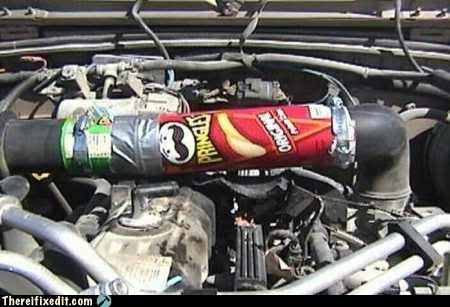
pringlescanengine
This looks like an engine fire waiting to happen.

outboardbabyseat
I don’t think the child safety belts will reach out the back that far.

carmod
Good news: this car is now road-trip-ready. Bad news: no more seeing out the back window.

ducttapecupholder
I’ve heard of using duct tape for everything, but using the whole ROLL on ONE thing? LOL

coneholecover
Well, I guess this kinda covers the hole in the road. Sorta.

suspendedfloorfan
When you absolutely NEED a fan pointed in a certain direction, at a certain height…

randomspoiler
Not sure whether this guy was trying for a super-cool spoiler or a radio antenna with better range.

powercordkludge
I love how most of it is wrapped around with yellow electrical tape, as if that makes it 100% safer.

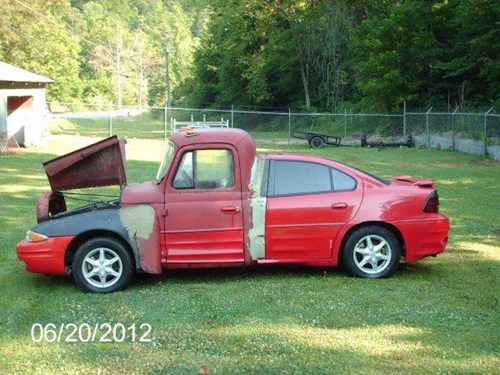
frankencar
It’s a Frankencar!

404tilenotfound
So, someone is familiar with the Internet, but not tile repair.

schoolchaircarseat
Of all the chairs to put in a vehicle, they chose an uncomfortable-as-all-get-out plastic school chair?

See more hilarious kludges at: There, I Fixed It

My Fair HTML List

CSS rarely flexes its styling muscles stronger than in the display of ordered and unordered lists. HTML outputs basic-looking lists like these…

basic_ol basic_ul

…but CSS can change them into great-looking lists like these:

opencircle_list squarefont_list romanborders_list
alphabottomborder_list gifbackground_list

But exactly how CSS can style these lists can be pretty obscure to a beginning webmaster (or even old hats like me). Here’s how to turn your plain ol’ lists into something lovely, sleek, and even spectacular. (Read to the end if you want to know how to create these five styled lists!)

Step 1: Label Your Lists

Before you can begin styling any specific list, you have to give it a name. CSS provides two ways to name your lists: classes and IDs. (CSS classes can be used over and over, but IDs can only be used one time on each page.)

CSS classes look like this: .list1 {styling rules go here}
CSS IDs look like this: #list1 {styling rules go here}

You can label your list anything you want to, as long as you remember to link your CSS style rules with your list, like so:

<ul id=”list1″>

<ul class=”list1″>

Step 2: Select Your List Styles

Once you’ve labeled your list, you can begin putting in style rules to make it fit your design. CSS has three style rules that pertain specifically to list styling:

  • list-style-type: Changes the bullet point out beside each list item to look a little different. (See the solid disc beside this list item?)
  • list-style-position: Changes whether the bullet point is included with the list item or hangs out a little farther beside it. (The “hangs out” position is the default)
  • list-style-image: Specifies a custom image as your bullet point image. (You have to make or find the bullet point image yourself)

List-Style-Type

To change the bullet point image with list-style-type, you simply write a line of CSS that looks like this:

#list1 {list-style-type: circle;}

If you don’t want an open circle as your bullet point, you can replace the word “circle” in the above example with another word from the following list. (Note: numbers will not work with unordered [un-numbered] lists, and likewise, bullet point images will not work with ordered lists.)

List-Style-Type Bullet Point Types

For Unordered Lists For Ordered Lists
disc (filled-in circle)
circle (open circle)
square (filled-in square)
decimal (.1, .2, etc.)
decimal-leading-zero (0.1, 0.2, etc.)
lower-roman (i, ii, iii, etc.)
upper-roman (I, II, III, etc.)
lower-greek (classical Greek numerals)
lower-alpha/lower-latin (a, b, c, etc.)
upper-alpha/upper-latin (A, B, C, etc.)
georgian (Georgian numerals)
armenian (Armenian numerals)

Also, if you don’t want a bullet point at all, you can put “list-style-type: none;” into your CSS instead.

List-Style-Position

To affect whether the bullet point displays closer to the list item than the default, write a line of CSS like this:

#list1 {list-style-position: inside;}

(If you want the bullet point to appear a little farther away from the list item, you can either type “list-style-position: outside;” or you can just leave out the “list-style-position” stuff altogether.)

List-Style-Image

To select a custom image for your bullet points, just add a line of CSS which looks like this:

#list1 {list-style-image: url(‘IMAGE_FILENAME.jpg’);}

Replace the “IMAGE_FILENAME.jpg” with the name of your custom image, and you’re in business!

Step 3: Write Your List Style Rules

Once you’ve figured out how you want your list styled, you can combine all these various properties into one CSS rule, like so:

#list1 {list-style-type: square; list-style-position: inside; list-style-image: url(‘myimage.gif’);}

You can also combine all the “list-style” things into one shorthand property, like so:

#list1 {list-style: square inside url(‘myimage.gif’);}

When writing the shorthand, make sure that the “list-style-image” choice comes first, then “list-style-position,” and last, “list-style-image.”

Step 4: Make It Spiffy

Thankfully, you don’t have to just write “list style” rules. You can also change the list’s background color, font size, font family, borders, and all sorts of things, just as you can style other parts of your HTML code. Not only that, but you can style each list item, too! Check out the following examples to see how different padding, colors, borders, etc. affect your list’s look:

opencircle_list
#list1 {list-style-type: circle;
width: 150px;}

#list1 li {padding: 0px;
margin: 0px;}

squarefont_list
#list2 {list-style-type: square;
width: 150px;
font-family: “Verdana”, sans-serif;
font-size: 15px;}

#list2 li {padding: 5px;
margin: 0px;}

romanborders_list
#list3 {list-style-type: upper-roman;
width: 150px;
font-family: “Garamond”, serif;
font-size: 18px;}

#list3 li {border: 1px solid #336699;
margin: 5px;
padding-left: 4px;}

alphabottomborder_list
#list4 {list-style-type: lower-alpha;
width: 150px;
font-family: “Bell MT”, serif;}

#list4 li {border-bottom: 1px dotted #FF00FF;}

gifbackground_list
#list5 {list-style-image: url(‘flashy.gif’);
width: 150px;
background-color: #000000;
font-family: “Chixat 8”;
font-size: 10px;}

#list5 li {background-color: #000000;
color: #FFFFFF;
margin: 3px;
padding-top: 2px;}

(Note: the screenshot of the last list doesn’t show the animated GIF bullet point in action, so here it is: flashy)

Summary

Lists, like any other element of an HTML page, can be styled to perfection with just a few bits of CSS. Experiment with your own list styles and see what you can create!

5 Useful Writing Inspirations

As a novelist who often feels “stuck” because of certain writing hang-ups, I know that sometimes writer’s block feels like a steel trap caught around the leg of your plot, refusing to let it go anywhere. I think sometimes we writers psych ourselves into a state where we can’t even write because we’re afraid of what will come out of our heads–afraid it won’t be “good enough,” somehow.

Thus, I came up with the following 5 simple tips, which have helped me begin to break through the ice covering my novel; I hope they will help you begin to write again, too.

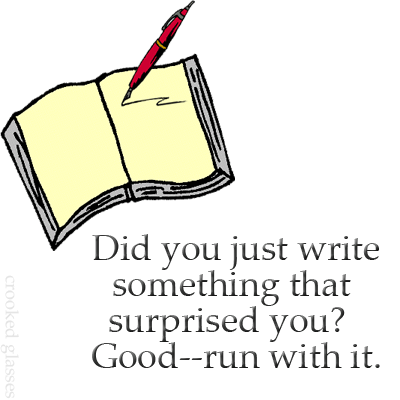
writinginspiration1

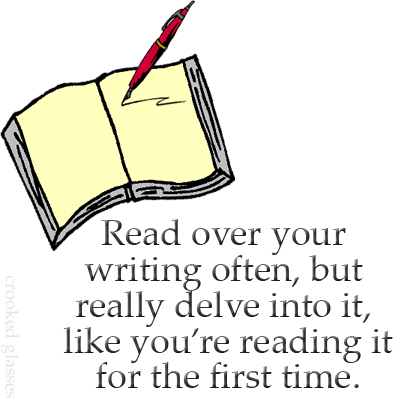
writinginspiration2

writinginspiration3

writinginspiration5

writinginspiration4

Image Credits: Source of image of book with pen