4 Essentials You Need on Your Main Page

When your visitors first come to your Web address, what do they see first? Too many of us webmasters crowd our main page with tons of information (guilty as charged), and it often results in information overload. Either that, or we give them a webpage with almost nothing on it–maybe a “splash page” with a clickable image and a tiny bit of information.

What I’m suggesting today is a middle path between these extremes: a main page that gives just enough information without being overwhelming. When you make your main page, here are the four essentials you must include:

#4: Clear and Concise Navigation

Navigation is very important for your visitor to see, but the format and number of links in your navigation is just about as important–it makes a big visual difference. A long horizontal bar of really tiny navigational links is daunting; navigation that is scattered all over the page in various sidebars is downright annoying.

Having all your navigation in one place, with a larger, easily-readable font (16-18 px), is the best way to go so that you don’t confuse your visitors. (If you have too many pages to link to on a horizontal navigation bar, you can always put your navigation in a sidebar menu and it will function just as well.) Also, make sure that the text for each navigation link is as concise as possible: using “contact” instead of “here’s my contact info,” for instance.

#3: Contact and Author Info

No matter what kind of contact information you plan to display on your site, it should be easily visible and accessible for your users. After all, if they have questions for the webmaster/webdesigner, they shouldn’t have to dig around for hours in your site to find out how to get in touch with you!

As far as “author information” goes, you can write a small blurb about yourself on the main page and/or link to a separate page of author info. But your contact information should be readily available. Your name/Internet nickname and an email address should be enough for most visitors. (You can even make or generate an HTML/Javascript contact form if you don’t want your email address actually visible to viewers.) These strategies help put you in contact with your visitors and give you a better idea of what they like and don’t like about your site.

#2: A Quick Site Purpose Statement

You don’t have to wax philosophical in your site description, but your main page should have at least a sentence or two describing what your site is about, whether it’s a personal blog, a fansite, a small hosting service, etc. This should be displayed prominently on your page so that the visitor’s eye is drawn to it.

This information helps people categorize your site for later viewing through a bookmark/favorite, and can help random visitors immediately know whether they want to stay on your site or keep on surfing. It’s all about convenience for your visitor, after all!

#1: Most Recent Updates

Going along with the “convenience” theme, the most important piece of information you need to display on your main page is your most recent updates to the site. If you are not already doing this, you should–it is the fastest way for your users to tell that your site is still alive!

You don’t necessarily have to place a big long update message on your site every time you update; just the date and a quick summary of what you updated will be enough for most users. This is especially important if you are going to be absent for a little while (for, say, a vacation, illness, etc.), so that your visitors know the site is still being maintained.

Summary

Providing clear navigation, contact/author info, a site purpose statement, and the most recent site updates not only makes your main page a hub of information, but it makes your site look and feel much more professional. When people don’t have to hunt around through your site for information, they are much more apt to come back and visit more often!

Custom Trading Cards as a Memory Tool

If you’ve ever had difficulty with memorizing information of any type, you’re likely familiar with using flashcards to help you learn it. But what if you have more information you need to remember, or very detailed information? You don’t want to have to write out a flashcard chock-full of information, after all!

One solution: make trading card flashcards!

The Process

Over at ReadWriteThink.org, they’ve got a cool little trading card creator (suitable for kids, but usable for adults, too) that can make trading cards about all sorts of subject matter. See below:

tradingcard_startscreen
Simply enter the name of what you’re creating the card for, then choose the category it falls in…

tradingcardcreator
…and fill in the answers to the questions presented to you. Click the right arrow at the bottom right of the screen to advance, and the left one to go back; you can add a suitable picture at the end of the card-making process. (In this example, I’m making a card about the literary concept of imagery.)

The Custom Trading Card and How to Use It

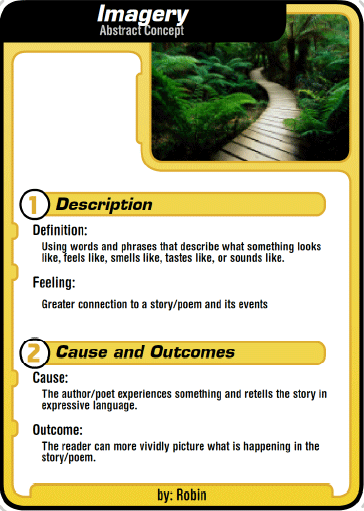
imagery_front
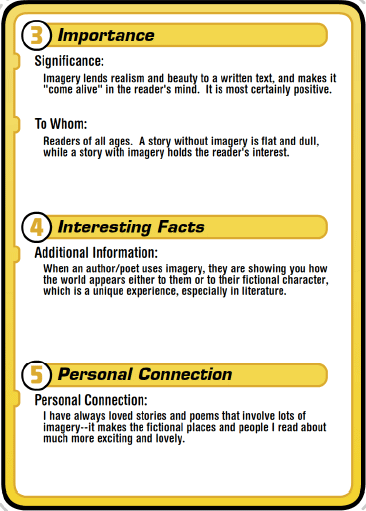
imagery_back
Here’s the finished product–a card that details what imagery is! Once you’re done with your card, you can save it as a PDF file, print and cut it out, and assemble it with tape. (Or you can just leave it as a digital file for reference, if you’re lazy like me, xD)

Where Else Can You Use This?

I like this idea for school group projects and for memorizing specific concepts for essay tests, of course. But I also like the idea of using this for remembering how to do creative projects (like how to put a lobster clamp on a beaded necklace, or how to make various paper projects). And it could be a good way to remember directions to a friend’s house, or for your child to remember their address and phone number!

I think this trading card creator could also be useful for remembering settings, characters, and plot details of a book you’re writing. HMMM…I might just need to mock up a few cards for my novel, now!

To Make Your Own Flashcards:

Trading Card Creator @ ReadWriteThink.org

How to Have a Perfect Day, Random (Funny) Thoughts, Emogotchi, and Hiding Tumblr Posts

Rules for a Perfect Day
Just for today, how can you feel happier, more serene, more spiritual?

Random Thoughts from People My Age
Totally agree with the Google Maps routing sentiment, as well as the iTunes shuffle one. Lots of good little gems about life in here. (slightly NSFW, some language)

Emogotchi
For fans of Tamagotchi back in the day (did I just date myself? Oh well!), here’s Emogotchi, your own personal emo to care for. Feed him, have him work out, let him headbang to some music, let him sleep…or if you’re feeling particularly spiteful, do more violent stuff to him. :/ Poor lil’ emo…

How to Hide Posts on Tumblr
Ways to declutter your Tumblr dashboard of posts you aren’t interested in.

Graceful Shades and Lines: The Art of Rebecca Guay

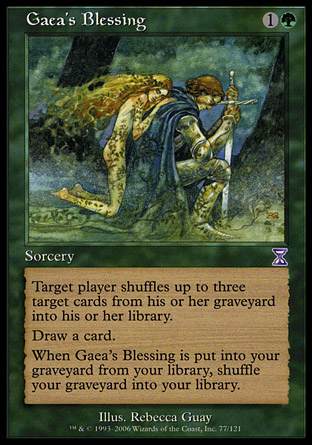
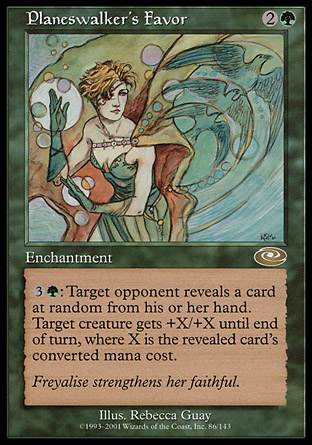
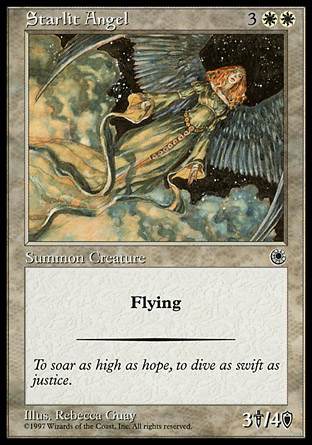
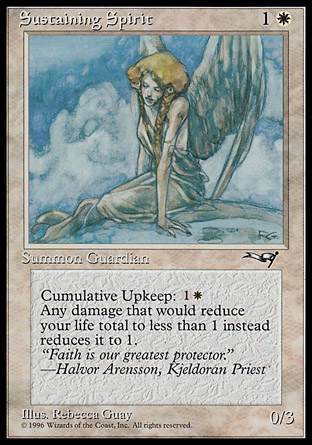
Of all the art in Magic: the Gathering, many of my favorite card arts come from one artist: Rebecca Guay.

She’s well known throughout many fantasy gaming franchises, such as Magic: the Gathering, the World of Warcraft TCG, and Dungeons and Dragons, but I first became acquainted with her art through M:TG. I was immediately drawn to her use of subtle shading, thin lines, and overall soft coloring, plus the general subject matter of beautiful natural landscapes and graceful yet powerful ladies dressed in flowing, soft fabrics. All the pictures seemed like the kind of illustrations I remembered from fairy tale books, just right for some of the fantasy flavor that M:TG included in its worlds.

So, with this appreciation for her artwork, it seemed only right that I should honor some of my favorite Magic: the Gathering card arts by her in a blog post. Scroll through and see what I mean about “graceful shades and lines!”

angelicpage angelicrenewal
angelicwall atalyasamitemaster
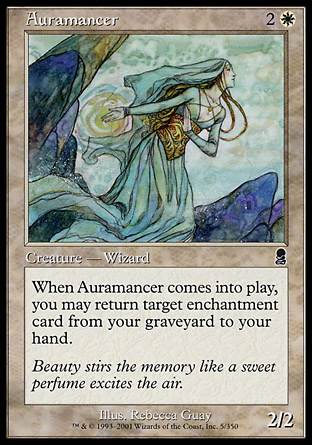
auramancer calmingverse
devoutharpist dwellonthepast
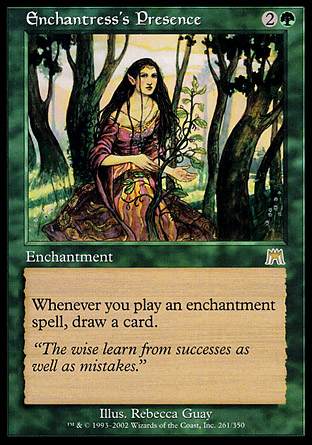
elvishlyrist enchantresspresence
gaeasblessing haruonna
nantukoshrine oborobreezecaller
planeswalkersfavor predict
resuscitate samiteblessing
seedtime serrasblessing
silentattendant starlitangel
sustainingspirit travelerscloak
wallofwood wanderlust
wordsofworship yavimayadryad

For More Information

MagicCards.info (where I retrieved all the card images)
RebeccaGuay.com
Wikipedia article about Rebecca Guay
Gatherer Card Search: Cards illustrated by Rebecca Guay

Money Shouldn’t Be Our Idol, Jesus Says

Matthew 6:24
24 No one can serve two masters. Either you will hate the one and love the other, or you will be devoted to the one and despise the other. You cannot serve both God and money.

Whew! Jesus doesn’t pull any punches here! Here, in His first preaching on the mountainside, we see Him warning all in attendance about the dangers of putting too much importance on money and worldly treasure. (We see similar warnings in Luke 16:13 and James 4:4–this is important enough to be repeated in Scripture!)

Now, this Scripture does not mean that we as Christians are not allowed to make money at all; what it means is that we must be careful about the priority we place on any money God blesses us with. If we begin to seek money purely for its own sake, accumulating wealth just so we can have pride in it, we have indeed placed money above God as our “master.” As Jesus points out, the love of money necessarily means that God gets excluded from our lives, because more money means a greater feeling of personal power. The more powerful we see ourselves, the less we depend on God–it’s a slippery slope.

But just resolving to “keep God first in our lives” doesn’t mean that we won’t slip into a money-serving mindset over time. This is something we have to keep evaluating ourselves about, something we have to be constantly mindful of. Otherwise, we could end up drifting away from God and not even realizing it–this is why Jesus speaks so bluntly about this problem!

A Most Useful Meme: Actual Advice Mallard

With the emergence of so many new memes across the Internet, it can be hard to pick out the best and brightest. One that I think deserves a lot more recognition is the “Actual Advice Mallard” meme–each one contains clever and useful life advice, a life hack, or a handy tip to make things easier, printed on a picture of a green-headed (male) mallard duck.

Here are just a few samples of Actual Advice Mallards from across the Internet:
adviceduck_1

adviceduck_2
This REALLY works, and not just for pizza–it works for any food that you want to rehydrate after a night in the fridge!

adviceduck_3

adviceduck_4

adviceduck_5

adviceduck_6

adviceduck_7

adviceduck_8

adviceduck_9

adviceduck_10
Very, VERY wise words…

adviceduck_11
(Important note: Check the Wikipedia page’s sources and make sure they are reliable and trustworthy before putting them on your source list–the content of your paper is far more important than not sourcing Wikipedia in your bibliography. This advice brought to you by a former English teacher.)

adviceduck_12
(Also known as: Don’t argue back while your parent is talking.)

adviceduck_13

adviceduck_14

adviceduck_15
Such appropriate advice for our time.

adviceduck_16

adviceduck_17
I’ve tried this fix, and it absolutely works–I’ve got two pairs of pants I’ve fixed with this advice.

adviceduck_18

adviceduck_19

adviceduck_20
Very important, especially while outside in direct sunlight!

adviceduck_21
Steam, also known as “the lazy person’s iron.” LOL

adviceduck_22
This needs to be plastered on every road billboard in my town.

adviceduck_23
From experience, I can say AMEN to this!

adviceduck_24

adviceduck_25
For all us job seekers out there!

adviceduck_26
SUCH TRUTH

adviceduck_27

adviceduck_28
I’m going to print this and put it in my wallet…XD

adviceduck_29
I can’t believe I never thought of this!

adviceduck_30
Something to keep in mind, especially for the summer months here in the Southeast!

adviceduck_31
Never knew about this little keyboard shortcut!

For More Actual Advice Mallard:

(Warning, some Actual Advice Mallards may have curse words)

Actual Advice Mallard @ Tumblr
Quickmeme
Memestache
Memebase

Headerless Layouts: The Why and the How

For me, this blog post deals with something I once considered web design anathema: design a page with absolutely no header. “Wait a minute!” my web design instinct cries. “Where will all my nifty page branding and my attractive page image go? What will I do instead?”

Simple: put it all into a sidebar.

Why Bother Going Headerless?

I suggest this layout style because more and more Web browsing is being done with mobile devices, and headerless designs simply load better on such devices. For instance, I’ve been using my iPhone at home for faster web browsing (we have dialup at home :C), and I’ve noticed how header images get distorted or just don’t show up in mobile browsers.

Keeping this in mind, trying a headerless design might just be the way to help our mobile users access the most important bits of our site without losing visual impact. Not to mention that the following design style effectively combines your sidebar into your header for a simpler and yet more elegant layout, leaving you with fewer sections to code and less for your browser to have to arrange. See below:

Sidebar: Your New Header

headerless_fullpage

This is just a quick sample I put together of what a headerless design could look like. See how the page content lies right up at the top of the page, so that the user does not have to scroll down to start reading? The same logic applies for the sidebar–all the pertinent information loads right at the top of the page, for ultimate convenience.

headerless_sidebar Here to the left, we see a close-up view of the sidebar–at the top, loading first, is a quick page summary, for people who don’t know anything about your site and are assessing your site to see if it’s something they want to browse. (Your “About the Author” section is for a similar purpose, especially on a blog.)

Next, we have social media and navigation; your social media links can be formatted to be much more compact with icons. You could also flip the positions of the Navigation and Social Media sections if you want the navigation closer to the top of the page.

You can definitely play with this sidebar style, but this is a pretty bare-bones representation of how to make your sidebar into your “header.” (Additionally, you could put in a few small images to make your sidebar even more visually attractive, such as a picture of yourself beside the “About the Author” blurb.)

How to Make a Headerless Layout

The way I put together my example uses a 2-column layout design, with the sidebar div set at a fixed width and the content div set to a percentage of the page width. (Unfortunately, mine doesn’t exactly do everything that I wanted, such as scaling correctly when the page resizes, so I’m not showing my [shameful] code here. LOL!) This style seems to be the best way to make a headerless design at the moment, however.

However, this concept has been tackled and solved by several webdesign whizzes–check out their tutorials to learn how to incorporate the headerless look for yourself!

Fluid Width with a Fixed Sidebar Demo @ StuGreenham.com
Fixed-Width Sidebar in Responsive Design: Discussion @ CSS-Tricks.com
Make a Layout with Fluid and Fixed-Size Columns @ RadiatingStar.com

The “Virtual Museum:” GoogleArtProject.com

Ever wanted to visit all the world’s museums and art collections just to view all those amazing artworks? Well, you’ll definitely want to check out one of Google’s newest projects: GoogleArtProject.com.

googleart_landingpage
When you land on the website, a random artwork will be displayed as the background–you can mouse over this image to see more detailed information, and click through to see more pictures by the artist, more artwork from the collection, etc. (Click and drag on the image to see a small portion of the artwork in more detail!)

recentlyadded_ticker
Down toward the bottom of the page, you can see a ticker full of recently-added collections going by–this is a great way to stay updated!

browse_specificcollection
If a collection intrigues you, you can click its title and go straight to its specific page, seeing all the images housed together within easy viewing reach.

browse_collections
Or, if you’d like to see the full list of available collections to view, you can browse by the “Collections” tab at the top left.

browse_artists
Browsing the “Artists” tab (second tab from the left) brings up an alphabetical click-through list, so you can go right to the artist you’re searching for. (This would be great for art history research!)

browse_artworks
And most certainly, if you just want to take in some gorgeous, thought-provoking art, you can browse by “Artworks” and see a randomized assortment of beauty.

You can also browse user galleries, and you can sign in to Google and make your own gallery, too.. (There are not a whole lot of user galleries quite yet, but you can change that 😉 ) All in all, this is a great Internet tool for discovering, appreciating, and studying art–well worth a visit (or 100!)

At Seventeen, If Life was Like Disney Films, Ballerina with Flowers, and Miche Purses

“At Seventeen” by Janis Ian (lyrics)

If Life was Like a Disney Movie: 10 Pics
Such funny truth here.

Ballerina with flowers (photo)
How graceful and light she looks! 🙂

MicheBag.com
One bag, many different looks, just by taking off one purse “shell” and putting on another. (One of my friends has a Miche bag and loves it–check it out!)

Split and Merge: How They Really Work

Recently, a new way of playing multi-figure bases has been given life in HeroClix: the ability to Split the multi-figure base into its composite characters, or to Merge two or more characters into a multi-figure base.

This new set of rules gives quite a bit more team flexibility and options, especially with all the Duo and Trio figures floating about, but along with those options comes a slew of rulings questions. So, today, I thought I’d bring to light some of the stickier points about Split and Merge rules, to make it a little easier to understand.

(Note: Each of the following rules questions and some of the answers appeared on HCRealms.com. The answers have been checked by and expanded on (if necessary) by an official HeroClix judge [also known as my awesome “rules lawyer” boyfriend :D].)

First, The Official Rulings

Split: Give this character a power action if it has no action tokens. Replace this character with one or more qualifying characters each from a different entry listed on this character’s character card. The qualifying replacement character(s) must have either qualifying name and total no more than this character’s point value (unless those characters previously used the Merge ability to be replaced by this character). Replacement character(s) are assigned an action token and can’t be given an action this turn. Replacement character(s) begin a number of clicks from their starting line equal to the number of clicks from this character’s starting line. This ability can’t be countered.

Merge: When this character is adjacent to other friendly characters that each represent one distinct qualifying character listed on a Duo character’s character card and all of them have no action tokens, give this character a free action to replace all of them with that Duo character, the same number of clicks from its star ting line as this character. The combined point value of the qualifying char acters must be equal to or greater than the point value of the Duo character (unless that Duo character previously used the Split ability to be replaced by these same characters). The Duo character can’t use the Split ability this turn. This ability can’t be countered.

Question #1: Which Click Do Split Characters End Up On?

So let’s say I want to split the 400 point Avengers Prime after he had taken 5 clicks of damage. So when I split him, Thor, Cap and Iron Man all begin on their fifth click, right? What if I started at the 300 point starting line? If Avengers Prime had 5 clicks of damage, would Iron Man, Cap and Thor start on their 5th click or their 8th click (since Avengers Prime’s 300 point dial begins on click 4)?

CORRECT RULING: It is from the starting line you started with. So if AP had taken 3 clicks of damage, they should be 3 clicks from their starting line no matter which points version you used. So Cap, Thor, and Iron Man should all be 3 clicks from their starting line.

Question #2: What If Splitting a Multi-Figure Base Would KO One of the Individual Figures?

What if I split Avengers Prime but realize one of three he splits into doesn’t have enough life to survive the split? Meaning, what if Avengers prime has taken 8 clicks of damage and splits and Captain America only has 6 clicks of life. Does Cap get KOed or would the split be declared invalid?

CORRECT RULING: Cap would be KOed–IF you chose him as one of the figures you would split Avengers Prime into. If you did want to split Avengers Prime and they were too beaten up for one of your figures, you are not required to split into that character.

Meaning, if A.Prime has taken 6 clicks of damage and is on “click 7” and the only Captain America you brought with you is HoT Cap, which only has 6 clicks of life, you are completely able to split A.Prime into just an Iron Man and a Thor as long as those 2 still meet the requirement of being costed = to or less than A.Prime.

Question #3: When Merging Figures on Different Clicks, Which Click Does the Multi-Figure Base End Up On?

Let’s say I have an Iron Man on click 3, a Cap on click 4 and a Thor on click 1. The three merge together – so which click do I put Avengers Prime to?

CORRECT RULING: Whichever one was given the free action to use Merge, their click number would be used. So if Cap was given the free action, Avengers Prime would be on click 4; if Thor was given the free action, then Avengers Prime would be on click 1.

Question #4: Do You Have to Specify Beforehand Which Characters Your Multi-Figure Bases Will Be Splitting Into?

When I go to an event, do I have to declare which Iron Man, Thor and Captain America I will be using for the splitting or can I bring a big baggy full of Ironmen, Caps and Thors and mix and match depending on my opponent? I feel like it is the former but I feel like I have to ask.

CORRECT RULING: You need to have your replacement figures specified before the game starts. However, how many figures you are allowed to have specified as “replacements” may vary by event rules, game shop house rules, or personal preference (if playing a casual game). (See Question #7.)

Question #5: Do All Merging Figures Need to be Present In Order to Merge into a Multi-Figure Base?

CORRECT RULING: While there are 3 figures represented, I see nothing in the rules that all 3 need to be present to use themerge ability. All that is required is that the character using the action be adjacent to the other qualifying character and their point value either be greater than the duo or have been split into those characters previously.

Example 1: 400 point Avengers Prime is on click number 8. A.Prime uses Split and turns into FCBD Thor on click #8 and CW201 Iron Man on click 8. Those 2 figures are equal to 400 points combined and meet the requirements of the split.

Example 1B: In the same game, Iron Man has used Regen and ended up on click 4, and has been cleared. He is adjacent to FCBD Thor on click 8 who is also without an action token. Iron Man takes the free action to use merge. As their point costs equal 400, they can merge into Avengers Prime at 400 and would be on click 4. Later in this game, A.Prime could split into a Captain America if one is present

SO A.Prime has another layer of complexity because it has 3 qualifying characters where most duos only have 2. This gives them a huge level of variety in what they can accomplish and turn into at any given point. (It’s also probably why they limited the “sideboard” because there could literally be hundreds of combinations of those 3 characters in Heroclix.)

Question #6: Do You Have to Use Exactly the Same Figures to Split and Merge Into Each Time?

Obviously I get the [basic concept of Split and Merge]. Thor & Herc (300 points) split into Thor (125) and Hercules (131) legally because 131+125= 256. Those two can rejoin even though 256 is less than 300 because of the exception. You just can’t start with the two and merge unless you have a 256 point Thor & Herc duo.

Here’s the sticky part: What defines “same character?” I know if you split Batman & Robin into Bats and a 40 point Robin, you can’t then grab a different 17 point Robin to glue back to Bats, unless Bats is at least 121 points. But how does this work with those characters merging and splitting with other people?

CORRECT RULING: You could merge Batman with a different Robin to form the Duo again, but you would still have to meet the requirements to be able to go back to the 138-pt base. Those requirements: if you’re going to split, choose figures of lower or equal points to the duo’s point total; if you merge, the characters have to equal or cost greater than the duo, unless they’ve already come from the duo before.

Question #7: How Many Figures Can You Have “Waiting in the Wings” to Split Into?

CORRECT RULING: Your force can be limited to just how many replacement characters can be waiting on the sideline. The rule book itself does not require a specific number, just like it doesn’t require a specific number for your build total. But the HeroClix Tournament standard will be 2 per 100 points of Force with a maximum of 12 characters.

Rulebook Article for Replacement Characters

(Note: Most players around my local shop have never heard of this “2 per 100 points” rule…to be sure you’re building your force right, ask your local shop’s HeroClix judge or shop owner about what they would prefer players to do for each tournament. Also, keep your ear to the ground for more rulings news about this point.)

Question Sources

Forums Post for Questions 1-5
Forums Post for Questions 6-7