Custom Website Background Tiles with PatternCooler

After making the changes to my domain’s new layout, as profiled in last week’s webdesign post, I found myself still dissatisfied with how plain the layout appeared. It just was…BLAH.

As per my usual habit, I found myself surfing aimlessly around the Internet, trying to pinpoint what it was about my favorite site designs that gave them the “oomph” I was looking for. I just couldn’t quite put my finger on it…and then, I sighted a subtle tiled background effect on one site, and realized that perhaps all I needed was something to give the background a little interest.

Enter PatternCooler.com, a website that should definitely be on your favorites/bookmarks as a design resource!

patterncooler_1
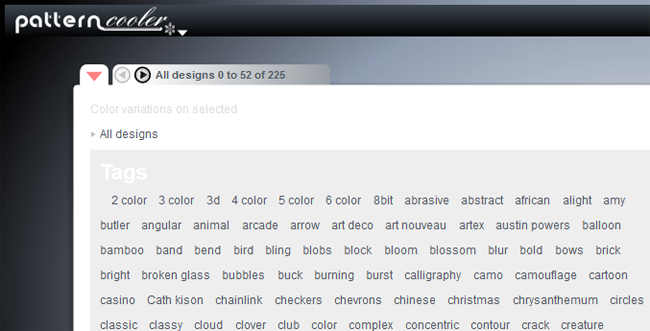
In the Pattern Editor, you can start off by browsing tons of different background patterns, from bold to subtle and everything in-between.

patterncooler_2
Sort through the background images using the tag menu, available from the top left drop-down arrow…

patterncooler_3
…and once you find a tag you like, you can browse through the shortened list much more quickly. But this isn’t where the magic stops!

patterncooler_4
Once you select a pattern you like, you can actually change the colors in the image with either the onboard color picker OR a custom HTML hexcode (like what Photoshop outputs).

patterncooler_5
For this example, I picked the colors from my domain’s upcoming Version 14 layout, and started playing around. It looks so cool already!

patterncooler_6
You can play with the Transparency slider at the bottom left of the editor to make one or both colors more or less prominent. There are also Texture filters to customize the image even further (bottom right toolbar), as well as options to resize the image. When you’re done, simply click Download!

patterncooler_example
And here’s a sample of what that very background image looks like in use on my upcoming layout! I like how the subtle color variation gives a LITTLE interest to the background without overwhelming the eye.

Be sure to check out PatternCooler.com‘s new Background Tile Editor for your layout needs; this has been by far the easiest and best experience I’ve had with creating a background tile. (And they ain’t paying me to say this, either–I just had the good fortune to stumble on this site and realize what a gem I’d found!)

Experiment: Posts Will Appear at Noon This Week!

Through the magic of Facebook and website statistics, I’ve noticed that not too many people are seeing my posts when they appear at 9:00 AM EST. So I’m going to try an experiment: my posts for the upcoming week will appear at noon EST instead!

I hope that by posting at a later time in the day, more people will be free to read the posts immediately. But, as with all experiments, I’ll never know till I try! I only want to make it easier for folks to see my posts.

If you have an opinion about this temporary change, feel free to share it (nicely)! You can comment on this blog post, post on Crooked Glasses’ Facebook page, or Tweet to me via the Twitter page.

My #1 Poetry Pet Peeve

I didn’t realize I had any pet peeves about poetry until I took one of my high school English classes. One 6 weeks we were supposed to write a poem in the style of the literature we were studying, and we were required to read them aloud to the class. This was all fine, until a classmate of mine got up and introduced the “po-EEEEM” she was about to read.

Something about her pronunciation of the word “poem,” with the emphasis on the second syllable and a strange stressing of the “e” vowel, set my nerves on edge. And it wasn’t a simple misspeaking–she continued to call it her “po-EEEEEM” through her entire presentation. It was all at once nasally annoying and haughty, as if her “po-EEEEEEM” was the best “po-EEEEEEEEEEEEEM” that had ever been written.

Somehow I made it through that presentation without going off my rocker. But, since I’d never heard the word pronounced like that before, I chalked it up to a personal choice on the classmate’s part, and thought no more about it. It was so outlandish and silly-sounding, too overdone for normal life…surely no one else would pronounce it like that. After all, who could seriously pronounce “poems” as “po-EEEEEEEMS” without cracking up, right?

WRONG. Several of my classmates in poetry and literature classes throughout college apparently labored under the same delusion–that pronouncing “poem” as “po-EEEEEEM” instantly gave their opinions and works an otherwise unreachable touch of class, artistry, and intelligence. Never mind that I was sitting there with my hands clawed around the edge of my desk as if someone was raking their nails down the chalkboard at the front of the room. And usually, the people who pronounced “poem” like this were the most conceited English majors in the room, acting as if their subjective opinions on literature were mathematically provable facts. Either that, or they were convinced that they were the next “famous dead poet,” and the rest of us were all just wannabes.

For me, then, the “po-EEEEEEEM” pronunciation has become shorthand for “I’m a huge snowball of arrogance barreling straight toward your brain and nothing can stop me!” It stands as an instant signal that this person thinks very highly of themselves, their opinions, and their art, and that everyone else is just a little bit less important. (You know, sometimes I really hate that the fine arts often attract this type of personality, because it gives the rest of us artists a bad image. We’re not all high-and-mighty nose-in-the-air types, after all!)

So if you ever see me cringing at a poetry reading, remember this post, and you’ll probably understand why. Just remember to duck the snowball of arrogance!

Revolutionary Health Ideas, Kitten vs. Scary Things, Monster Tree Driftwood, and Home DIY Ideas

101 Revolutionary Ways to be Healthy
WOW, I never thought of most of these!

Kitten vs. TWO Scary Things (funny video)
Who knew these two objects would be so frightening and fascinating to a feline mind?

Epic Driftwood: Monster Tree Washes Ashore
That is one BIG tree. :O Where did it even grow?

16 Amazing DIY Home Ideas
Using hanging mop holders to hold round spice containers in your pantry? GENIUS! How about using plastic rain gutters as cheap book shelving? These and 14 more amazing ideas for your home, behind the click!

Awesome 1-Mana Creatures, part 2: Blue

To continue the list of awesome 1-mana creatures from last week, I’ve searched through Blue and found its awesome 1-drop creatures. Blue’s 1-drops are more like precision tools rather than combat machines–they are more likely to provide a service, like milling the opponent, changing their land types, countering spells, or drawing/ditching cards. (There are a few good combat-ready creatures hiding in these ranks, however!)

As always, let me know if I’ve missed a good Blue 1-drop in this list! All card images came from MagicCards.info.

avenenvoy
An old favorite–1 mana for an 0/2 flying blocker, with 2 great creature types for later P/T boosting.
catharticadept
A milling machine you can play on first turn! (Use this and Hedron Crab together and you’re set!)
cloudfinraptor
1/1 flying, but with Evolve so it can get bigger later on!
cursecatcher
Great for those moments when your opponent is utterly tapped out and cannot pay more for their combo piece.
drownedrusalka
Sack one of your “comes-into-play-effect” creatures for a quick ditch-and-draw!
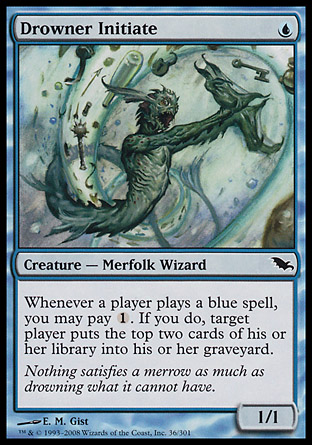
drownerinitiate
A different flavor of mill action, punishing the opponent for playing blue spells. Sneaky!
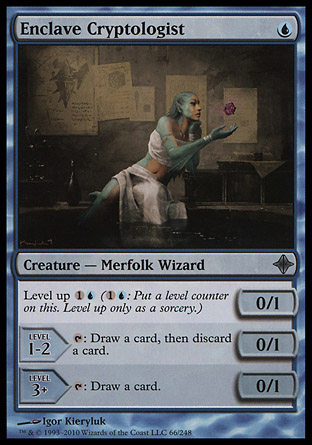
enclavecryptologist
The level-up ability gives this creature mid-game functionality as well as early-game help.
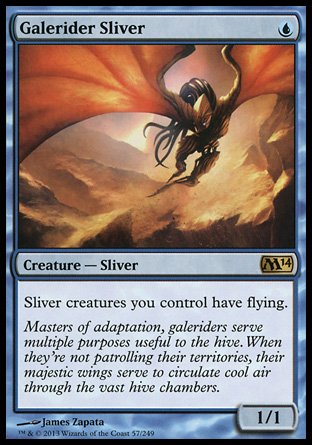
galeridersliver
Give all your Slivers flying for 1 blue mana? WHY NOT!
grayscaledgharial
1/1 islandwalk for the win.
grixisillusionist
This little guy helps fix your mana in a multi-color deck!
haplessresearcher
Draw-and-ditch is a great mechanic to pull off for 1 blue mana.
hedroncrab
One of the best mill creatures out there right now…quite lethal!
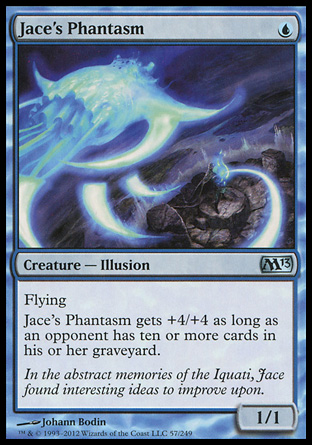
jacesphantasm
Mill your opponent enough and this guy gets HUGE…but until then, he’s a 1/1 flying for 1, which isn’t bad!
judgesfamiliar
A flying, hybrid version of Cursecatcher!
krakenhatchling
A 0/4 for 1? AWESOME! (Then again, I do like creatures with big toughnesses for low cost…)
mantariders
A blue creature with the option of flight…because sometimes, you might not want to have your creatures fly all the time. (Hurricane, anyone?)
martyroffrost
GREAT way to keep that final combo piece from hitting the table!
merfolkspy
Islandwalk plus the ability to peek at an opponent’s hand.
merrowwitsniper
“Comes-into-play” mill = awesome.
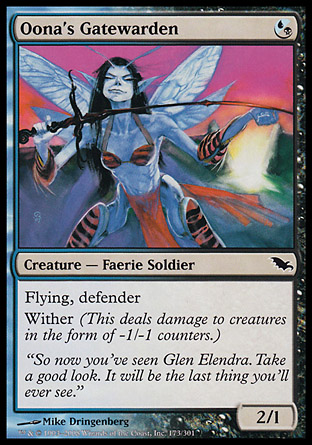
oonasgatewarden
Blue gets a 1/1 flying defender creature, with Wither added from Black!
realmwright
A potent little mana fixer, great for multi-color decks.
reefshaman
You can hit either your own lands or your opponent’s lands with this guy…give somebody a completely useless land for a turn, or help yourself out.
rootwaterdiver
Dig up that artifact one more time for added flavor–uh, utility!
rootwatermystic
Peeking at an opponent’s library every turn? Sounds good to me!
sageofepityr
AWESOME little guy–helps you get the cards you need to the top of your deck.
sandbarmerfolk
For those times when you need to draw more than you need another 1/1 creature on the field…
screechingsliver
Make all Slivers on the field into milling machines. This could be a masterstroke or a huge backfire…LOL
slipperybogle
The 1/1 Hexproof (with the help of Green) is a nice touch for Blue.
tidalwarrior
Tidal Warrior: an old-school way to help out your Islandwalkers.
trustedadvisor
Getting a larger hand size for 1 mana is great, and you can always bounce those “come-into-play-effect” creatures for extra oomph!
zephyrsprite
Simple 1/1 flier, with added danger from the Faerie creature type.
 

A One-Verse Faith Pep Talk

Psalm 31:24
24 Be strong and take heart, all you who hope in the Lord.

In this verse, the culmination of a buoyant psalm of praise to God, we see a final reminder: we Christians need to “be strong and take heart.”

Being strong, however, doesn’t mean never admitting our problems. Nor does it mean turning away from God and doing everything ourselves. In fact, “being strong” in God means looking pretty weak to the world–it means giving over control to God and relying on His strength, putting all our effort into faith that God will provide a way out of even the worst situations.

Once we become “strong” in this faith, then we will find it easier to “take heart”–to gain courage to face our life’s troubles, knowing that God is there with us riding out the storm. This verse reminds us that we can praise God and hope in Him because He is indeed capable to help us and faithful to do so (“mighty to save,” as the following song goes).

3 Tips for Beating the Procrastination Bug

I admit it, I’m a full-blown procrastinator, even about things I actually want to accomplish (see: my novel). Sometimes, my brain just REFUSES to do anything, choosing instead to wallow in aimless thoughts, non-essential tasks…or more often, crippling worry about not getting things done. Often I rely on the sheer adrenaline rush of “THIS HAS TO BE DONE NOW” to complete the essential tasks.

I call this “getting bitten by the Procrastination Bug,” and my bug has a particularly venomous bite. The following meme I made over at Quickmeme describes it perfectly:

procrastinationmeme

But there IS a way to conquer this bug! Actually, there are 3 ways I deal with the compulsion to procrastinate:

#1: Got Small Tasks? Good. Break Them Up Even Smaller

Nothing hurts my productivity worse than looking at my to-do list and feeling absolutely daunted by the enormity of my tasks. (And by “daunted” I mean “wanting to either cry or vomit.”) One trick that works: breaking up these huge tasks into itty-bitty sections.

Now, you’ve probably heard a variation of this tip before, but I mean taking it to the next level–break the huge task down into the tiniest pieces you can imagine. (Example: my procrastination on my novel got so bad that I finally set myself up a “100-word-a-day” goal. That’s right, ONE HUNDRED words a day. Not 500, not even 300. And it worked–it got me writing again!)

The logic behind this tip: if you break your task down into things you can do in 5-10 minutes, you’ll be exponentially more likely to do them because they “feel” easier to complete. Plus, if you’re having a “brain-doesn’t-want-to-focus” day, you can complete a couple of these teeny-tiny tasks and still feel productive, which may help reduce your anxiety about your to-do list.

#2: Take Frequent Breaks (With Rewards)

If an essential task on your list is really stalling your brain out, here’s another trick I try: taking a “reward break” for every set number of minutes of work/every part of the task completed. For instance, if I write on my novel for 15 minutes, I could allow myself 15 minutes of TV, aimless Internet surfing, or reading. Or, if I complete one blog post, I could allow myself 30 minutes of gaming time or Internet.

Using the standard “work before play” mindset in this way accomplishes two things at once. First, it trains my brain to like doing the essential task; second, it allows my brain to relax and regroup for a little while before settling back down to work. Having to work on one thing for long, unbroken hours drives me nuts, and makes me less likely to complete the task quickly the next time I have to do it. If it’s associated with rewards and breaks, it makes the work easier to bear.

However, the complete “brain rest” and rewards scenario sometimes just isn’t feasible with the amount of work you have to do in a short time. For those moments, I suggest the last tip…

#3: Have a Rotating List of Tasks

Sometimes, I procrastinate because my brain just doesn’t want to settle–I hop from TV to book to Internet to game to TV to book and so on, making it hard to focus on even things that I like, much less things I have to do. I would call it “boredom,” but it’s way beyond bored; I end up too bored to sleep, too bored to eat, etc. Yet the tasks are still piling up on my to-do list, even as I struggle to marshal my brain into adulthood for a few moments.

This is one reason I have a to-do list that includes all sorts of small tasks due within a typical week–I’ve got a few physical-labor tasks (like cleaning and straightening the house) mixed in with some mental-labor tasks (writing my novel and organizing my digital files), and they are all of various difficulty levels and require different amounts of time and effort to complete. Thus, I can hop from one task to another if the first one is getting too boring or time-consuming, and I can return to it at any point to complete it. Switching tasks gives me a form of brain rest, making my brain work in a different (read: non-bored) fashion.

You’d be surprised how well this works to combat procrastination; you’re actively working on new stuff every 5 minutes or so, give or take, and so you feel instantly more productive and less aimlessly energetic. Plus, you’re likely touching on all the tasks you need to do, so you’ll potentially be getting more work done in the long run even though you’re switching around a lot.

Summary

Procrastination can be a pain, especially when you’re trying to be an adult and get things done; anxiety and lack of focus can keep you from doing what needs to be done. These 3 tips got me through college and grad school (not to mention earlier grade levels!)–I think they’ll help you, too!

What Happens When You Rethink Your Design

Last week, I wrote about my upcoming domain layout and the design issues I was having with it. Check out what happened when I started rethinking all the bits I didn’t like!

layoutchanges_small
(click picture for larger image in new window)

This layout has a very, VERY different feel from my first design; the lighter, more neutral background color and the longer, thinner sidebar feel like the biggest changes, because those were my biggest problems with the first layout (too dark and crowded). But I also made some smaller changes, depicted below:

Text Shadows and Box Shadows, EVERYWHERE!

lc_dropshadows
The headings have a subtle shadow behind them to make them pop; so do the boxes holding the various website feeds. Even the sticky navbar at the top of the page has a little shadow! (I was following my own advice, LOL!) Though at first I was afraid I was going shadow-crazy with the layout, the design seemed to need a little extra detail, and I find that the text shadow on the headings especially looks good without being overdone. What’s your verdict?

Social Network Sidebar Slightly Revamped

lc_socialnetworks
Since I loved the social network sidebar as it was, I didn’t want to change it too much…yet the taller, thinner dimensions of the sidebar in this design called for me to make some sizing changes, at least. Instead of two wider rows of icons, I now have three narrower rows. However, I’m not sad about these changes–in fact, I like this more compact design even better!

*GASP* A Background Gradient!

lc_gradient
I’ve written about background gradients positively and not so positively, but after struggling with several background tiles and finding them all too “busy,” I finally chose this subtle gradient style, which highlights the top of the page AND scrolls with the sticky navbar as it glides down the page with the user. (I like this option better than the other ones I tried, but admittedly I’m still not QUITE sold on it…what do you think?)

New Quick Links Section

lc_quicklinks
After receiving a couple of complaints from visitors about not being able to find certain sites on my domain, I decided to include this little section–and quickly realized it would be just as helpful for me as for others! These are the sites that are the most active these days, so this Quick Links section could help draw attention to them as well as make it easier to navigate my network.

Less Blathery Welcome on the Sidebar

lc_welcome
Part of what made my first layout feel so crowded, I realized, was the super-long welcome paragraph I had shoved into the main content area. It felt clunky and distracting…so, with a ruthless Backspace key, I edited it and put it at the top of the sidebar instead, where it can properly greet people without overrunning the layout’s prime attention-grabbing space.

Bottom Line: Rethinking Isn’t Scary or Annoying–It Can Be Fun!

Revamping and rethinking my design seemed like a huge pain at the outset, but once I started digging into my layout and really trying to revision what I wanted for it, I found myself unexpectedly freed. For instance:

  • If I didn’t just love a layout feature, I wasn’t expected to keep it
  • It’s MY layout, so I can choose to have features wherever I wish/wherever they make sense
  • I can make several different versions of changes and compare them

In fact, doing this redesign gave me carte blanche to try styles and formatting I hadn’t messed with much before (such as the text shadows and the welcome message on the sidebar)–I found myself thinking, “why not try it?” After all, if I didn’t like it, the all-powerful Backspace key and Undo button could help me change it back. That was incredibly liberating! (Just make sure to save your work under different filenames if you want to compare two or more versions!)

So if you’re currently stuck on a webdesign you’re not sure about, I hope this post will inspire you to look back at your design and think, “Hmm, what could be different?” You may only make subtle changes, but it could end up creating a very different look–as I discovered!

Creativity Boost: Be Around Creative Folks Like Yourself

On November 18th, I had the unique pleasure of singing with a massive choral and orchestra group at Gardner-Webb University–we presented an evening of classical music the likes of which I hadn’t done since my college choir days. And boy, was it an evening of creativity and art! I was nearly bowled over with it!

I really didn’t expect to be so moved or touched by performing with this amalgam of musicians, and yet I was; I was up there singing my heart away, feeling for all the world as if I was in my element at last. I had come in dressed for performance like always, and some part of me viewed the event as “business as usual,” but it certainly wasn’t! With almost 400 people packing the stage for the choir/orchestra numbers, I felt myself part of a large, well-oiled musical machine, and it was ELECTRIC.

I got home, kinda dazed, after the performance, and wondered over my reaction for a little while. The thought that kept coming back was: “I was around people like ME!” All of the performers were classically trained musicians like me, and this was a collegiate performance, much like the ones I enjoyed being in during my own college years. I had gotten in touch with a part of my musical soul which had lain dormant, likely, since that time. It felt so good to know that other people were as passionate about music as I was, and were experiencing music in the same way. This group musical experience sparked a mini-tidal wave of creative musical ideas, which I’m still happily riding.

Want this kind of experience for yourself? Here are some ways you can find other artsy people like you, no matter what art you make and enjoy:

  • Post on social media accounts about wanting to find creative/artistic people. Make it shareable, and others WILL show interest. Through this kind of post, you can find people both in your area and around the world!
  • Check with your local Arts Council to see if they have or know of any local arts groups and when they meet. (Do a Google search for “arts council of [your city]” and it should bring some results up.)
  • Start up a blog or small site about your art form; search for other small blogs and sites on your topic, and email the owners about affiliating or link-exchanging. That way, you can make connections and friends! (Good free blog/site creation: Blogger, Tumblr, and WordPress)