Mobile-Friendly Designs, part 2: Separate Mobile Site or Responsive Design?

Last week, we discussed the pros and cons of building a mobile app for your site. But what if you’re not interested in building an app? Are there still viable options for making your regular site mobile-friendly?

In fact, there are two options we webdesigners have for this issue. We can make a whole separate site for mobile devices only, or make our desktop site “responsive” to the types of devices that are accessing it. As we’ll soon see, there are pros and cons to both approaches.

Mobile-Friendly Design #1: A Separate Mobile Site

Pros:

  • Is designed specifically for mobile browsers, so no extra layout junk is needed
  • Usually pares down content to just what mobile users will want and need
  • Keeps you from having to make a layout that is everything to every browser–often cheaper

Cons:

  • Have to make sure pertinent content is cross-posted between your regular site and your mobile site
  • No reliable way to know what content mobile users will want to access and what they won’t
  • It’s one more site to maintain

Making a separate mobile site can be a less time- and money-intensive way, at least at the outset, to build mobile functionality into your site. You build one separate layout that looks good for any mobile user, then put it onto a separate site that only has the content your mobile users want to see. If people end up wanting to see something that only appears on the full site, they can then click a handy “Go to full site” link, as Jakob Nielsen suggests on nngroup.com. All of that, and no more zooming in to read text or zooming out to find navigation! Sounds great, right?

However, building a separate site brings with it its own set of issues. As handy as it is in the beginning to cross-link and cross-post between two sites, it can easily become an updating/maintenance nightmare, since you have to remember to keep updating two sites instead of one. Plus, you won’t really know until after the fact whether you’re providing all the content to mobile users that they want–you’ll probably get a few emails saying “Wait a minute, where can I find this page on the mobile site?” Nielsen suggests making a lot of inter-linkage between the two sites, but some mobile users (i.e., me) can be very turned off by having to click more times to get to content than is really necessary.

Mobile-Friendly Design #2: Responsive Design

Pros:

  • Layout design looks consistent and functions similarly on all devices, so there’s no “re-learning” that users have to do to use your site
  • All content is readily accessible through any device
  • Your web address stays consistent across all devices (no “m.yourdomain.com” or anything)

Cons:

  • Often difficult to automatically detect what type of device a user is accessing your site through, so some mobile users might get shown your desktop layout, or vice-versa
  • Some responsive code may not be handled well by certain mobile devices–could render an awful product on some devices and not on others
  • Navigation may get misplaced way off-screen and render the site unusable on mobile or on desktop

Making a site that responds to whatever device is accessing it is what “responsive design” is all about, as Bruce Lawson at SmashingMagazine notes. Whether somebody’s looking at your site using a laptop, a smartphone, a tablet, or a giant TV screen functioning as a monitor (hey, it happens), a responsive design will ideally look great to everyone and be equally usable. Plus, no worries about interlinking content–it’s all contained on the same site, so when you update your content once, it’s done for all browsers and all devices. Lastly, you don’t have to worry about your web address looking different and possibly confusing users about what site they are visiting.

However, responsive design does require a little bit more work on the backend–it requires that you make a layout that can shrink and grow with the screen size, and a navigation design that functions well whether the screen is itty-bitty or huge. This is a design challenge and a half, let me tell you. It’s like us ladies asking for a man that is tough AND sensitive AND burly AND refined…it’s a tall order to fill. (LOL!) Plus, responsive code may not respond correctly to every browser or device which accesses it, which could lead to a lot of zooming in and out again to read text (something you definitely want to avoid).

My Verdict? It Depends

Unlike either of these referenced articles’ authors, I do not believe that either approach is the definitive answer to designing for the mobile user. I think that your choice really depends on what kind of site you have.

Responsive Design: For Content-Driven Sites

If you have a site with a ton of content, like a high-volume blog or a fansite, I think a responsive design is best. Like I said earlier, you never really know what kind of content your mobile user will want to access, and if you’ve got a lot of content to choose from and it’s your primary site focus, you really need to make sure your user can quickly get to their desired page.

Thus, a site design with as few link hoops to jump through as possible works better–a responsive design that simply serves up the content, no cross-links or cross-posts necessary. Plus, it’s less to update and maintain later, even if there’s more work up-front.

The one concern I have with this is that the responsive design may not “respond” accurately for all devices right at first. But as long as you stay updated on what kinds of browsers and devices need to be catered to, it seems to me that the responsive design still works better for big content-driven sites. (A few of the resources I’ve linked to below will help you toward making a responsive design function better.)

Separate Mobile Site: For Service-Driven Sites

If you have a site that exists mainly to provide a service, like e-commerce or social networking, I believe a separate mobile site is best. When you have a service-driven site, it’s probably already pretty stripped down in terms of content, so there won’t be a lot of excess updating/maintenance issues between your full site and your mobile site.

Thus, a separate mobile site would make it simpler for mobile users to use your service without having to worry about loading the full site’s layout or any extraneous content. (It would almost be like an app in that regard.)

A Final Word

The bottom line? Identify what kind of site you have (content-driven or service-driven), and then design accordingly. I’ve tried to give a good guideline of which to choose in this post, but it’s really up to your discretion as a designer/developer which type of mobile design you use.

But, whichever type you choose, make it the best you can. Don’t rush a half-hearted, ill-thought-out mobile design just to have one–remember that mobile browsing is fast becoming the only way some of us access the Web at all. You want your site to have the best mobile first impression it can!

Resources for Further Reading and Development

Responsive Design

Make Your Site Mobile-Ready Without Creating a Mobile Site
Why We Shouldn’t Make Separate Mobile Websites

Separate Mobile Site

How to Make a Mobile Website: 6 Easy Tips
Mobile Site vs. Full Site

Comparing the Two

32 Examples of Usable Mobile Website Layouts
Separate Mobile Site vs. Responsive Website: Presidential Smackdown

General Mobile Design Advice and Help

How to Create a Mobile Version of Your Website
Mobile Guidelines
Onbile.com (make mobile version of your site easily)

Music Theory Fun, part 6: Every Key’s Got a Relative

Talking about major and minor keys, as we did last week, inevitably brings up a question: “How do you mark minor keys’ key signatures? All we covered in the key signature lesson was major keys.”

The answer: To find out any minor key’s key signature, you have to know which major key it’s related to.

Mapping Out the Keys’ Family Tree

For every major key signature, there is a minor key which uses the exact same signature, because it uses just about the same scale (set of 8 notes). The only real difference is that the minor key scale begins and ends on a different note. When we talk about these minor keys in comparison with their similar major keys, we use the term “relative minor.”

(I’m not exactly sure why the people who created modern Western music notation chose to note minor key signatures this way, but it probably saved time and brain space. Instead of having to make 12 major key signatures, then make 12 more key signatures for minor keys, they used each key signature twice, because each major key already had a minor key that was very similar to it.)

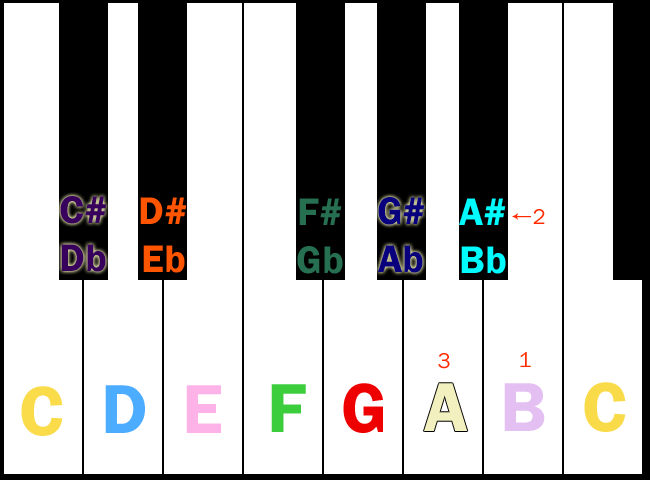
To find any major key’s relative minor, simply go down three half-steps from the major key’s beginning note (the note it’s named after). For instance, say we’re trying to find the relative minor of C major, below:

cmajor_selected
Begin on C (the note circled in red on this graphic)…

findingrelativeminor
…and go down in pitch (to the left on this graphic) 3 half-steps. In this case, you’ve landed on A. This tells you that A minor is the relative minor of C major.

What Has This Got to Do with Key Signatures? A Lot, Actually

gmajor So, for instance, when you see the key signature for G major (at left), for instance, the ensuing music might not actually be in G major–it might be in the relative minor key instead. (What is the relative minor of G major? Remember, count three half-steps down from the original key (G major), and you’ll find the beginning note (or keynote) of the relative minor.)

Answer: Below G is F-sharp, then F, and finally E…and E minor is the relative minor of G major. E minor is thus given the key signature of one sharp.

One Important Caveat: That Pesky “Sharped Seventh Note” Again

Remember last week when I discussed that minor key scales are created by taking the major key scale, flatting the third and sixth note, then sharping the seventh–except that the “sharped seventh” is really in the same place as it is on the major key scale? Well, that comes into play here.

When you play the relative minor key, it’ll be the exact same scale as the major key it’s related to, except that the seventh note will be sharped. That change is not reflected in the key signature at all–it’s just something you have to remember. Take the key of A minor, for instance; it’s related to C major, which has no sharps and no flats. But when you play something in A minor, the seventh note is a G-sharp, because that’s just how minor key scales are constructed.

The Complete Key Signature Family Tree: The Circle of Fifths

To remember and reference all these various major-relative minor matchups, music theorists have come up with a cool little graphic called the Circle of Fifths, seen below (this was retrieved from line6.com):

Circle-of-Fifths
Names of major keys appear on the outer “ring” of this graphic, while their relative minor keys appear synced up with them on the inner “ring.” This really helps as a memory tool!

Next Week: A Look at REAL Sheet Music

Now that we know a good bit about the way music is notated, let’s see how to apply that knowledge to real sheet music. That challenge appears next Saturday!

Sexual Politics of Dancing, Photoshop Cooking, Toeshoes on Timbers, and Home Organization

Sexual Politics of Dancing
Guys who barely move (or girls, for that matter) are only letting themselves be hindered by social pressure. Just dance!

Photoshop Cooking: A Demonstration Video (Funny)
I need this program now, please. 😀

Toeshoes on Timbers
Juxtaposing delicate ballet slippers against rough wood.

52 Totally Feasible Ways to Organize Your House
WOW @ tip #15: Turn Your Hangers to Find Out What You Really Wear… nifty little way to figure out what’s just taking up space in your closet. That and many more tips for storage and general headache-saving advice behind the click!

Flow Free

Looking for a puzzle game with plenty of little challenges? Then I suggest you check out Flow Free, a neat little game app by the folks at BigDuckGames.

Basic Gameplay

The point behind Flow Free is to connect all the dots on a grid of a certain size, using the connecting lines to fill up the entire grid, without any lines overlapping each other. Seems pretty simply and straightforward, right? Well, it is–for the first few levels.

simpler-flow
Image Credit: iTunes App Store
At first, you start out with levels like this 5×5 grid at left, with only a few different colors of dots. These puzzles don’t take too long to solve–you just have to figure out how to wrap the lines around each other rather than crossing over each other. With grids this small, you also don’t have to worry too much about filling up all the allotted grid space–it pretty well happens by nature.
level-choose
Image Credit: iOSApps.com
But, as you can see at the extreme right of this screenshot, there are levels beyond the 5×5 grid. More space is introduced; more colors of dots are introduced. You wouldn’t think the game would get harder with MORE space, but it does–you still have to fill up the grid, so sometimes you have to come up with interesting ways to take up space with a line or two. And above all, the lines can’t block each other off!

harder-flow
Image Credit: GamesDreams.com
Eventually, you end up with levels like this and beyond, where colors interweave in a careful, angular dance that’s often more about thinking outside the box and taking up space rather than getting things connected in the most efficient manner. (The website I just linked to, GamesDreams.com, has solutions for every level, which is helpful if you get flat-out stuck as I have a few times!) Rest assured, each level presents new challenges!

Game Levels

The game comes with several 150-levels-apiece packs for free:

  • Regular Pack (5×5 to9x9 boards)
  • Bonus Pack (5×5 to 9×9)
  • 8×8 Mania (lots and lots of 8×8 boards)
  • 9×9 Mania
  • Jumbo Pack for iPad (10×10 to 14×14 boards–super difficult!)

There are also some extra packs you can buy for 99 cents each, or buy for about $4.00 all together:

  • Green Pack (5×5-9×9)
  • Blue Pack (5×5-9×9)
  • 10×10 Mania
  • Kids Pack (5×5 and 6×6)
  • Rainbow Pack (5×5-9×9)
  • Purple Pack for iPad (10×10-14×14)
  • Pink Pack for iPad (10×10-14×14)

Completing a Level vs. Perfecting a Level

In Flow Free, just “completing” a level can be different from finishing it perfectly. You can finish a level and move on to the next one, no matter how many times you had to retrace your lines or undo moves, but you get extra points if you can finish it with the minimum number of moves. Completed levels are marked with a check mark; perfected levels are marked with a star. Try to perfect them all!

Bonus: Time Trials

Once you complete the game’s Free Play levels, which are not timed, you can try your hand (or fingertip) at the timed levels, which test how many puzzles you can solve in a certain length of time (30 seconds, 1 minute, 2 minutes, and 4 minutes). All of the Time Trial puzzles are 5×5 boards, so they aren’t too terribly hard, but some of them can be a little tricky!

To Download and Play:

For iPhone/iPod touch/iPad: iTunes App Store link
For Android: Google Play link
For Windows 8/RT: Windows Store link

Job Decries Judgmental Attitudes as Non-Christian

Job 16:1-5
1 Then Job replied: 2 “I have heard many things like these; miserable comforters are you all! 3 Will your long-winded speeches never end? What ails you that you keep on arguing? 4 I also could speak like you, if you were in my place; I could make fine speeches against you and shake my head at you. 5 But my mouth would encourage you; comfort from my lips would bring you relief.”

All throughout the Book of Job, three “counselors” try to tell Job why he’s suffering, telling him how he “deserves what’s coming to him” because he is human and therefore evil in God’s sight. Chapter 15, for example, is nothing but a diatribe against Job and people like him–sinful people who do not deserve blessings. So in chapter 16, Job answers this “Christian-esque” criticism with some pointed replies that many modern non-Christians have echoed even today.

I believe this passage is very appropriate for all of us Christians to read and learn from today, because the Christian church today is known as a prideful, judgmental institution among nonbelievers. Sounds harsh, but it’s a widely-held belief. Ask any random non-Christian what they think about “the church,” and you will inevitably hear some variation of that definition. For that matter, I used to think the same myself. Sadly, people see the Christian church as judgmental rather than helpful to people in need; the so-called Christian response to the AIDS epidemic is one glaring example, with actual churchgoers often saying things like “Well, why should I care about AIDS? It’s just a gay disease–if they weren’t sinning, they wouldn’t get it.”

On this and many other social, physical, and emotional issues, people simply don’t like to ask Christians for help anymore, for fear they will be judged and ridiculed. Job was no stranger to this kind of attitude, and that’s what he’s arguing against in this passage. He doesn’t want to be told how he deserves the suffering he’s enduring; he wants someone to understand, and to help with compassion and caring.

It’s all too easy to judge those who are suffering as somehow “deserving” of what’s happened to them, especially if a string of bad decisions has led them to their current state. But those who are suffering need compassion, the exact kind of compassion Jesus showed in the New Testament. They need someone to understand their situations, pray with them, and act as a beacon of God’s mercy and grace against the despair that threatens to claim them.

Think of it this way: a suffering person is like a drowning person in deep water. Judgmental Christians simply stand on the shoreline and shout encouragement or make gestures to tell the person to swim closer in to shore; compassionate Christians throw a rope or float to the drowning person, or even wade out into the water and drag the person back to shore. That is the difference between being condescendingly righteous when you help someone, versus being gently compassionate. Let’s make a conscious choice to be the compassionate Christian–after all, someday we may be the one drowning in deep water, and in need of someone to drag us back to shore.

The “Clear” Winner: Desktop Organizer Becomes Makeup Organizer

A couple of years ago, I finally dug into my massive collection of old hair and beauty products and purged about 80% of them. The collection that had once taken up two countertops, dozens of boxes in my closet, and several feet of floor space now fit nicely under the two bathroom cabinets and in a small five-drawer organizer sitting atop the cabinet.

My makeup collection especially saw a big reduction. So much, in fact, that I only had to use two of the five tiny drawers in that organizer to store my makeup.

But there was a problem. Actually, three problems, which showed up in ensuing months:

  • The drawers often got stuck because of a makeup product’s packaging blocking the way
  • Some of the makeup products, especially lip glosses, slowly leaked when put on their sides (the way they had to be stored in this drawer system)
  • The makeup that got accidentally shoved to the back of the drawer never saw usage, because I couldn’t see it/access it anymore

I had to do something about this. I knew I wanted a more open storage system for my makeup, something that I didn’t have to open and close to get to…but I also wanted to be able to see everything in my collection without having to move other things out of the way. Plus, I didn’t want to spend a ton of money on whatever organizing system I got, just in case it didn’t work.

Then, I happened to be at Walmart, when I spotted something in the office supplies aisle:

emptyorganizer
It was a clear desktop organizer, meant for office supplies and the like. I, however, saw it a little differently. I bought it, brought it home, and within about 30 minutes, I had transformed my makeup organization space.

makeuporganizer
BAM!! 😀

makeup-guts-everywhere
Yep, these are all the makeup products I own, and they all fit in this little desk organizer that takes up just under a square foot of space. Amazing, huh?

But even with all this awesomeness, there were a few issues I had to address while I was putting each item into place. Here’s some handy hints for storing your own makeup in such an organizer:

back-big-compartment
1: Big tall compartments, like this one at the back of this organizer, are great for large palettes and tall items (like the eyeliner pencil at left). Don’t put small items (like travel-size lip glosses) in these compartments, because they’ll just fall over and get hidden by bigger items. (Learn from my fail.)

middle-ittybitty-compartments
2: Use the very small but still high-walled compartments for items like lipsticks or other stick makeup that are best stored vertically. For me, this was key, because some of my glosses had begun to leak when stored horizontally; the vertical storage solves that issue! Tiny compartments also help keep the tiniest items from falling over, like those five tiny glosses in the middle compartment.

front-medium-compartments
3: Use medium-sized, flatter compartments for smaller palettes or individual items–here, I’ve used them for blush, bronzer, face makeup, and even my sharpener because I feared the little thing would get lost otherwise. Also, be careful that your smaller palettes don’t get jammed down in the flatter compartments–I had to do some serious prying after my blush compact got stuck in the left compartment. That’s why it’s stored propped up the way it is!

Now that I’ve had my makeup stored this way for about a month, I love it and wouldn’t go back. I can see every product and pull it out easily to use it, and more importantly, nothing gets ignored because the organizer is clear. It makes getting ready a LOT easier–and all because I tuned into my repurposing radar. Neat!

Product Information

organizerlabel
Available at Walmart

Mobile-Friendly Designs, part 1: Do You Need an App?

With much of our personal websurfing now being done through mobile devices (hey, it’s something to do while waiting in line!), many websites have created apps to make navigating to their sites that much easier. In a way, apps have become like bookmarks or favorites for our mobile devices.

But, as webdesigners ourselves, do we need to take the time and trouble to make an app for our own sites just yet? Well, as I discovered while thinking and researching for this article, it depends.

Biggest Reasons to Build an App for Your Site

  • Your site has a HUGE readership and lots of web traffic per day
  • More complete control over how content displays on all mobile devices
  • Offers a simpler way for users to access your site

If you have a blog that already gets a lot of attention, or a website that many people use, an app may be just the ticket to help boost your popularity and usage to the next level. Also, if you’ve studied your website statistics and have seen that a large percentage of your visitors are using mobile browsers to visit your site, making an app could be a great idea. Lastly, if you don’t want to build a separate mobile version of your site, an app can be a simpler, sleeker “mobile portal” of sorts for your content. (Case in point: I use the Beautylish app from Beautylish.com every day to read their articles without loading all the layout graphics and extraneous stuff from their desktop site.)

As a personal example, I’ve considered building an app for this blog to help with my mobile readership, since I update every day and get a fair following on Twitter–people might appreciate a simpler link to my blog. I’ve also noticed how I have to zoom in when I read my own blog on my iPhone, and have thought how great it would be to have a simpler layout and better social media functionality all wrapped up in an app.

Biggest Reasons NOT to Build an App for Your Site

  • It’s something else for readers/viewers to download and store on their devices, rather than just visiting a mobile-friendly site
  • Have to keep updating the app to stay current with mobile platforms
  • Can bring unforeseen complications, like app crashes, bugs, etc., which interfere with usage

If you’ve just got a small personal site, or a site you mainly build and maintain for hobby purposes, creating an app for your site is likely not going to be very helpful for you. An app is one more thing to keep updating, and could introduce more programming issues than you really want to handle, especially for those of us who don’t get into much web programming beyond HTML and CSS. (Even the apps that are “made for you” can have bugs, and they’ll still need updating, too.) And if your app doesn’t offer much more functionality than just visiting your site through a mobile browser, viewers might not opt for downloading it anyway. (Case in point: I downloaded the Google app, but found it to be so slow that I switched back to using Google in a mobile browser.)

Making an app for my main domain, withinmyworld.org, for instance, would be quite frankly a waste of time and effort at this point, since my domain is mainly a personal site and portal to all my other sites. It would be little more than a gimmick at best, since I know I probably wouldn’t update the app all that much (not much to update!).

Bottom Line: Site Size, Topic, and Popularity Matter, But…

If you want to put the time and effort into building an app yourself, or creating one using an online service, make sure you’ve done your homework beforehand. Having an app can be a great asset, or it can be little more than a superfluous gimmick. To me, frequently-updated blogs or sites with very helpful, often-accessed content would benefit most from having an app, and personal sites or hobby sites are better off not worrying about it.

BUT! If you really want an app and think it could rocket your little site into popularity, that is your choice to make. Who knows–if you’ve got a lot of people visiting your site via mobile devices, the app could just make their visits easier, and word-of-mouth advertising would spread it further!

App Creation Tips and Services

If you’re interested in creating an app but don’t necessarily have all the programming skills to do it yourself, here are some sites to check out:

How to Make a Blog or Site into a Mobile App without Programming Knowledge, @ Lifehacker

App-Making Sites

AppMakr (iPhone; Android beta)
AppsGeyser.com (Android)
Conduit (iPhone, Android, HTML5; Windows Phone coming soon)
Genwi.com (Helps you build one app in the “cloud,” and then they make it workable for iPad, Android, iPhone, etc.)
Phonegap (more hands-on app making with HTML/CSS/Javascript; supports iPhone, Android, Windows Phone, BlackBerry, and some others I don’t even know)

Music Theory Fun, part 5: “Major” and “Minor” Differences

Now that we’ve learned about key signatures and pitches, we can start talking about “major” and “minor” keys in a little more depth.

First, let’s look at a few graphics to help you visualize the “keys” I’m talking about. (I made this based on a piano keyboard, because I am a pianist and learned music theory largely by interacting with the piano. To me, seeing the notes as clearly as a piano displays them REALLY helps with learning theory.)

pianokeys
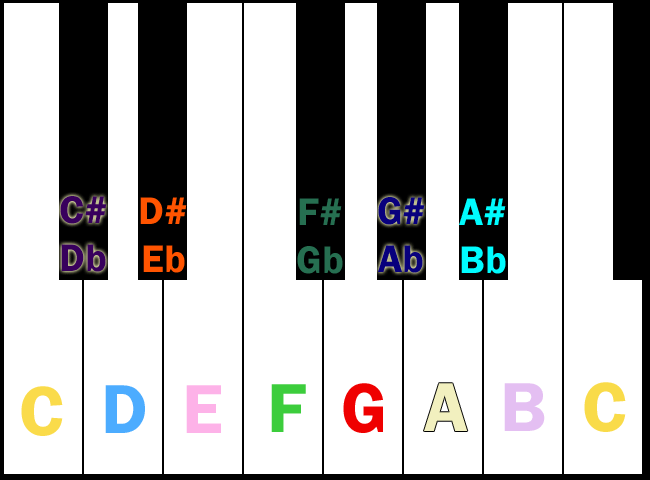
This graphic represents a small section of a piano keyboard. Here are the notes labeled:

pianokeys_labeled
There are several things to take note of here. First, see how there’s a note labeled C on the left side of the image and another note labeled C on the right side of the image? The C on the right sounds higher than the C on the left–that’s the difference. The pitch names repeat themselves, but the notes get higher going to the right on a piano keyboard, and get lower going to the left.

Second, there are black notes fitting between some of the white notes on the keyboard, and all of them are called “something-sharp” or “something-flat.” That’s going to be important later in this post!

Lastly, each of the black notes have two pitch names instead of one. This is perfectly acceptable; for instance, you can call the note between C and D either C-sharp or D-flat. It’s really just personal preference.

(Oh, and don’t worry about the colors of each note being different–this has to do with my sound-color synesthesia. I was feeling kinda OCD about making sure the colors of each label “matched” the musical note. LOL)

So, What’s So Major about a Major Key?

Last week, we talked a good bit about key signatures, and at the end of the post, I gave you an “answer key,” of sorts, showing all the different key signatures. I also identified all of them as being “something-something major.” But you probably wondered: “What does ‘major’ mean, and why does she keep specifying it?”

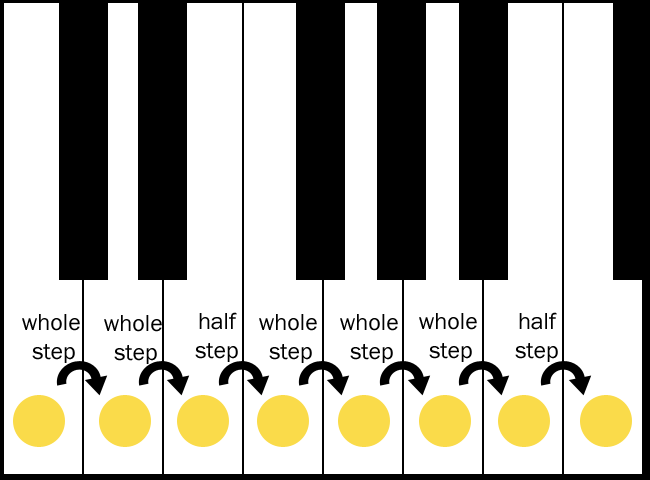
When a musician says that a song is played in a “major” key, it doesn’t mean that it’s in an “important” key–it means that the scale of the key (all 8 notes played in sequence) follows this pattern:

cmajorkey
This graphic depicts the C major scale; starting on C (leftmost note), you hit C, D, E, F, G, A, B, C. Looks pretty simple and straightforward, right?

Well, underpinning this simple sequence is a rule concerning how all major key scales are constructed, using intervals. Intervals are what I keep referencing when I say “whole step” or “half-step,” like so:

  • A half-step is the interval between two adjacent notes on the scale, such as the interval between C and C-sharp, or the interval between E and F.
  • A whole step is the interval between two notes with another note squished between them, such as the interval between C and D, or the interval between G-flat and A-flat.

So the interval pattern described for you in the above graphic has you make two whole steps up the scale, then a half, then three more whole steps, then another half. This is how all major key scales are determined–if their scale abides by this rule, they are major!

Minor Key Scales: Some Minor Adjustments to This System

cminorkey
Now, in terms of minor keys, the nice neat little system we saw earlier gets a little bit of a monkey wrench thrown in it. The above graphic depicts C minor, and there are a few differences when you compare it to C major:

  • Instead of hitting an E-natural (“regular E”), you hit an E-flat
  • Instead of hitting an A-natural, you hit an A-flat
  • B natural is still the seventh note, just like the C major, but for some reason, the seventh note is still considered “sharped” (never understood that, myself)

There is a very technical interval pattern for minor keys, but it’s very complicated. Basically, we musicians just remember that for every minor key’s scale, we take the major scale, flat the third and sixth note, and keep the seventh note in the same place.

Next Week: Every Key Has a Relative

Now that you know a little more about major and minor keys, we’re going to see how they’re related to each other, next week. (Thankfully, you won’t have to remember whose brother’s uncle’s cousin is related to whose! LOL!)

“4 Men in Hats” Logic Puzzle, How Much to Tip, Optical Art, and Web 2.0 Design

4 Men in Hats
Great little logic puzzle. Can YOU figure out how one of these 4 men will figure out what color hat he’s wearing, and save himself and all his friends from execution?

Reddit Discusses Tipping Wait Staff
A lively discussion on tipping and the strange/funny/scary things that can result from tipping too little.

Optical Art Tutorial
Draw awesome optical art with this easy-to-follow, pictorial tutorial!

99 Resources to Help You Build Web 2.0 Designs
Read and click to discover tons of new resources you’ve probably never even heard of!

Storing My Magic Decks: A New Idea

Since my huge closet reorganization this past fall, I’ve been able to store most of my gaming collection in the closet, up out of the way of foot traffic and mishaps. But, for some odd reason, my Magic decks hadn’t made it onto the “gaming shelf” in my closet yet, and they were still rather vulnerable to being lost or damaged (more from me tripping over the briefcase than anything, lol).

mtgdeck_briefcase
This is how I had been storing my Magic deck boxes–I used to carry them to my local gaming shop in this giant silvery-metal briefcase, and they just kinda stayed in there when I wasn’t actively playing with them. The problem? This case was WAY too heavy to put on a closet shelf without bending or breaking it.

So, after a little thinking outside the box (literally), I remembered I had a three-drawer plastic organizer I bought a couple of years ago, which was as of the moment unused due to purging the items that had been stored within. (Walmart carries them.)

mtgdeck_organizer
I eyeballed its overall measurements (it’s about 13 inches wide and about 10 inches high) and the depth of the drawers (about 1 1/2 to 2 inches deep). It seemed like it would work for holding my Magic decks. And this way, I could organize them by type as well, putting my tribal creature decks in one drawer, my combo decks in another, etc.

Hauling my MTG briefcase into the room, I began to organize. A few minutes later, this was the result:

mtgdeckorg_full
The top drawer ended up being my tribal- and creature-based decks, the middle drawer became my combo deck drawer, and the bottom drawer held some overspill from the creature deck drawer. (LOL, I have a “few” creature decks…)

The two deck boxes sitting on top of the organizer were too big for the drawers–one is a larger-than-normal UltraPro MTG box, and the other is one of those deck boxes with a belt clip on the back (plus, it’s a huge box to begin with). All the other normal-MTG-size UltraPro boxes fit into the drawers just fine, lying on their broad sides.

With that finished, all that remained to do was to put the little drawer system into the closet, beside the rest of my gaming stuff, like so:

mtgdecks_incloset
Now I can access my Magic decks very easily, picking out which one I want to play by the organizing drawer system, and there’s room on the top of the organizer for storing my too-big-to-fit Magic decks, as well as any other Magic gaming supplies. All in all, I’m very happy with it!

So, if you’re looking for a way to both organize and protect your Magic decks, an organizer like this might just be the solution. I certainly won’t be tripping over my old Magic briefcase anymore!