All posts by Robin

I'm a woman in my early thirties living in North Carolina, USA, and I have a lot of varied interests; I love creative writing, music composition, web design, surfing the Internet, thinking out loud, and gaming. And yes, my glasses are crooked. :)

Coffee Shop Internet Etiquette

coffeeshopinternet
Coffee shops are a hub for public activity, even and including Internet access. For most folks, it’s a nice getaway from home and a place to be with friends. But for some people, “coffee shop Internet” is their only choice for fast Internet. It was for me until winter 2013.

Wait, Why Doesn’t Everyone Have Internet at Home?

In this day and age, home Internet access is nearly considered a utility like electricity and water. But some folks just don’t have it, for these and many other reasons:

  • Can’t afford it
  • ISPs don’t provide service to their community (this was our problem till Dec 2013 when AT&T finally installed U-Verse ^o^)
  • They don’t need Internet enough to warrant paying for it every month

For these people, public Internet access, provided at libraries and coffee shops, is their only link to the Internet. Libraries, however, are usually taken up with students and don’t allow food and drink, so coffee shops are the natural recourse.

Coffee shops, however, are not the easiest places to use Internet. If you enjoy lots of noise, space constriction, and inconvenience, coffee shops are great! If you’re actually trying to get work done, well…

if you're trying to get internet work done at a coffee shop you're gonna have a bad time

My Pet Peeves as a Public Internet User

  • PEOPLE! TALKING! IN! THEIR! LOUDEST! VOICES! (GRR! Even headphones don’t block it out!)
  • People taking up 2 or 3 tables for no reason, blocking out space I could use
  • People looking at my screen and making obnoxious comments/being nosey
  • People hogging the tables/chairs next to power outlets when they’re not even using them, so I have to work off my battery capacity
  • People asking me if they can use my computer
  • People asking me for computer advice because I happen to be using a computer

Basically, if you’re a loud, obnoxious, space-hogging coffee shop visitor, chances are the working people around you are actively restraining the urge to strangle you. (There are so many people in my hometown who are alive today because I restrained myself… LOL)

How to Be Courteous to Public Internet Users

  • Leave the tables and chairs located near power outlets for computer users.
  • Speak quietly if seated near someone using a computer, even if they’re wearing headphones (easily-distracted people will thank you for it)
  • Don’t spread your stuff over multiple tables if you only need 1 table.
  • Don’t ask to use someone else’s computer; ask if they could look up something for you instead.
  • Allow them to have a bit of privacy–don’t ask or comment about what they’re doing on the Internet.

What Tips Would You Add?

Have any additional advice for public Internet users or the people around them? Add your voice in the comments section!
5 Tips for Increasing Site Loading Speed

loadingspeed
In this day of widespread fast Internet coverage, I’ve noticed that many webdesigners have built much more complicated pages, with larger images, more feeds, and multi-step scripts. For most users, who have access to higher-speed connections, this is not a problem.

However, just because most desktop users have faster access doesn’t mean that all our visitors have fast access. As more and more people use the Internet via smartphones and tablets (which often have slower data connections), we now have a new challenge: to design good-looking sites for desktop users which still load quickly and look good on mobile, too. (Not to mention that there are still places where fast internet is not offered; my household could not get anything but dialup until the winter of 2013!)

So, how do we go about designing these beautiful but quick-loading sites? Here are some tips from my experience on slow connections:

#1: Slice Up and Compress Images

I can’t count the number of times a page wouldn’t load on dialup simply because the designer used a background image the size of a small soccer field. (And on mobile, it’s a lost cause. TRUST ME.) If you want a big background image (or any big image on your page), please, PLEASE, for the love of Internet, use a graphics program to slice it up into smaller pieces and compress each piece (see Tip #5) so that all connections can load the page much faster.

You might complain, “But then I’ll have to align all the image pieces in a table or bunch of divided layers!” True, it might be a little more backend work for you, but it will likely result in a faster-loading page for your users, and that’s what you ultimately want: a page that loads quickly so that your users can get the information they came for. (Free graphics tools and programs that slice: GIMP and PicSlice.com.)

#2: Don’t Use Images Where Well-Formatted Text Would Suffice

Pages full of images are very frustrating for both mobile and slow-connection users, especially when the images are just text. Each big image can take up to 15 minutes to load, just by itself, on a dial-up connection, whereas a page full of just text would have loaded in under a minute.

If you really, really want a different and trendy font for your web site, try using the @font-face CSS property and be sure to include the font file on your site. (Also, make sure that there’s a more generic “fallback” font specified for mobile and dialup connections, otherwise your text will be invisible until the font file loads!) Style your font carefully with CSS, and you might just like your text better than the image version anyway!

#3: Divide Up Long Pages of Images

Instead of having an “endless” page of images (which never load on mobile/dialup anyway), break up image pages into sections/pages. This does mean more clicks for your user, but it also means each page loads more quickly so that they can enjoy your content quicker. Using a fast-loading thumbnail image script, like the one at DynamicDrive, phpThumb(), or HighSlide, can work well, too.

#4: Minimize the Number of Site Branding Images

The more images you have per page, the longer it takes to load every time your user clicks an internal link on your site. Thus, you want your image usage to be striking but not overwhelming. Any place you’re using an image for site branding, brainstorm ways you could reduce or replace that image with a CSS trick, icon font, or HTML special character.

For instance, you can use CSS’ margin, padding, and line-height properties to space text out without having to resort to using a text image. Icon fonts, like Socialico and Modern Pictograms can be brought in with the @font-face property to use for social media links or iconic navigation. (Alternatively, you could use HTML special characters, such as the ones listed on UTexas, Webmonkey, and DeGraeve.)

#5: Pay Attention to File Size and Content

No matter what files you’re using, pay attention to how big they are. If you’re consistently creating and calling files over 500KB, slow connections won’t have a prayer of seeing those in a timely fashion. (And 1MB files just make mobile and dialup users cry at the unmoving progress bar.)

Do all you can to keep file size down. Firstly, use image compression techniques that work for your needs (see my JPG, GIF, or PNG article about which image compression technique would be best). Also, for large text files, PDFs, or coded webpages, cut out extra stuff and load it separately–for instance, I use PHP includes to load my header and footer on most of my sites so the browser doesn’t have to keep reloading the same layout info every time.

Lastly, using deprecated tags or having a page loading in quirks mode (without a doctype) is also a loading speed killer–make sure your code is valid, otherwise, your mobile and dialup users will be waiting a long time and most likely see an error page instead of your site.

Summary

Loading speed may not be the issue it once was, but it’s still important. Streamline your site, and you’ll be surprised how much faster your sites will load–even your fast internet users will notice!

My 5 Tenets of Beaded Jewelry Design

beadedjewelrydesign
I consider myself still an amateur beader in many ways, but I like the process of coming up with new designs for the simple, delicate necklaces I favor. I might not be able to weave thousands of tiny beads together into a wearable maze of color, but I can at least string some pearly and sparkly beads on a wire! πŸ˜€

I’ve noticed, though, that I tend to use a certain set of rules when it comes to creating beaded patterns, though–and those rules sparked the idea for this post! Read on to discover how I design my pieces!

Tenet #1: Use smaller beads at the ends of the piece and larger beads in the middle of the piece.

This technique, called “size graduation,” is one of my favorites, especially for necklace design. You start out with small beads at either end of the necklace, and then use larger and larger beads till you get to the center of the piece. This draws the eye to the center of the piece, and also helps the wearer know where the necklace is supposed to be centered!

Tenet #2: Make patterns of interlocking symmetry.

I usually do lots of small patterns to make up my necklaces and bracelets. For instance, on either end of the necklace, there’s usually a couple of little symmetrical patterns; then, closer to the center of the necklace, there is a larger symmetrical pattern that surrounds the centerpiece (usually one to three large beads). All together, this necklace pattern looks like a wearable palindrome, both sides mirroring each other.


Pattern: tiny pink pearl–clear seed bead–tiny white pearl–clear seed bead–tiny pink pearl. This would be great at the ends of a necklace.


Pattern: clear seed bead–tiny pink pearl–small white pearl–tiny pink pearl–small tan/gold pearl–tiny pink pearl–small white pearl–tiny pink pearl–clear seed bead. This longer pattern would be great for building up toward the center of a necklace.

Working with small units of patterns like these seems to create a much better-looking product than some of the non-symmetrical designs I’ve attempted over the years. Somehow, I never finish the non-symmetrical designs–I don’t even get around to stringing them. The symmetrical ones, however, always end up finished. πŸ™‚

Tenet #3: Use colors that play well with each other.

In most of my pieces, I sprinkle in a good bit of neutral and metallic colors, like white, clear, gold, tan, black, silver, or gray–and then I use one or two stronger colors that stand out. Old favorite combos like pink and gold or blue and silver also work well for me. Sometimes I’ll use all beads of the same color but in various finishes to achieve a neat effect (sparkly purple, for instance, looks very different from pearlescent purple).

I do occasionally like to weave in a few distinctive beads, but that’s usually saved for the centerpiece of a necklace, using patterns of more “ordinary” neutral beads around it to visually support it.

Tenet #4: Different light textures are welcome.

What I mean by “light textures” is how the light bounces off each bead (as mentioned briefly above). Sparkly beads sharply reflect light, while pearlescent beads softly glow, and metallic beads shimmer. By putting the three different textures together, you get a neat effect on the eye–the eye constantly moves around the necklace, taking in the different sparkles, shimmers, and glows.

My favorite necklace, by far, is one that I made using light teal sparkly beads (Pacific opals) and white pearls, with clear and silver seed beads as accents. It always gets delighted comments when I wear it, and I think it’s because of the different light textures (plus the pretty color combination).

Tenet #5: Don’t go too big.

I like to use smaller beads because it lends a delicate, fairy-like look to my jewelry designs. In small sizes, any sparkly beads are pretty rather than flashy, keeping the overall effect clean and modest. It also doesn’t draw attention away from the outfit as a whole, but enhances and plays up the good parts of the ensemble. (Given that I’m pretty clumsy, I don’t like to wear any jewelry that I could potentially get tangled up in or injure myself on, so that’s probably another reason I go for short, simple jewelry. :D)

Summary

Small, balanced designs with colors and textures that play harmoniously with each other represent the five rules I go by when making beaded jewelry. But what do you think? What are your favorite ways to design? Tell me in the comments!

The Golden Rule’s Origin, Hendrix in Picks, Try Saying These, and CSS Sandbox

goldenruleorigin
Did Jesus Plagiarize the Golden Rule?
Many people have tried to discredit the Golden Rule by saying that Jesus wasn’t the first to come up with it. This article acknowledges the sound-alikes, but has an interesting perspective on it.

Hendrix in Picks
A very cool portrait of Jimi Hendrix done with 5,000 guitar picks. All I can say is, what patience!

Try Saying These
Instead of cursing at customers or co-workers in your workplace, try saying these mild-mannered phrases…if you can muster up a straight face, that is!

CSS Sandbox
Play with CSS on this website the way you used to play with shovels and buckets in the sandbox. Seriously!

Mana Base: The Literal Foundation of a Magic Deck

manabase
Okay, I’ll admit it: I’m generally terrible at building a mana base for my decks, even though I’ve been playing Magic since 2005. When I start building a new deck, I’m usually focusing on the awesome cards I’m going to put in, rather than the mana I’m going to use to play said cards. Usually, I end up with way too many cards I want to put in and no room for mana!

I’m sure I’m not alone in this, either. I theorize that the reason Standard Magic (or Type II) has so many netdecks (copied strategies from pro and semi-pro players) is because most of us have a hard time building the right mana base. (Check DeckCheck, EssentialMagic, and the Standard General section of the Wizards of the Coast forums if you don’t believe me about copied strategies.) And, since mana bases are the foundation of any deck, when your mana base isn’t right, the deck doesn’t work.

So, how does a Magic player go about making a mana base that works? Here are some tips I’ve recently started to follow, with success:

#1: Determine what types of mana you need.

Sounds too simplistic, but this is the very first step to building a working mana base for your deck.

If you’ve got a mono-colored deck, for instance, you don’t need dual-color lands. And if you have dual-colored cards in your deck, you’re going to need both colors of mana to support them unless they are hybrid-mana cards (which means they could be played with either color).

How you choose to provide mana for your deck from color determination on is really based on what kinds of cards you have in your deck. For example, if you have a creature like Leonin Elder that gains life whenever an artifact comes into play, you will want artifact lands (like Ancient Den, at right) in your deck so that you have more artifacts to trigger that life-gain.
You also might have a creature that costs less to play for each certain type of land in play (this is called the “affinity” mechanic, seen on Tangle Golem at right). Playing this kind of ability means you’d want more of that land type in your deck than anything else.
Branching off the affinity concept, you could also use artifact lands to pump up a creature like Broodstar, who gets bigger for every artifact in play:
Other lands could support your deck in other ways, like lands that turn into creatures when a certain condition is fulfilled, or lands that can do other things besides give mana. Urza’s Factory, for instance, can put a 2/2 creature into play.
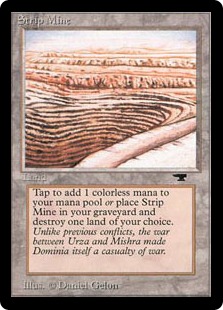
Strip Mine can get rid of an opponent’s land…
And Mutavault can become a 2/2 creature until end of turn.

You have to determine what you want your mana base to do for you before you proceed!

#2: Determine how much of each type you need.

Mono-colored decks get off easy in this regard. You simply put in enough mana sources of the color of your choice to constitute at least a third of your deck (so you’re drawing land about 33% of the time with a good shuffle), and you’re pretty much done.

However, if you’ve got a deck with more than one color, you need to balance things more carefully. Some things to consider include:

Casting costs of each spell.

Example: If you have a Green/White deck together, but all your Green spells have two Forests in the required casting costs, you’re probably not going to get away with an even split of Plains and Forests in your mana base. Instead, you’ll have to put in twice the number of Forests as Plains, so that you’ll more likely have the mana to play those double-green spells.

How many cards of each color you have.

Example: If you have a Green/White/Blue deck together, but you only have a few Blue cards, you won’t need many true Islands in the deck–you could possibly get away with just having a couple of dual- or tri-color lands. (I have such a deck together, and I’m only running 3 Islands, but I actually have enough access to Blue mana with the tri-color lands and land fetch I included in the deck.)

The land fetch you have included in your deck build.

Especially if you’re playing mono-Green or you’ve splashed Green into your deck, land fetch will help offset a troubled mana base. Land fetch, or the ability to retrieve another source of mana from your deck, is often necessary to offset turns where you have no land to play.

If you’re playing a lot of land fetch, you may not need as much of each color as you might have otherwise. If you’re not playing any at all, you will probably need to boost the amount of each type of mana you need for your deck.

#3: Determine how much of the deck you want to devote to your mana base.

I said earlier that about a third of most decks is dedicated to land. However, there are times when you don’t need 20 lands in a 60-card deck. You might need 24, or you might need 16. 20 is a good place to start, but depending on the type of deck you’re running, you may need to adjust that land count as you play the deck.

The only way to tell how much you’ll truly need for the deck’s best play is to test-play it quite a bit, either in a virtual environment or a real-life environment. I’ve had times where I built a 20-land mana base and got so consistently flooded with land it was unimaginable; I’ve also had times where a similar 20-land mana base got me stuck mid-game because I could not consistently draw enough land to support the cards I wanted to play.

Decks that discard a lot of their hands might have to ratchet up their land count to offset the cards they might lose in the process, for instance. Decks that need lots of mana to play super-high-costing stuff (such as Angels, Elementals, etc.), also generally need higher land counts. By contrast, decks that have lower-costed spells or creatures that tap for mana might not need as many lands. This is the most difficult part of refining a mana base, but it is necessary!

Summary

By taking into account your particular deck’s casting costs, spell types, colors, and abilities, you can be more informed about creating a good mana base the first (or thirty-first) time around. Research and consideration, plus a good dose of trial and error, is the best way!

Sometimes, Suffering IS Necessary

sufferingnecessary
Acts 1:15-17
15 In those days Peter stood up among the believers (a group numbering about a hundred and twenty) 16 and said, “Brothers, the Scripture had to be fulfilled which the Holy Spirit spoke long ago through the mouth of David concerning Judas, who served as guide for those who arrested Jesus–17 he was one of our number and shared in this ministry.”

In this first chapter of Acts, the remaining 11 disciples have just seen Jesus ascend into Heaven, and they are feeling a bit bereft, trying to choose a replacement for Judas and continue their ministry without their Shepherd. They are also reeling from the shock of recent days–some of them are having trouble making sense of the reasons why Jesus had to be crucified, or why He had to return to Heaven. You can imagine the questions going around in their minds: “Why did God let this happen? And why is Jesus now ascended rather than staying with us?”

At this point, Peter intervenes, reminding them that Jesus’ birth, betrayal by Judas, and death were all foretold for thousands of years in the Old Testament (the Scriptures referenced here). All of Jesus’ suffering, as well as the betrayals and failures that led up to His ultimate sacrifice on the cross, were all necessary, not just to fulfill some old words, but to gather God’s people back to Him. In a way, the disciples, even Judas, did what they were supposed to do. (Hard to conceive of Judas doing something he was supposed to do, isn’t it?)

We, too, have a hard time reconciling how God could let us suffer, especially if we view ourselves to be faithful and righteous believers. “How could God let this happen to me?” we ask. “Maybe God just doesn’t exist, because I’m suffering and nothing seems to be getting better.” Hard times can drive believers away from God, as they sit insulated by their own grief and pain, feeling bereft by God. And yet, suffering can develop us in ways we never expected, and can shape us for the better as we struggle to cope with our current situation.

For instance, during my failed attempt at becoming a teacher in 2009, I wondered at times what–if any–good could come from the series of unexpected difficulties and failures I faced. Eventually I had to quit or risk becoming even more suicidal than I already was. Yet since I quit my teaching degree program, I have seen how that time of suffering developed me, even though it was unconscionable at the time to me. I needed to be shown that I indeed COULD fail, that I was NOT perfect, and that God (and my human loved ones) loved me anyway. Just as the disciples had to be reminded that Jesus’ great sacrifice was for the betterment of all, I had to be reminded that I needed to rely on God for wisdom in choosing my life’s course. It was not an easy, comfortable reminding process, but it was necessary.

Dusk…My Favorite Time of Day

duskfavoritetime
3863536906_76da7abb33_b
Beautiful, evocative dusky road; picture found at Alan Yahnke’s Flickr.

I have always loved dusk more than dawn, ever since childhood. Dusk is a time of trees turning deeper green and casting lengthening shadows, of harsh sunlight fading into lovely colors, arcing deep into the west. It also is a time of winding down for the day, a time when it seems like you can be outside without being attacked by zillions of bugs, and you can rest without being swarmed by your to-do list. Not only that, it’s cooler (especially during the summer).

Forest dusk Wallpaper__yvt2
Look at this beautiful dusk light effect! Ahh… picture found at ScenicReflections.com

I love driving at dusk, walking at dusk, or even looking out the window at it. The transient time of late afternoon passing into early evening brings out some of the most beautiful and ephemeral colors in the landscape, and it seems to put away the endless noise of morning and midday, bringing with it a sudden stillness with light cricket accompaniment.

1299649558_1024x768_dusk-forest
Deep blue-green forest; picture found at Flash-Screen.com

Dusk, in contrast to dawn, is the end of stress and rushing around, and the beginning of “me time.” I’m usually done with all my work for the day and can now devote a little time to writing, watching some TV or a movie, talking to my boyfriend, family, or friends, or even just thinking quietly. Lying in bed, feeling the heaviness of my own limbs pressing into the soft surface, breathing deeply for the first time all day…it’s a languor that dawn does not allow, and dusk revels in.

Dusk also seems to bring out the relaxed conversation I love most. When I’m out at dusk with lots of people (or even just a few people), our words seem to turn to the philosophical and the meditative, the peaceful and the glad. Talk to anybody in the morning (just after dawn, usually), and you’ll likely get a string of complaints, worries, pains, and problems–well, either that or they’re entirely too darned happy ’cause they’re morning birds, LOL! But talk to anybody in the evening, and you’ll likely get a little slower and gentler conversation, maybe dotted with a bit of griping about the day…which eases off as dusk transitions the world toward sleep, as if the time of day itself helps wipe away the day’s concerns.

I guess you could say I’m a night owl because I love evenings more than mornings, but I think it’s probably more relaxing for me to know that relaxation, togetherness, and sleep is ahead rather than a rushed meal, gridlock, and expectations. Dusk is an escape from all that, an escape without anything else necessary to enhance it.

Clothing for Your Website: Color Schemes

clothingforwebsite
Choosing the colors for your site’s layout might seem like an arbitrary decision, but in fact, a layout’s colors can have a remarkable impact on your visitors. Using color strategically and beautifully is one more way we as designers can delight our visitors (and keep them on our site long enough to enjoy our content!).

But how do we choose just the right colors, and how do we implement them? Here are a few tips:

Image-Heavy Sites: Simple Blocks of Low-Key Color

imageheavysites

Sites with a lot of images, such as photoblogs, Tumblrs, or craft sites, just need color to visually delineate the site, since the images themselves will be attractive enough to viewers’ eyes. In the illustration above, the “navigation/sidebar” is a different color blue from the “content,” and the lower panels are done in light green, enough to draw attention when the user gets to the bottom of the page. This separates out the site’s content.

Image-heavy sites don’t need a lot of dramatic color; choosing softer shades of any color will work best, especially colors with lots of white, gray, or black mixed in (such as pastels, slate blue, and jewel tones). Try working within the “warm” colors (red, orange, yellow) or “cool” colors (green, blue, violet).

For Text-Heavy Sites: High-Contrast Text and Background Colors

textheavysites

The number-one concern for sites with a lot of text content is readability, and for that, you’ll want a color scheme with a high contrast between its text and background colors. The example above uses a light blue for the background color and a dark blue for the text, which helps the text stand out. (An even better contrast would be white background and dark blue text, but you can still use lighter colors for your background.) You can arguably use a dark background and light text, but your older visitors will have a harder time seeing the text.

As for which colors to choose, it’s best to stay within the same color family on a text-heavy site. Shades of the same color make the site both easy to read and attractive. (Just don’t use a red background color!)

For Feed-Heavy Sites: Small Shots of Color

feedheavysite

When you have a feed-heavy site (or a site with a lot of little sections you want to draw attention to), you can get away with little pops of different colors. Above, I have used colors from Facebook, Youtube, RSS feeds, and Twitter, with a couple of random colors mixed in, to show how this can work. Tiny bits of different colors helps your visitors see right away that your site has lots of different content–just don’t go overboard! Use unifying neutral colors (I used gray) on the rest of the site.

As for choosing which colors to use, you can just about use any shade of any color you want, since you’ll be using each color in such a small dose. Just try not to use the entire rainbow in your site–limit your color usage, perhaps, to 5 or 6 different brighter colors for the “color shots,” and use neutrals everywhere else.

Get More Color Scheme Inspiration

Be sure to look around you wherever you go for color scheme inspiration. In my hometown, for instance, there’s a beautiful old hotel that was once painted in cream and light pink, with a lot of black wrought-iron details. The colors have all faded somewhat over the years, so that the wrought-iron is now dark gray, the pink is just barely there, and the cream is almost white, but you can still see parts of the building that haven’t faded so much. I took that unexpected color scheme, modified it a bit, and used it for my novel update page. Literally anything can be color inspiration!

Color Scheme Websites

ColourLovers
Adobe Kuler
Paletton
ColorCombos.com

Glassics: Saturday with the Spark

This is a complete topic review of all the posts in the category Saturday with the Spark. Looks like I need to do more drawing/art-related posts, as well as general creativity and crafting posts! But don’t worry, I’ll get to it all. πŸ™‚

Music/Songwriting

Sight-Reading Fail
Seeing and Feeling Music
Perfect Pitch
Melodies from Dreams
Joining My Voice with Others
There’s a Reason the Piano is Called a Percussion Instrument
Phases of Songcraft
Confront the Giant in Song
Studying the Songcraft of Others

Poetry/Writing

Novel Therapy
Poems: Kernels of Art
Writing as a Pressure Valve
A Twist in the Web: Complex Subplots in Simple Storylines
Awake in the Middle of the Night? Write!
The Enemy of Creativity: Self-Censorship
Coming Up with “Novel” Ideas
Journals in Verse: My Personal Poetry
The Impromptu Writers’ Club
Connotation: The Search for the Right Synonym

Drawing/Art

Happy Little (Sketched) Tree
Little Doodles of Life

Crafts

Getting All Beaded Up

General Creativity

A Fickle Playmate: My Muse

Glassics: Friday Around the Web

Not really a topic review today, since the Friday Around the Web posts are four random links apiece–one thought-provoking, one game/media, one funny, and one internet tool. πŸ™‚ I’ll keep on keepin’ on, since I enjoy finding cool stuff around the Internet every week!

Tools for Teachers, Jedi Trainer, Sleeping Cat, and the Day You Were Born
Kids’ Inventions, Eyeball, How to write a paper, and Birth Year Info
Poetry, Sound Matrix, Procrastination is Fun, and Grooveshark
Celebs With Mental Issues, Dots, Paper Pop-Ups, and Help for Packing
Random Dancing, Video Game Irony, Switcheroo, and Do Nothing for 2 Minutes
Philosophers, Shuffle, Lamp vs. Chair, and Barcode Art
Dance to Get Smarter, PacXon, A Haiku, and ArtPad
Poetry, Street Fighter II, Bubble Sheet Prank, and PortableApps
World Wonders, Knoword, My Daily Life, and Their Circular Life
Untranslations, Flying Puzzle, Paraprosdokians, and FlashFace
Facts About the Body, Air Typer, Strange Carolers, and Virtual Flowers
Philosophy Encyclopedia, Great Gatsby Game, Surprise Raisins, and Desktop Wallpapers
Image Quote, Youda Survivor, Four Singing Horses, and Web Software
Earth in Real Time, Rock-Paper-Scissors, Self-Actualization, and Getting Phit
Broad Philosophy, FlyGuy, Silly Warning Sign, and How to make a Flash video
PhilosopherTypes, Back to the Future, More Dinosaur Theory, and Unit Conversion
Snowbells, Smart Fridges, A Style Game, and Psychology
Destressing, Pattern Maker, Dinosaur Theory, and I Can’t Find My Phone
Code of Conduct, StarDust, True Facts, and The Idea Swap
What to Read Next, Creative Desktops, Life as We Experience It, and How to Treat Others
Contact Number Posters, Solipskier, Octopi, and Cl1p.net
Rare Books, Drums, ASCII, and Being Kinda Productive
Image Poetry, Cute Gastly, Back in the 90s, and JustPaste.it