Tag Archives: gaming

3 Ways to Be A Fun Opponent

All of us gamers, whether we’re casual gamers or tournament players, have probably met the “un-fun” opponent. This is the guy or girl who can’t seem to lighten up and just play the game, who either loses and rage-flips the table, or wins and rubs it in everyone’s face for the next few hours. The un-fun opponent can also manifest as a player who overthinks every move for fear of losing the game, or who quits a game when the mere shadow of defeat falls across the table.

None of these all-too-common gamer attitudes make a game fun to play for the other person. I should know; I’m one of those who quits before I lose, and overthinks far too often, and so I see how my negative reactions suck the life out of a game for my opponents. So, today, I thought I’d challenge myself and all of us gamers to try being a little more fun–not necessarily playing more casually, but making all gaming more entertaining and less draining.

#3: Dare to Smile a Little More

A simple smile at your opponent can work wonders for a gaming atmosphere. When you’re both (or all) super-focused on the game, smiles can fall by the wayside, easily forgotten in the heat of tabletop battle. But if you take the time to smile at your opponent, you’re reminding him or her that you’re human, and that this is a game rather than a life-or-death situation.

This little jolt of positive emotion in the middle of a tense game can lighten the mood and help everyone have a better time. You don’t have to tell a ton of jokes or make silly faces, nor do you have to lose all concentration on the game for a moment…just smile. You wouldn’t believe what a positive effect that can have on another player.

#2: Dare to Try New Strategies

If you’ve got an amazing, butt-whooping deck or team of figures which you love to play in tournaments and casual games alike, that’s wonderful. But don’t limit yourself to playing only “the stuff that wins.” The best gamers are not the ones who have flawless win/loss records, but the ones who try out all types of strategies to discover new ways to win, new combos that work, and new modes of self-expression.

When you attempt new strategies, you flex your gaming creativity muscle, which makes any game more interesting. No longer do you have to rely on the Internet to tell you which hot new strategy is winning everything this month (AHEM, lookin’ at you, Friday Night Magic tourneys). Instead, your strategy comes from within you, and can be tweaked in any way you personally wish. It gives you a certain amount of freedom, even within a tournament format!

#1: Dare to Lose

“WHAT?!” you’re probably thinking. But just as in life, losing in gaming can teach us quite a bit more about our strategies, if we don’t allow ourselves to stew in anger and misery first.

This might be hard for some of us gamers to grasp (it’s hard for me!), but winning all the time doesn’t make us the best human beings on earth, nor does losing all the time mean that we are wastes of space. When we win so often that it seems like a foregone conclusion, it can suck the interest out of the game, both for us and our would-be opponents. No one wants to play us in a “quick game” because both parties know how it will end; the game is no longer fun for us because there is no challenge in it anymore.

That’s why I suggest being willing to lose a little more often. This does not mean “throwing the game,” but perhaps using your old favorite strategy pieces in new ways. Maybe avoid using that old reliable combo of figures that wins the game every time, and instead rely on some of your backup figures, to see how well they perform. Maybe change out a card or two in that well-oiled deck you lovingly use in tournaments, and see what results. If you lose, so what? There’s always another game. (Plus, when you play against newbies, it’s important not to thrash them in their first game–who would ever want to get soundly defeated by an expert when you’re still learning the game?)

Bottom Line: Be Human, not a Winning Machine

All three of these suggestions boil down to allowing humanity to creep back into our gaming. We likely game among friends, so why not treat them like friends instead of opponents? We likely started playing these games because they were fun, so why let gamer-rage and overthinking take the place of fun?

I’m stepping all over my own toes with this post, because I’m still working on becoming a more fun opponent. But I think if we all really worked on behaving more humanly toward each other, we could end up having a lot more fun even at “serious gaming” tournaments. Isn’t that a worthy goal?

Never Ask “What’s That M:TG Set Symbol?” Again!

Over the last few years, Magic: the Gathering has released many official sets–but those are not their only products. In fact, there have also been quite a few special collections, such as the Duel Decks, the From The Vault collections, and the Premium Deck series. Plus, there have been new formats introduced, such as Commander and Archenemy.

All of these mentioned products have their own set symbols, and that leads to quite a bit of confusion for both M:TG newbies and veterans. I’ve heard quite a few M:TG players trying to figure out these rarer symbols, and I’ve been a little bewildered by it all as well. Finally I decided to compile a reference article about it, to help us all learn these special symbols. (I’ve covered only the last three years in Magic, to cover as many “new cards” and “new sets” as possible in a short article.)

Special Collections for New Formats

Set Symbol Set Name Release Date
archenemy Archenemy June 2010
commander Commander June 2011
commandersarsenal Commander’s Arsenal November 2012

Duel Decks

Set Symbol Set Name Release Date
phyrexiavscoalition Phyrexia vs. The Coalition March 2010
elspethvstezzeret Elspeth vs. Tezzeret September 2010
knightsvsdragons Knights vs. Dragons April 2011
ajanivsnicolbolas Ajani vs. Nicol Bolas September 2011
venservskoth Venser vs. Koth March 2012
izzetvsgolgari Izzet vs. Golgari September 2012
sorinvstibalt Sorin vs. Tibalt March 2013
heroesvsmonsters Heroes vs. Monsters September 2013

Premium Deck Series

Set Symbol Set Name Release Date
fireandlightning Fire & Lightning November 2010
premiumdeck_graveborn Graveborn November 2011

From the Vault Collections

Set Symbol Set Name Release Date
ftv_relics From the Vault: Relics August 2010
ftv_legends From the Vault: Legends August 2011
ftv_realms From the Vault: Realms August 2012
ftv_twenty From the Vault: Twenty August 2013

Expansion Sets

Set Symbol Set Name Release Date
scarsofmirrodin Scars of Mirrodin October 2010
mirrodinbesieged Mirrodin Besieged February 2011
newphyrexia New Phyrexia May 2011
innistrad Innistrad September 2011
darkascension Dark Ascension February 2012
avacynrestored Avacyn Restored May 2012
returntoravnica Return to Ravnica October 2012
gatecrash Gatecrash February 2013
dragonsmaze Dragon’s Maze May 2013

(All the preceding symbols were retrieved from the MTG Salvation Wiki, an excellent resource for set symbols and tons more M:TG information.)

That’s Not Hieroglyphics, It’s Hero Clix Code

If you’ve bought any of the most recent HeroClix sets, you might have noticed some very strange-looking new symbols printed on their character cards, like the following:

improved_targeting improved_movement destroysblocking characterbase

They have also begun to appear in rules text like the following:
sharpshooter_example
swim_example

These and several other symbols like them now stand for certain rules within HeroClix, which the 2012 Powers and Abilities card goes into in detail. The symbols just make it a lot simpler to print these rules on character cards. Today’s blog post will make you an expert at decoding this newest Hero Clix code!

What These Rules Are All About

Collectively, these rules are known as the “Improved Movement and Targeting” rules. Movement is symbolized by the improved_movement running man, and targeting is symbolized by the improved_targeting bullseye. These two symbols are the first ones you should look for on a character’s card, to determine which kind of character action (moving or shooting) is affected.

Take the Swim example from above:
swim_example
In this example, we can see that the Swim ability affects movement, because it’s got the little running man symbol in its rules text.

sharpshooter_example
By contrast, we can see that the Sharpshooter ability affects targeting, because it’s got the little bullseye symbol in its rules text.

The Other Associated Symbols

Now that you know the two main symbols, you can see how the additional symbols tell you more about how each special power and ability works.

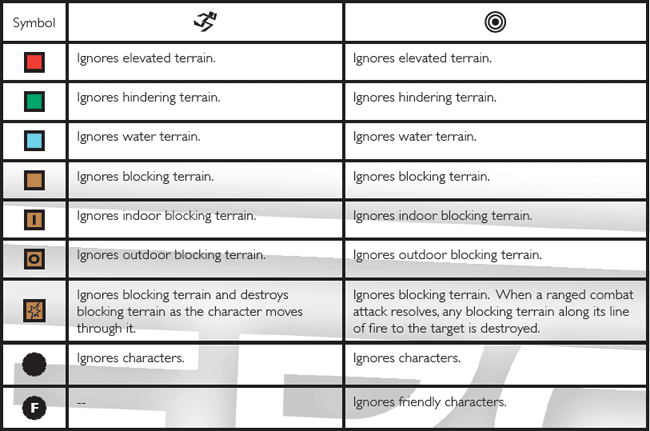
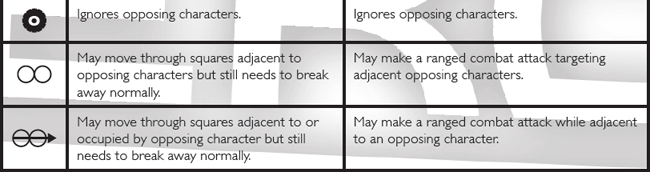
Here’s the whole chart of Improved symbols and their meanings, taken from a screenshot of the powers and abilities card PDF file:

improvedchart_1
improvedchart_2

The difference between the two columns is that the Improved Movement column (left) shows what things the affected character ignores for movement purposes, while the Improved Targeting column (right) shows what things the affected character ignores for attack purposes.

For instance, someone with the bullseye symbol followed by a green square means that they ignore Hindering Terrain for attack purposes (like Superman ignores Hindering Terrain for attack–watch out, Batman!). However, a running man symbol followed by a green square means that the character ignores Hindering for movement purposes. (Anybody with Leap/Climb on their dial has this ability!)

There are some additional symbols here–the roundish, Hero-Clix-dial-shaped symbol means that character bases can be ignored for either line-of-fire or movement purposes, for instance (depending on whether the running man or bullseye symbol precedes it). Though these new symbols look a little daunting, this chart generally makes easy work of understanding and referencing them.

Test Your Decoding Skills!

Let’s check out a few examples of rules text where these symbols are used! (Answers at the end of this article)

flight_example

  1. Which kind of ability is Flight: an Improved Movement or Improved Targeting ability?
  2. Which types of terrain does it ignore?
  3. Can Flying characters move through squares occupied by opposing characters?
  4. Can Flying characters break away automatically?

pulsewave_example

  1. Which kind of ability is Pulse Wave: an Improved Movement or Improved Targeting ability?
  2. Which types of terrain does it ignore?
  3. Do character bases block Pulse Wave’s line of fire?
  4. Can a character using Pulse Wave move through opposing characters’ spaces?

sharpshooter_example

  1. Can Sharpshooter ignore character bases for line-of-fire purposes? If so, which kind of character bases?
  2. If an opposing character is adjacent to a Sharpshooter character, can the Sharpshooter still make a “ranged” attack against that character, according to these symbols?

greatsize_example

  1. Which kind of ability is Great Size: an Improved Movement or Improved Targeting ability?
  2. Which types of terrain does it ignore?
  3. Can Great Size characters move through squares occupied by opposing characters?
  4. Can they break away automatically?

swim_example

  1. Which types of terrain does the Swim ability ignore?

And now for the last question–a little tricky!

leapclimbphasing_example

  1. What is the main difference between Leap/Climb and Phasing’s rules symbols? (Look closely, now!)

Practice with These Symbols Makes Perfect!

How’d you do on the little quiz above? It may take a little time and frequent referencing back to the Powers and Abilities Card to master these symbols, but you’ll get ’em down pat soon enough! In the meantime, HeroClix.com has provided us materials so that we never forget the rules too easily.

To download a copy of the 2012 Powers and Abilities card for yourself, visit HeroClix.com’s Rules Downloads page.

Answer Key

Flight:

  1. Improved Movement
  2. Ignores Elevated, Hindering, and Outdoor Blocking
  3. Yes, they can move through opposing characters’ squares
  4. No, they cannot break away automatically

Pulse Wave:

  1. Improved Targeting
  2. Ignores Hindering
  3. No, character bases do not block line of fire for Pulse Wave attacks
  4. Yes, Pulse Waving characters can move through opposing characters’ squares

Sharpshooter:

  1. Yes; they ignore opposing character bases only
  2. Yes, they can make a ranged attack against adjacent characters

Great Size:

  1. Improved Movement
  2. Ignores Elevated, Hindering, and Outdoor Blocking
  3. Yes, they can move through opposing characters’ squares
  4. No, they cannot break away automatically

Swim:

  1. Ignores Water Terrain

Leap/Climb and Phasing:

  1. The only difference is that Leap/Climb only ignores Outdoor Blocking Terrain, while Phasing ignores ALL Blocking Terrain.

Cards from Middle-earth: The Lord of the Rings Card Game

lotr_cardgame
This beautiful image, used here only for illustration purposes, was made by BoardGameGeek user Legynd, and was originally posted on the Lord of the Rings BoardGameGeek page.

Part roleplaying game, part card game–that’s the best way to describe the LOTR card game in a nutshell. If you like the Lord of the Rings books and you love fantasy, you’re going to have a blast with this game, a self-described “Living Card Game” that bridges the gap between booster-pack-driven card games and static dungeon crawls.

Basic Gameplay

This cooperative card game is for 1-2 players using one 226-card Core Set; you can also have up to 4 people playing if you have two Core Sets. All players, using constructed decks, work together to defeat the challenges on each of several epic “Quests” included in the game (thus, why I said it’s sort of like a roleplaying game such as Dungeons and Dragons). Yet part of the game is also the luck of the draw every turn, which makes it a card game quite like Magic: the Gathering.

Players don’t directly play through the events of the LOTR trilogy in order, but there are plenty of Middle-earth and Mordor-themed challenges and stories to see. Plus, you’ll see a lot of familiar heroes and enemies as you play through each quest, so the flavor of the trilogy is not lacking in any regard!

There are four different starter decks to choose from, or you can create your own as well. (For first-timers, it’s easier to use one of the prefabs to get the hang of the game.) Each prefab uses different characters from the Lord of the Rings books, combined together to help the deck achieve its specific goal to help the group. But if you want to build your own deck, you certainly can using the Core Set’s selection!

Different Types of Strength

Remember, all players work together, so not every player’s deck is meant to kick as much butt as possible in a short time–a good team of players requires various strengths to survive. In the LOTR card game, there are four basic strengths, called “Spheres:”

Leadership

Charisma
Inspiration
Command

Lore

Knowledge
Wisdom
Experience

Spirit

Willpower
Courage
Loyalty

Tactics

Strategy
Skill
Cunning

You will more than likely find that one of these spheres is easiest for you to play. For me, I played the Lore sphere really well, especially the prefab deck which served as the group’s “healer.” The other players I played with did better at the Leadership and Spirit spheres, respectively–the Leadership sphere has a lot more ranged attacks, and the Spirit sphere is more about taking damage and keeping on truckin’. Together we made a pretty sweet team! It just takes a little experimentation to figure out which sphere is right for you.

Adventure Packs: The New and Improved Booster Packs

You can play a full game with just the Core Set, but Fantasy Flight Games is also going to be releasing expansions called Adventure Packs every month, which will have new Quests, characters, items, etc. to add to your Core Set over time. Unlike booster packs, the cards will be known ahead of time, as far as I know, so you can pick and choose which Adventure Packs you want to add to your LOTR card game collection.

For More Information

Official LOTR Card Game Site
LOTR Card Game @ BoardGameGeek.com
Lord of the Rings Card Game Review with Tom Vasel (Youtube)
Lord of the Rings Card Game Playthrough, Part 1 (Youtube)

An Idea for Safely Storing Miniatures

This week, I thought I’d share with you my system for storing miniatures figures; in this case, it’s my Clix collection, but conceivably you could store several types of miniatures in the system I’m going to show. It has completely changed the way I organize my miniatures, and definitely for the better!

clixtray_empty
This translucent plastic sectioned tray is part of the Really Useful Products line. It is 8 3/4 inches wide, 11 inches long, and 2 1/2 inches deep; each of its 16 sections measures 2 1/4 inches wide, 2 3/4 inches long, and 2 1/2 inches deep.

clixtray_full
This is an example of how I use a tray to store Clix figures–this particular one holds all my team-support figures, and they are separated out according to type using the handy sections. For instance, all my Paramedics are in the top left section, while all of my combat-ready Probability Control figures are in the top right section, and so on. I find that the sections are big enough even to hold double-based figures, like the Green Lantern & Green Arrow piece stored at bottom right!

clixtray_side
The whole thing is translucent, so you can easily tell which figures are stored within on all sides. VERY handy for quickly picking out which tray you want to look at!

clixtrays_closet
The other great thing about this tray? Multiples of them stack really easily. This is my entire Clix collection, stored in 5 of these style trays on a shelf in my closet. They are sturdy enough to stand up to being stacked, without being so heavy that they threaten the shelf’s stability.

My Experience with This System

If you’re currently looking for a way to store minis at home, I would definitely recommend this kind of tray. Since I switched over to this system of storing my Clix, I find that I keep track of my collection easier, and find figures much more quickly. Plus, the figures don’t get damaged as easily, nor do they collect too much dust.

The only caveat is that this system of trays is not very portable on its own, because they are open trays with no lids or handles. However, you can purchase boxes which hold several trays securely at one time (see below). This system’s modular functionality is the real winning ticket for me–we gamers need systems that easily expand to fit our growing collections!

Where to Buy

The following links to the Really Useful Products online store should help you find trays and boxes that will work for your miniatures collections:

Storage Tray Details
Storage Box Details

New M:TG Abilities, part 2: Gatecrash

gatecrash The very latest Magic set (as of February 1st), Gatecrash features five more new keyword abilities, one for each of its featured dual-color guilds. As we examine these, you might just find another one you want to fit into your deck–there are some REALLY interesting ones here!

Ability Keyword

Associated Guild

Rules Text

More Info

Battalion boroslegion
Boros Legion
This mechanic means slightly different things on every card, but it always activates when the battalion-bearing creature and at least two others are attacking at the same time. Battalion @ MTGSalvation Wiki
Cipher housedimir
House Dimir
702.97a Cipher appears on some instants and sorceries. It represents two static abilities, one that functions while the spell is on the stack and one that functions while the card with cipher is in the exile zone. “Cipher” means “If this spell is represented by a card, you may exile this card encoded on a creature you control” and “As long as this card is encoded on that creature, that creature has ‘Whenever this creature deals combat damage to a player, you may copy this card and you may cast the copy without paying its mana cost.'”

702.97b The term “encoded” describes the relationship between the card with cipher while in the exile zone and the creature chosen when the spell represented by that card resolves.

702.97c The card with cipher remains encoded on the chosen creature as long as the card with cipher remains exiled and the creature remains on the battlefield. The card remains encoded on that object even if it changes controller or stops being a creature, as long as it remains on the battlefield.

Cipher @ MTGSalvation Wiki
Bloodrush gruulclans
Gruul Clans
Allows players to discard creature cards in order to give an attacking creature a temporary power/toughness boost equal to the power and toughness of the discarded creature card. Bloodrush @ MTGSalvation Wiki
Extort orzhovsyndicate
Orzhov Syndicate
702.99a Extort is a triggered ability. “Extort” means “Whenever you cast a spell, you may pay 1 black or white mana. If you do, each opponent loses 1 life and you gain life equal to the total life lost this way.”

702.99b If a permanent has multiple instances of extort, each triggers separately.

Extort @ MTGSalvation Wiki
Evolve simic_combine
Simic Combine
702.98a Evolve is a triggered ability. “Evolve” means “Whenever a creature enters the battlefield under your control, if that creature’s power is greater than this creature’s power and/or that creature’s toughness is greater than this creature’s toughness, put a +1/+1 counter on this creature.”

702.99b If a creature has multiple instances of evolve, each triggers separately.

Evolve @ MTGSalvation Wiki

Which Ability is Right for You?

  • If you love playing creature-heavy decks (especially with lots of weenie creatures) and attacking all out every turn, Battalion is your new favorite ability.
  • If you like to put extra abilities on creatures, but hate how easily Enchant Creature cards are destroyed in-game, you will DEFINITELY want to try Cipher.
  • If you always end up with one creature out on the field and three or four in your hand unable to be played (due to mana problems, etc.), Bloodrush will work wonders for you.
  • If you already have a Black/White deck, or if you’ve always been intrigued by the color combo, you’ll want to start gathering Extort cards–it’s pretty much exactly how Black/White has always worked, with a little more punch. (And it’s HILARIOUS in group games!)
  • If you don’t like ending up late-game with a bunch of 1/1s sitting helplessly alongside your beefy attacker, having a few creatures with the Evolve ability will help your deck ramp up in strength as turns go by.

New M:TG Abilities, part 1: Return to Ravnica

returntoravnica Return to Ravnica, one of the more recent Magic: the Gathering sets, includes five new keyword abilities printed on the cards, one for each of the five dual-color guilds featured in the set. Let’s take a moment and look at each of these abilities–you might find one you want to incorporate into a deck build of your own!

Ability Keyword

Associated Guild

Rules Text

More Info

Detain azorius_senate
Azorius
Senate
701.26a Certain spells and abilities can detain a permanent. Until the next turn of the controller of that spell or ability, that permanent can’t attack or block and its activated abilities can’t be activated. Detain @ MTGSalvation Wiki
Scavenge golgariswarm
Golgari
Swarm
702.95a Scavenge is an activated ability that functions only while the card with scavenge is in a graveyard. “Scavenge [cost]” means “[Cost], Exile this card from your graveyard: Put a number of +1/+1 counter equal to the power of the card you exiled on target creature. Activate this ability only any time you could cast a sorcery.” Scavenge @ MTGSalvation Wiki
Overload izzetleague
Izzet
League
702.94a Overload is a keyword that represents two static abilities: one that functions from any zone in which the spell with overload can be cast and another that functions while the card is on the stack. Overload [cost] means “You may choose to pay [cost] rather than pay this spell’s mana cost” and “If you chose to pay this spell’s overload cost, change its text by replacing all instances of the word ‘target’ with the word ‘each.'” Using the overload ability follows the rules for paying alternative costs in rules 601.2b and 601.2e–g.

702.94b If a player chooses to pay the overload cost of a spell, that spell won’t require any targets. It may affect objects that couldn’t be chosen as legal targets if the spell were cast without its overload cost being paid.

702.94c Overload’s second ability creates a text-changing effect. See rule 612, “Text-Changing Effects.”

Overload @ MTGSalvation Wiki
Unleash cult_of_rakdos
Cult of
Rakdos
702.96a Unleash is a keyword that represents two static abilities. “Unleash” means “You may have this permanent enter the battlefield with an additional +1/+1 counter on it” and “This permanent can’t block as long as it has a +1/+1 counter on it.” Unleash @ MTGSalvation Wiki
Populate selesnyaconclave

Selesnya
Conclave
701.27a To populate means to choose a creature token you control and put a token onto the battlefield that’s a copy of that creature token.

701.27b If you control no creature tokens when instructed to populate, you won’t put a token onto the battlefield.

Populate @ MTGSalvation Wiki

Which Keywords Are Right for You?

  • If you like to play control, Detain was tailor-made for you. Period. 😀
  • If you like to swing with big creatures, both Unleash and Scavenge are great mechanics for pumping up creatures’ power and toughness, albeit through very different means.
  • If you like to amass lots of little creatures very quickly, Populate will serve you well–just make sure you have one token to start off, and then let the Populating mechanic go wild!
  • If you like to play combos, or if you like big splashy game effects, Overload in all its various forms will give you great options for both early-game and late-game.

Resident Evil DBG: Mercenaries

Released in November 2012, the Mercenaries expansion for the Resident Evil deck building game has added quite a few new cards–and some very interesting new mechanics–to the existing game. Read on to see a sampling of the new and improved cards!

Big Change #1: Basic Resources, Reinvented

One of the new updates, long-needed and well-deserved, comes on the 10 basic cards each player begins the game with. Ammo cards, the basic Knife, and the basic Handgun have been revisioned for the Mercenaries set, seen below:

Ammo Cards

Ammo_x10_Mercenaries_AM-005 Ammo_x20_Mercenaries_AM-006
Ammo_x30_Mercenaries_AM-007
  1. Ammo x10: Now it’s much easier to get rid of this without losing the Gold for the turn you Trash it out. You still can’t just Trash it by itself–you’ll need something like Shattered Memories, Quirk of Fate, or Anticipation (which you’ll see later in this post).
  2. Ammo x20: Fast upgrade to the big ammo, anyone? This is a great way to both boost your Decoration count AND get your ammo changed out.
  3. Ammo x30: Late-game, I don’t know how you wouldn’t be Exploring every turn, but if you find yourself without an Explore and you just want to buy stuff with your biggest Ammo and Gold, this new effect allows you to put that spent ammo/gold back on the top of your deck, to be drawn again next turn. Awesome!

Basic Weapons

Reliable_Blade_Mercenaries_WE-050 Custom_Standard_Sidearm_Mercenaries_WE-049
  1. Reliable Blade: This even has a chance to kill the Chicken (new in the Mercenaries mansion), but you can also combine it with other weapons to defeat an Infected. Once you do, then you can get +10 Gold and Trash out the blade, getting rid of it without having to waste a turn later.
  2. Custom Standard Sidearm: Instead of getting Gold contingent on defeating an Infected, you can simply give the Standard Sidearm +10 damage, and then trash it out at end of turn. Useful!

Big Change #2: Skill Cards

Rebecca_Chambers_Mercenaries_CH-050 Notice anything about Rebecca here? She’s only got one Decoration Level each, unlike earlier sets. The game creators haven’t made a mistake, though–they’ve introduced a whole new way to look at Character skills. As in, they are changeable and customizable, through Skill cards.
Toughness_Lv1_Mercenaries This is what skill cards look like. Drafted randomly at the beginning of the game, you can choose 3 of these to boost your character’s abilities. For instance, Toughness Lv. 1, here, provides you a shield from damage if you’ve built up “XP” on this Skill. (You get 1 XP every time you Explore.)

You start the game with none of your chosen Skills active–you have to Explore to gain XP, and once you have enough XP to match the red number on the top right of the Skill card, you can take an Action to move all the required XP over to activate the Skill. (You can’t move XP one at a time–you do it all at once.)

Levels 1, 2, and 3

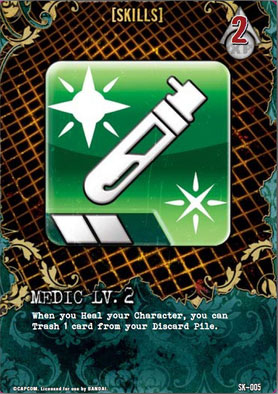
Medic_Lv1_Mercenaries Medic_Lv2_Mercenaries
Medic_Lv3_Mercenaries

As you see by the set of Medic skills displayed here, there are 3 levels of each Skill, with slightly different abilities for each level. Having all 3 of the same set doesn’t give you any bonuses–actually, you’ll do better to diversify which types of Skills you take–but being aware that there are various levels within each Skill type is helpful.

Generally, Level 3 is the best kind of skill for that particular type, but it usually takes a lot of XP to activate, so you’ll be waiting longer in-game to get that awesome effect. Sometimes taking a Level 1 or 2 Skill is just as good, depending on your Character’s needs and your personal playstyle.

Giant_Killing_Lv1_Mercenaries_SK-022 Giant_Killing_Lv2_Mercenaries_SK-023
Giant_Killing_Lv3_Mercenaries_SK-024

The Giant Killing set of skills, above, gives you more awesomeness while Exploring, just as the Medic set improves the effects of Healing. Check out more Skills, below, for previews of what they do as well!

A Small Sampling of Skill Cards

These certainly aren’t all the skills in the new Mercenaries set, but this gives you at least an idea of what’s out there. Skills provide many new ways to give your character an offensive boost, a defensive shield, and even ways to get the best hand or best play, turn after turn!

Reversal_Lv1_Mercenaries SmartReload_Lv2_Mercenaries

Big Change #3: Other New Updates

Anticipation_Mercenaries_AC-047 Move over, Shattered Memories, this is my new best Trashing friend. You wouldn’t believe how fast you can ramp up to the best Ammo just by using this little beauty. Trash two Ammo x10 cards from your hand, and not only do you get +10 Gold from each of them for Trashing them, but Anticipation then gives you +20 extra Gold for Trashing two cards of the same type! You end up with 40 extra Gold, which can buy you an Ammo x20 easily.
Custom_Bolt-Action_Rifle_Mercenaries_WE-047 One of the new XP-specific Weapons–remember that every time you Explore, you get XP. You don’t have to automatically move that XP to a Skill–you can keep it on your character to boost this Rifle if you wish!
Custom_Full-Bore_Machine_Gun_Mercenaries_WE-045 This Weapon gives you 1 additional XP for Exploring–great for building up XP fast to activate those Skills!
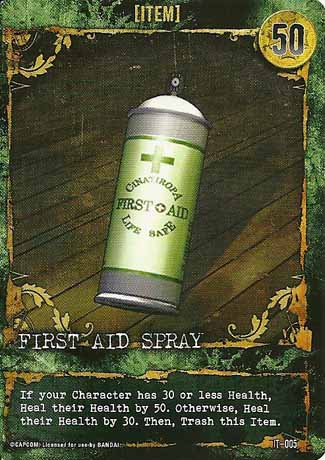
First_Aid_Spray_Mercenaries_IT-005 A First Aid Spray with variables! Works to either give a BIG heal or a little one, since some Skills and Characters are dependent on having less than Maximum Health to get the best effect.

For More Information/Credits

Most of these images were scanned in by hand by my awesome boyfriend who owns a copy of the game. Any other images have come from the following websites. (All images are used in this post for instructional purposes only.)
Resident Evil Deck Building Game: Official Site
Resident Evil DBG: Mercenaries @ BoardGameGeek.com
Resident Evil DBG @ Wikia

Flow Free

Looking for a puzzle game with plenty of little challenges? Then I suggest you check out Flow Free, a neat little game app by the folks at BigDuckGames.

Basic Gameplay

The point behind Flow Free is to connect all the dots on a grid of a certain size, using the connecting lines to fill up the entire grid, without any lines overlapping each other. Seems pretty simply and straightforward, right? Well, it is–for the first few levels.

simpler-flow
Image Credit: iTunes App Store
At first, you start out with levels like this 5×5 grid at left, with only a few different colors of dots. These puzzles don’t take too long to solve–you just have to figure out how to wrap the lines around each other rather than crossing over each other. With grids this small, you also don’t have to worry too much about filling up all the allotted grid space–it pretty well happens by nature.
level-choose
Image Credit: iOSApps.com
But, as you can see at the extreme right of this screenshot, there are levels beyond the 5×5 grid. More space is introduced; more colors of dots are introduced. You wouldn’t think the game would get harder with MORE space, but it does–you still have to fill up the grid, so sometimes you have to come up with interesting ways to take up space with a line or two. And above all, the lines can’t block each other off!

harder-flow
Image Credit: GamesDreams.com
Eventually, you end up with levels like this and beyond, where colors interweave in a careful, angular dance that’s often more about thinking outside the box and taking up space rather than getting things connected in the most efficient manner. (The website I just linked to, GamesDreams.com, has solutions for every level, which is helpful if you get flat-out stuck as I have a few times!) Rest assured, each level presents new challenges!

Game Levels

The game comes with several 150-levels-apiece packs for free:

  • Regular Pack (5×5 to9x9 boards)
  • Bonus Pack (5×5 to 9×9)
  • 8×8 Mania (lots and lots of 8×8 boards)
  • 9×9 Mania
  • Jumbo Pack for iPad (10×10 to 14×14 boards–super difficult!)

There are also some extra packs you can buy for 99 cents each, or buy for about $4.00 all together:

  • Green Pack (5×5-9×9)
  • Blue Pack (5×5-9×9)
  • 10×10 Mania
  • Kids Pack (5×5 and 6×6)
  • Rainbow Pack (5×5-9×9)
  • Purple Pack for iPad (10×10-14×14)
  • Pink Pack for iPad (10×10-14×14)

Completing a Level vs. Perfecting a Level

In Flow Free, just “completing” a level can be different from finishing it perfectly. You can finish a level and move on to the next one, no matter how many times you had to retrace your lines or undo moves, but you get extra points if you can finish it with the minimum number of moves. Completed levels are marked with a check mark; perfected levels are marked with a star. Try to perfect them all!

Bonus: Time Trials

Once you complete the game’s Free Play levels, which are not timed, you can try your hand (or fingertip) at the timed levels, which test how many puzzles you can solve in a certain length of time (30 seconds, 1 minute, 2 minutes, and 4 minutes). All of the Time Trial puzzles are 5×5 boards, so they aren’t too terribly hard, but some of them can be a little tricky!

To Download and Play:

For iPhone/iPod touch/iPad: iTunes App Store link
For Android: Google Play link
For Windows 8/RT: Windows Store link

Storing My Magic Decks: A New Idea

Since my huge closet reorganization this past fall, I’ve been able to store most of my gaming collection in the closet, up out of the way of foot traffic and mishaps. But, for some odd reason, my Magic decks hadn’t made it onto the “gaming shelf” in my closet yet, and they were still rather vulnerable to being lost or damaged (more from me tripping over the briefcase than anything, lol).

mtgdeck_briefcase
This is how I had been storing my Magic deck boxes–I used to carry them to my local gaming shop in this giant silvery-metal briefcase, and they just kinda stayed in there when I wasn’t actively playing with them. The problem? This case was WAY too heavy to put on a closet shelf without bending or breaking it.

So, after a little thinking outside the box (literally), I remembered I had a three-drawer plastic organizer I bought a couple of years ago, which was as of the moment unused due to purging the items that had been stored within. (Walmart carries them.)

mtgdeck_organizer
I eyeballed its overall measurements (it’s about 13 inches wide and about 10 inches high) and the depth of the drawers (about 1 1/2 to 2 inches deep). It seemed like it would work for holding my Magic decks. And this way, I could organize them by type as well, putting my tribal creature decks in one drawer, my combo decks in another, etc.

Hauling my MTG briefcase into the room, I began to organize. A few minutes later, this was the result:

mtgdeckorg_full
The top drawer ended up being my tribal- and creature-based decks, the middle drawer became my combo deck drawer, and the bottom drawer held some overspill from the creature deck drawer. (LOL, I have a “few” creature decks…)

The two deck boxes sitting on top of the organizer were too big for the drawers–one is a larger-than-normal UltraPro MTG box, and the other is one of those deck boxes with a belt clip on the back (plus, it’s a huge box to begin with). All the other normal-MTG-size UltraPro boxes fit into the drawers just fine, lying on their broad sides.

With that finished, all that remained to do was to put the little drawer system into the closet, beside the rest of my gaming stuff, like so:

mtgdecks_incloset
Now I can access my Magic decks very easily, picking out which one I want to play by the organizing drawer system, and there’s room on the top of the organizer for storing my too-big-to-fit Magic decks, as well as any other Magic gaming supplies. All in all, I’m very happy with it!

So, if you’re looking for a way to both organize and protect your Magic decks, an organizer like this might just be the solution. I certainly won’t be tripping over my old Magic briefcase anymore!