All posts by Robin

I'm a woman in my early thirties living in North Carolina, USA, and I have a lot of varied interests; I love creative writing, music composition, web design, surfing the Internet, thinking out loud, and gaming. And yes, my glasses are crooked. :)

Slaying the Clutter Dragon, part 2: The Valiant Sword Sweep

I’m back with another installment of defeating the Clutter Dragon in my bedroom! This time, flushed with the success of last week’s efforts, I endeavored to clean off the top of the plastic dresser next to the catchall bins.


This is what I planned to clean up, anyway. But there was a problem.


…THIS pile of junk was on the floor in front of the dresser. I could not even reach the other side of the dresser to clean it off without slipping and falling on the pile (and believe me, I tried). There were literally no places to put my feet, and no floorspace to work within.

The Clutter Dragon had struck back at me with its vicious tail. If I were to get anywhere with my original project idea of cleaning up the dresser top, I had to clean up the floor first…and that meant tacking on much more work than I had expected.

But it had to be done. I was heartily sick of living this way. And, after all, I didn’t want to disappoint myself, or you, my faithful readers! 🙂

Uncovering the Floor, and Hidden Treasures Galore

I began by picking up most every item off the floor, throwing obvious trash away as I did so, until my entire bed surface was again full of items that needed to be sorted.


Again, I amaze myself at how much utter crap I can cram into such a small space. Argh. >_< But surprisingly, I found that about half of this stuff did not actually belong in my room at all--I had just stored it on my room floor because it was a "temporary" storage spot. (Note to self: no place I set any item in is going to be just a "temporary" spot. If I've learned anything about my organizing habits, it's that.) Thankfully, I was able to take some items out of the room entirely and put them back where they belonged. AWESOME! 😀 (The less junk in my room, the better.) Other items just needed to find another, more permanent home within my space, so I took time during this first step to find each misplaced item a home to belong in. For instance: several travel bags, which were lumped in with the clutter, but which actually need to be stored with the rest of my luggage in a corner of my room. Once all these big items were dealt with (or stored on the bed for the moment), I discovered that there was a hidden layer underneath all the keepable items: a layer of paper clutter, unbeknownst to me.
Did I mention how much I hate paper clutter? Especially having to stop and read through it to see whether I need to keep or toss it? Drives me nuts. It’s the worst part of cleaning, I swear. >:(

Anyway, the trash bag again came in handy, as I slowly sorted through all this detritus pictured above. For this part, I had to sit on the floor; my ankle was beginning to complain, as was my back, from having to bend and lift as I had done for almost 45 minutes thus far.

But, once all the random paper clutter was cleared up (either thrown out or put aside for sorting/shredding), I had this lovely vista to gaze at:


This is what was left behind after clearing away the larger paper mess–little bits of paper randomness, crumbs, and general dirt. (How all that dirt got in underneath all the clutter, I will NEVER know. I think it just burrowed under there or something. SIGH…)


Lacking a working small vacuum cleaner that can maneuver into these tight spaces, I improvised with a broom and dustpan. Though my floor is carpet and really does need a good vacuuming, this will have to do for now.


As you can see, I did a pretty good job of sweeping up most of the crumby dirty mess. You can actually tell that the carpet used to be white, now. xD


First small win of the day: in the process of picking up and sweeping, I found about $2.50 in coins hidden on the floor. Hidden treasures, indeed! Every little bit helps! 😀

Tackling the Dresser Top, At Last!


With most of the obvious trash gone, and most of the large items sorted, I was left with less of a pile on the bed. I then deemed it was time to tackle that messy dresser top. So I took all the stuff off the dresser and put it onto the nearest available surface…the bed, again.


Um, yeah. I know this looks pretty terrible. But all this clutter carnage was necessary…see what happened?


See? Proof that there WAS a surface under there, and that I DID clean it off completely! 😀 I even dusted, which is a small miracle in and of itself. xD

Once everything from the dresser was on the bed, I began the sorting process again, throwing away obvious trash, laying aside important financial bits and papers (pay stubs, receipts, and the like) where I would not lose them till I have dealt with them, etc.

One of the unexpected wins I came across during this cleaning spree was a selection of shoeboxes, shipping boxes, and a few organizational bins I had purchased in a futile past effort to clean.


Each of these little boxes and bins came in handy to sort out and store little items from the dresser top which could easily get lost. (Pardon the blurry picture…my hand must have been shaking or something. 🙁 )

In the process of organizing, sorting, storing, and throwing away, I found even more treasure hidden by the Clutter Dragon:


Yay! I think there’s close to 4 bucks in there now. 😀

At last, when I finally got everything from the dresser top sorted and/or dealt with, I put back just a few items that were meant to sit there:


Mainly, the dresser top holds mail, my cell phone (especially while it’s charging), some assorted arts/crafts supplies (because I don’t have desk space for them yet), and other things I’m generally using on a daily basis. I even have a mail/paper sorter off to the side for bigger paper pieces. But I’m never going to let it get so stacked up again!


YAY a clean bed! Proof that I did actually do some real cleaning, right?


The floor beside the bed, which I worked so hard to clear, just has a couple of bags set there so they will not get damaged elsewhere in the room (because I am prone to accidentally trampling on stuff). Ultimately, they will both go somewhere else in the room…but that must wait for next week.

Next Week: The Cluttery Abyss


What horrors next await me in my battle with the Clutter Dragon? This picture does not even do it justice. Next week, this procrastinating warrior will face the hardest challenge yet: the Abyss of Closet Clutter! Stay tuned!
PHP Includes: Not Just for Headers and Footers Anymore!

Many of us likely use PHP includes to build and maintain our sites these days. But I would guess that most of us just use the following includes and nothing else:

<?php include(‘header.php’); ?>
<?php include(‘footer.php’); ?>

Headers and footers are very easily managed through the PHP include method. But thankfully, includes are not restricted to just headers and footers–in fact, you can manage a whole site with includes!

Example: My Joined Fanlisting Page

Back before I really mastered PHP includes, I had a joined fanlisting page–literally, it was a PAGE, because it was one single HTML file. Everything–style info, links, image sources–all were crammed into this one file. Uploading new layouts for it didn’t take a long time, but it sure was time-consuming to edit the file in any way. God forbid I would actually have to change a link or an image source!

For a long time, I didn’t know how else to do it; I just kept scrolling up and down in the same huge HTML file, spending countless minutes hunting for the small portion of code I wanted to edit.

And then, I discovered the beauty of including more than just header and footer.

The Solution: Make Each Section into a Different File!

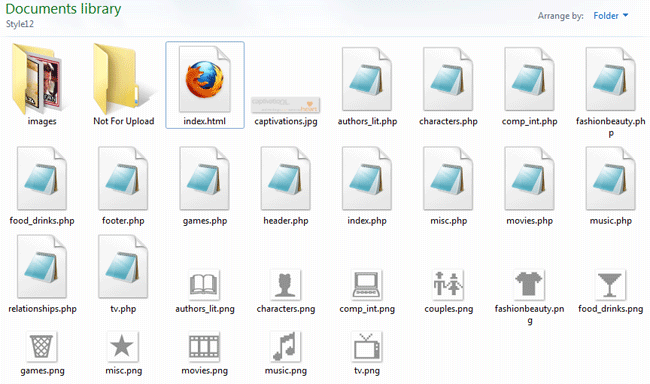
When you visit my joined fanlistings site, it may not look any different to the user, but it’s vastly different on the back-end. Each section of fanlistings is separated out into its own files, as seen below:


As you can see, I have a file for every subject matter: fashion and beauty, food and drinks, movies, characters, etc. This makes it much easier to locate and edit links when needed. All I have to do is look for the general topic of my fanlisting, open the file that corresponds to it, and start editing, no frantic searching required!


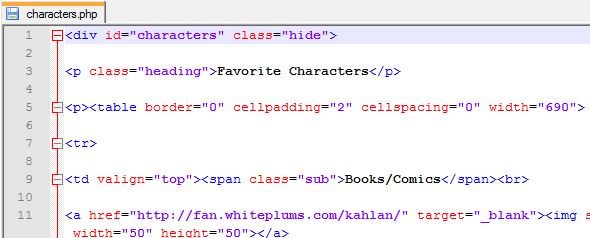
This is what each separate file’s code looks like. Each section has its own special divided layer, and all of its code is self-contained so that it all fits within the larger “puzzle” of the index.php file.

Notice that I don’t have to put includes for the header and footer in each of these files–each file is simply a piece of index.php, not a page in its own right like most other PHP-driven sites.


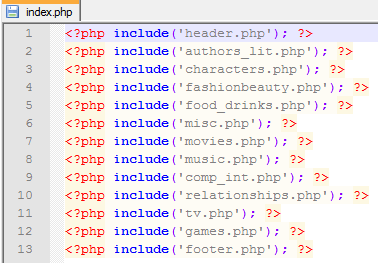
Therefore, index.php is just a list of included files and nothing else, which makes it easy to add or delete a section from the viewable site as needed.

Why Bother Doing This?

I can think of three reasons you’d possibly want to break up your site into small files and including them with PHP:

  • You’ve gotten lost in the code while trying to edit your file
  • Editing your file has become so tedious that you put off doing it
  • The individual file loads more slowly than you’d like

In any of these three cases, breaking your data into chunks with separate files, and then reassembling those pieces with PHP includes, will help with editing time and loading time.

How to Make PHP-Included Files for Your Site

#1: Determine what defines a “section” for your site.

Look at your code, and look at the content you have. How does it divide up into sections? For me, I could divide my content, my joined fanlistings, by what general topic they could be filed under (Movies, Music, etc.).

#2: Copy-paste each section into its own file.

To divide up your file, you’ll need to carefully copy and paste each little section into a new file, and save it as a PHP file.

Warning: Make sure you carry over any formatting or structure that is specific to each section! I initially forgot to copy-paste the Fashion/Beauty section’s opening divided layer tag when I was creating my new joined fanlistings page, and major havoc resulted when I tested the page. xD

#3: Make your index.php file, with code that includes all your new files.

Once you have all your new little files, it’s time to include them! Wrap them all in a big group hug with code like the following:

<?php include(‘header.php’); ?>
<?php include(‘firstsection.php’); ?>
<?php include(‘secondsection.php’); ?>
<?php include(‘sidebar.php’); ?>
<?php include(‘footer.php’); ?>

Save this as “index.php”, then upload and test it. Result: you should have a perfect, much more manageable site! It shouldn’t look any different to your users, but it’ll be much less of a headache for you. 🙂

Using the Five Senses in Writing

As a writer, sometimes I get WAY too caught up in telling the story, eager to get ahead to the next plot point. When I get in that impatient mode of writing, it’s hard to remember that I’m creating an experience for the reader, that I need to make the scene vibrate with life. I think all writers struggle, at some level, to make their stories have that kind of immediate life to them, like the readers are watching a movie unfold in their heads every time they read the printed words.

Putting Sensory Information Into Our Stories

One of the many ways we as writers can characterize that life–that rich, lush sense of a story being lived out in front of the reader–is to involve more of the five senses in the story.

Let me give you an example of prose without the five senses:

I walked out onto the front porch and went down the eight steps to my car, counting them as I went. I had to hurry–there was so little time left in the day to get my errand done.

This is a slice of very ordinary life, but it’s a very bland slice. Why does the person count the steps going down from the porch? Is this an OCD moment, or is there more purpose? Also, what time of day is this happening, that the narrator feels such a time pressure to get things done?

Sensory information can actually fill in the holes of this story, as well as describe the scene much better:

The breeze was a warm, moist breath along my arms as I opened the door to step outside onto the front porch. Summer’s humidity, along with the sharp, fresh tang of ozone, lay heavy on the air outside; it was this muggy air I’d been avoiding all day. But I couldn’t avoid the outdoors without ignoring my errand. Already I’d let so much of the day slip by that the eight front steps were darkened with auburn dusk and tree shadows. The velvet green leaves above my head swished a little as I made my way carefully down the steps, counting them so I wouldn’t slip.

The raspy voices of the crickets began tuning up all around me as I got into the car, popping a mint into my mouth and allowing myself to enjoy how the peppermint percolated on my tongue. If I just took care of it now, I reasoned, I’d have no reason to worry myself awake all night.

See how this prose is so much richer, and yet the story still moves along, despite the added description? The sentences are longer, and there are more of them, but each piece of sensory description adds life to the story and pulls it along. There are lush sights and sounds, distinctive scents, real sensations, and even a bit of taste thrown in, too–and all this brings the scene more vividly to life.

I’m not sure if this falls into the category of “show, don’t tell,” but I think the second selection of writing definitely outshines the first in terms of quality. What do you think? Which was the more engaging to read, for you?

To Make Your Writing Sing of the Senses:

  • Picture the scene in your mind. What colors are present? What visible textures? What kind of shadows, and what kind of light? Describe these for your reader, especially if they’re meaningful to the plot, or to the character’s state of mind.
  • Are there any sounds in the environment you’re writing about? If so, are they instantly recognizable (like music, laughter, or language), or are they randomly noisy (like cars rushing by, rattling, etc.)? Put a line or two in about these, if it makes any difference to your story’s plot or characters.
  • Any smells or tastes which are important to the story? If so, go ahead and include them–these are the two senses that get left out of a story all too easily. Just a few words about scents and tastes, however, can conjure up emotions and scenes of their own.
  • Don’t forget the sense of touch! Are there any important textures that you can feel in the scene you’re describing? What about anything in the environment that affects your character (like the breeze in my example paragraphs)? What does the environment feel like?
  • Include just enough of these details to paint a scene, but not so many that you forget to move your plot along. This is where it’s helpful to have someone else read it, to see if they get the same “mind-picture” you do without crowding out your story.

Do We Really Take Time to Live?, Chuck Norris vs. Super Mario Bros., Book Landscapes, and Cloud Storage

The Dalai Lama Answers a Question (comic)
If we spend our lives rushing around trying to live, do we ever really live?

Chuck Norris vs. Super Mario Bros (video)
xD Chuck Norris doesn’t NEED to play the level–he makes the castle AND the princess come to him!

Carved Book Landscapes by Guy Laramee
Something to do with your old and unsellable books–ship ’em to this guy so he can make “book landscapes” out of them!

Free Cloud Storage Services, Compared
From SkyDrive to Box, from Dropbox to Google Drive, all the pros and cons of saving your data on the Internets.

A Gamer’s Plea: Do NOT End City Of Heroes

Last Friday, NCSoft dropped a huge bomb on City of Heroes players, and sadly, it wasn’t an awesome game-wide event. Without any warning whatsoever, it was announced that game production would cease, and that City of Heroes would be discontinued by November 30th.

Mine were among the first shouts of dismay and horror; mine were among the first heartbroken Tweets and Facebook statuses tolling the sad news across the Internet. But they were most certainly not the last.

With this sudden, cutting action, NCSoft not only struck at the heart of its most popular game’s community, but undercut the City of Heroes developers (Paragon Studios) as well. Those developers were simply laid off, seemingly as if the decision meant nothing to anyone. I was appalled at how slapdash and unprofessional it all seemed. Did the developers’ hard work and creativity really mean so little? For that matter, did our creativity and hours of playtime, as customers, really mean so little, too?

I was shocked at the time, and I still am. But I am not ready to roll over and let my heroes play dead. If there’s one thing I’ve learned from City of Heroes, it’s that being defeated is only temporary: you can be brought back into the fight in many ways.

If there is still time to reconsider, still time to talk, I will not simply give up. I want to continue playing this amazing game, and I know that I speak for many CoH players when I say so. So I present my best and most accurate shot, the most powerful I can summon, to ensure that my voice is heard.

Dear NCSoft:

Please, do not give up permanently on City of Heroes. We customers know of your grievous financial losses and are trying to understand that you may have done this out of necessity. But we are saddened that you felt you had to take this highly drastic course of action, when so many more temperate options were available to you (selling the game to another company chief among them).

This move need not be permanent, and in fact may do more damage to your business overall than anyone ever dreamed. With this action, many players, including myself, feel alienated and unheard; we would LOVE to work with you to restore this game, which is your most beloved product, but we do not feel you will hear us. Please consider how this has damaged your reputation as a company among gamers, and at least give thought to mitigating the decision.

We, the players, would love to see the game continue, whatever else happens. If you no longer want to be the parent company of the game (or cannot be, for whatever reason), then perhaps another company can step up and take over leadership. If you do not want another company to take leadership, or if that avenue is blocked by legalities, then perhaps you can make the game code open-source. That way, fans could host their own servers, and still partake of the beautifully creative world you once spearheaded. I know these two options would make no more money for your company, but announcing the closure of the game ensures that anyway.

I know we as players do not understand all of the reasons behind this decision, and I fully admit my ignorance in this. But I respectfully ask for you to reconsider and, if possible, reverse the closing of City of Heroes, at least until other possibilities for continuing the game have been thoroughly explored.

Thank you for your time and patience, and I look forward to hearing from you.

What Happened to Nineveh, the “City of Blood”

Nahum 3:5
Woe to the city of blood, full of lies, full of plunder, never without victims! 2 The crack of whips, the clatter of wheels, galloping horses and jolting chariots! 3 Charging cavalry, flashing swords and glittering spears! Many casualties, piles of dead, bodies without number, people stumbling over the corpses–4 all because of the wanton lust of a harlot, alluring, the mistress of sorceries, who enslaved nations by her prostitution and peoples by her witchcraft. 5 “I am against you,” declares the Lord Almighty. “I will lift your skirts over your face. I will show the nations your nakedness and the kingdoms your shame.”

Here, Nahum, one of the Minor Prophets of the Old Testament, speaks God’s opinion and judgment of Nineveh, the capital city and representative of the ancient Assyrian nation.

A Little History about Assyria

Assyria was an aggressive, conquering nation that had already swallowed Samaria; by the time of this prophetic writing, the northern part of Israel was conquered as well. The Assyrians posed a great threat to the Israelites, God’s chosen people, but it seemed nothing and no one could stop them–or so they believed.

But Nahum’s prophecy speaks against their self-importance. Not only does God disapprove of what the Assyrians have done, but His judgment is coming for them, and swiftly. Nineveh isn’t called “the city of blood” for no reason, after all; God has seen the massacres and torture they have inflicted on the populations they conquered. (Several historical accounts contemporary with the Bible have the ancient Assyrian kings stacking thousands of corpses like felled wood, or arranging body parts into whole pyramids.)

It is not only the Assyrians’ brutality in conquering that has angered God, however. Nineveh has also tempted many from around the known world to seek pleasure and wealth within its walls, like an ancient Las Vegas, only to then inflict brutality on them. Worship practices to other deities go on within the city as well, drawing God’s people away and ultimately leading them to ruin.

God’s Judgment: Stern but Absolutely Just

God is righteously angry at the Assyrians’ blatant, grievous sins, and for these He declares judgment against them. He will punish them the only way they can be punished–through shame and revelation, immobilizing and stopping their rampage. Nineveh, being the symbolic prostitute in these verses, will be stripped of her wealth and beauty, her crimes against humanity exposed for all to see.

Notice that God is not doing evil acts. This punishment is exactly that–a tactic meant to halt bad behavior and correct it in the long run. While God’s words sound harsh to modern readers, Assyria’s treatment of its nation-state neighbors was far worse, and needed to be stopped. God is the only One who can, and yet it must grieve His heart to have to do so; He created these people, too, and now has to stop them from continuing these bloody sins.

God is not happy or forgiving here; He’s very different from how He seems in the New Testament especially. Yet this is part of God’s personality, too–He is indeed kind, but firm to the point of sternness, too. He leaps to the defense of His people, and moreover intervenes in the middle of sin to keep more from happening. Sin angers and grieves God, and He always acts to stop it.

What Can We Learn from This?

  • God is just, not overly wrathful and out of control. He is still holy and forgiving even as He punishes, much like a parent must be.
  • God’s judgment always comes for the wicked who will not stop sinning and hurting others. It may not be right away, it may be even years or decades later, but it always comes, and we have justice in that.

Slaying the Clutter Dragon: The First Sword Charge

Hello, my name is Robin, and I’m a pack rat.


I really didn’t intend to let it get this bad, but here it is. This is the first of my set of “catchall” bins, situated right at the door of my room to catch my purse, library books, Sunday school texts, and anything else that kept getting lost in the black hole of my room.


It started out as a place of organization, about a year ago. You can see what’s happened since then…it’s lived up completely to its “catchall” nickname.

I REALLY don’t like this habit of mine, but it happens every time. First, I get a clean, flat surface available in my house, and I enjoy its cleanliness for a few days. Then I start thinking “COOL, I have a place to put [insert random object here]; I’ll just set it here till I have a permanent place for it.” Repeat this process about 1,000 times, and soon my “clean flat surface” is a “junky flat surface” again, often overflowing its junk into the floor at random intervals.

And when I say that every clean flat surface in my room is covered with junk, I mean that…


every single…


flat surface…


in my room…


is covered…


with JUNK.

And yet, it’s seemingly all “necessary junk.” I can’t really get rid of it, even when I search through it, because when I do check through this junk, it’s all stuff I need access to, or need to categorize, otherwise I’ll forget about having it in the first place.

Wait, How Can You “Forget” About Your Stuff?

When I put things away, I tend to forget about them. Out of sight, out of mind, LITERALLY.

This is one reason I can’t put library books anywhere but RIGHT at the door, easily visible from my bed, because if I put them somewhere else, they’ll never be returned, or even read. Items have to be staring me right in the face if I’m going to think about them (and even then, sometimes I still walk out of the house without that library book I’ve been meaning to return for a week).

The Intent of the Catchall Bins

Because I apparently can’t put things away without forgetting that I even have them, I got this set of open catchall bins. I will say it’s done its job fairly well, keeping my Sunday school books and Bible from being stomped on or lost, keeping me from forgetting about library books, and keeping my purse out of trouble on the floor. It just…well, it just looks like the rest of my room now–overflowing with junk.

The Solution: Clean Out, Categorize, Replace

So, this past Friday, I finally tackled these messy bins, marking the first “sword charge” in my battle against the Clutter Dragon, who had claimed my room for its domain.

The first thing I had to do was to take everything out of the bins so I could sort it all. (I also had to dust out all the bins, especially the bottom one…for being so crammed full of junk, it sure got dusty!)

The following picture shows the result of cleaning out the bins:


My full-size bed is almost completely covered with the junk from these four small bins. :/ I hadn’t realized, until this moment, just HOW much stuff was hiding in open storage. Yes, yes, I know, my “Severe Pack Rat” certification is in the mail as we speak. xD

It’s a terrible jumble of old bank statements, church bulletins, Sunday school textbooks, random books, magazines, and DVDs, even past Christmas gifts (the two red boxes in particular). But most maddening out of all this junk was the paper clutter, the stuff I have to read through to see if I still need to keep it. Paper clutter is probably THE reason I live such a cluttered life–it just takes so much TIME to read and sort through all of it, and it just makes me tired to look at it.

Anyhoo, once the bins were emptied…

(proof that they WERE empty at one time, lol)

…then I had to begin the unenviable task of sorting and throwing away–i.e., the most difficult part of organization and cleaning.

I put back the necessary stuff onto the bins, all the stuff I knew I was keeping there; my purse, Kindle, Bible, current magazines, and gym gear, mainly. Then, I just had this remaining stuff left:


Most of this was old Sunday school texts, random old magazines, a DVD or CD here and there, Christmas gifts, and, of course, paper clutter. I sorted through all the paper trash next, mainly because I was getting mighty sick of looking at it. (Sad to say, some of the paper clutter got shifted to yet another flat surface because I need a shredder before I can throw it out. SIGH.)

But, once that was done, I was left with two piles: old Sunday school texts, and past Christmas gifts.

A Side Quest: Creating a Display Shelf

The old Sunday school stuff already had a future home: back at the church, where it belonged. But the Christmas gifts? I devised a whole new plan on the spot to deal with those.

See, the Christmas gifts were all little statues and figurines my boyfriend has bought me over the last couple of years, and because of the lack of clean flat surfaces in my room, I’ve never even unboxed them; there was no point in doing so. But as I glanced across the room, to the desk which has stood there since I was a little girl, I caught sight of the shelf just above the desk surface, and had an “A-HA!!!” moment.


Cleaning off the shelf of girlhood detritus (a couple of small dollhouses) was the work of about 10 minutes; I was left with this blank, clean canvas. Thus, I unboxed the three figurines at last, and added to that total another figurine I’d been wanting to display as well.

Here’s the result: my new display shelf!


From left: Belle looking at the Enchanted Rose under the glass; Belle and the Beast dancing (from the iconic scene in Beauty and the Beast); Dove II (Dawn Granger), still in the toy packaging. (I’m going to get a stand for the Dove figure at some point, but I didn’t have one handy for this shot.) Pardon this shot’s slight blurriness–it’s very hard to get pictures in a room as cluttered as mine!

Sadly, the biggest statue my boyfriend had gotten me was just a wee bit too tall for the shelf, so I had to put it on the desk below.


She’ll get her rightful place on a display shelf someday, I swear it! 😀

The Result of the First Epic Cleaning Quest

Here’s the result of my hard work:


This is the top bin, which stores my purse, Kindle, CDs, and anything else that usually leaves the house with me. (My ankle braces are hung on either side to remind me to wear them as much as possible.)


The books/magazines bin, second from the top, which contains all that I’m currently reading and working on. Great for keeping library books safe, too!


The third bin holds only my Bible at the moment, but will soon hold my current Sunday School textbook for the new quarter–again, to keep it safe from the floor and my clumsy self.

…And I don’t have a picture of the bottom bin because it kept showing up very dark and blurry. Lighting in my room is terrible for pictures. But all that’s in there are my gym shoes anyway. LOL! That is a triumph in itself–now I no longer have to hunt through the piles of crap in my room every week to find my shoes!

I am immensely proud of this first effort, even if it doesn’t look like much. It’s the first time I’ve been able to DO anything with this room in months, and admittedly it was very difficult to get started. But now that I AM started, now that I have charged in and stabbed at the clutter dragon…I find myself eager to continue, before it gets the better of me again.

Next Epic Cleaning Quest: The Dresser Beside the Bins

Next week, I’ll be tackling the top of the overflowing plastic dresser unit near the door. I’m not even worried about what’s IN the dresser; it’s what’s on TOP of the dresser that’s bugging me. Tune in next Tuesday for the next installment of “Slaying the Clutter Dragon!”

Web Design on a Budget: The Three Best Free Software Tools

If you’re just beginning web design/development, or if you simply don’t want to spend money on expensive software tools, it may seem impossible to achieve your dream of coding and designing your own site. You might even think you can’t create anything worth looking at or browsing if you don’t have high-end software.

I am happy to tell you that there are wonderful free software options for all of us who can’t yet afford some of the loftier programs. Not only are these programs free, but they are often the best utilities out there for the price. Here are the three webdesign software tools I use for my own designs:

Best Free Code Editor: Notepad++

Ever since I began web design, I longed for a “just-code” editor, one that would display the bare code like Notepad did…except that I wanted a little more Web-specific functionality, too. I wanted to surf through the code without getting so lost; I wanted to be able to speed up the long and tedious editing process. I needed a program that wasn’t so simplistic as a WYSIWYG editor, but one that was also helpful for those of us who were learning code.


Well, someone in the Notepad++ development team must have heard my prayers! Here, you can see how the different bits of code are color-coded (HTML tags are blue, selectors are in red, option choices are in purple, and so on).


See the gray minus sign and the line extending between the opening p tag and the closing p tag? This is another one of Notepad++’s great tricks: “folding up” a section of code if you need it up and out of the way.


When you click the minus sign, it closes the section of code encased by the opening and closing p tags, resulting in a display like this. Clicking the red plus sign will expand the hidden code out again.


Like the image above says, the “Replace” function is also known as “Hallelujah!!!” That’s what you’ll shout when you realize you can use the Find & Replace function to edit the same text in every file you have open within the program. SO awesome for expediting those previously long and tedious tasks, like editing a line of code on every page of your site.

Now, I haven’t even begun to expound upon all of Notepad++’s awesome features. The program supports a variety of different languages, from ASP all the way to XML, and even including some languages I’ve never even heard of (Haskell and KIXtart, among others). Plus, it has the ability to use macros, plugins, and converters for even faster programming. Check out the program with the link below:

Download Notepad++: Notepad-Plus-Plus.org

Best Free Graphics Program: GIMP

Ever wanted Photoshop but couldn’t hack the $600 price tag? Well, GIMP can do most things you’d use Photoshop for, even transparency and text addition, but for free.

Its interface is a little more free-form and spartan…


…but within it, you can still do all of the basic image-editing techniques, as well as some of the more sophisticated ones usually in higher-end products.


This is how an image looks when opened within GIMP–it appears in the central box of the program.


Most of the tools that usually appear under Enhance in Photoshop-esque programs are located under Colors in GIMP, such as Brightness/Contrast, Levels, Hue & Saturation. etc. These dialogs work just as well as the pricey ones, and these come with handy ToolTips to help you navigate the menus.


This is an example of the Levels dialog, in which you can change the shadows, midtones, and highlights to your heart’s content.


The Image menu remains largely unchanged from programs like Photoshop–it’s just that the “Resize Image” dialog is renamed “Scale Image.”


The dialog for resizing the image appears here. To resize your image proportionally, just type in your desired height or width, and then click the linked chains to the right of the boxes to get the corresponding number in the other measurement.

Besides changing sizes and tweaking shadows and highlights, GIMP can also do a lot of the artistic filters on pictures that Photoshop can, plus cropping, layering, and masking. It’s a great program, and even after six months of using it I’m still not done exploring all it can do. Check it out for yourself!

Download GIMP: GIMP.org

Best Free File Uploading Program: FileZilla

If you’ve got tons of files to upload, never fear that you’ll be stuck uploading through your browser again! FileZilla is a free FTP program that offers clean and simple uploading (and downloading!) functionality.


This is what the program looks like before you make a connection to an FTP server. On the left appears your computer’s folder hierarchy (top left pane), and the content you’re working with in the currently open folder (bottom left pane).


To connect to your FTP server, you’ll need to provide FileZilla with some information. This is the Site Manager dialog box, where you plug in the info for your site. The “Host” line is usually something like “ftp.yourdomain.com”; you’ll need to fill in your username and password for your hosting server. (My details are obscured for privacy reasons.) Once you’re done filling in your info, you can save and connect!


This button, at the top right underneath the word “File,” is the Quickconnect button. Use this to connect to any of the sites whose profiles you’ve saved already through the Site Manager dialog box.


Once you connect to a server, its folder hierarchy appears in the top right pane, and the contents of an individual folder appear in the bottom right pane. Uploading can be as simple as dragging and dropping the files from the bottom left to the bottom right pane!


Or, you can always right-click the file you want to upload and choose “Upload” from the right-click menu. (For Mac users, I am not sure of the keyboard shortcut to achieve this–please pardon my Windows-user ignorance.)


If you want to upload multiple files, the highlight-and-right-click-upload method works best, I’ve found.


FileZilla will even warn you if a file already exists, and through this dialog box you can choose whether you want to overwrite it or not–it even specifies very detailed actions depending on the age and size of the two files it’s comparing.


Not only can you upload files, but you can download them from your server as well! It’s great for making file backups…and, as I found out in 2011, great for emergency saves of all your hard work. When my hard drive crashed in 2011 and I lost ALL my data, FileZilla was able to download copies of all my files from my hosting provider very quickly and efficiently.

(And, just like uploading multiple files, you can highlight-and-right-click all the files you want to download from your server, and do it en masse. That’s what made getting all my Web work back a whole lot easier.)

FileZilla may not have a lot of frills, but it’s an excellent utility for bulk uploading and downloading, making file backups, and connecting to your site without having to have a browser window open. It’s well worth a download!

Download FileZilla: FileZilla-Project.org

How The Right Music Makes Things Weirdly Funny

Today, I wanted to feature a very creative video from Youtube that’s always made me laugh, but has also puzzled me.

This is a scene from the 2005 film War of the Worlds (loosely adapted from the book by H.G. Wells), but instead of the original musical track for this scene, someone has put the theme music for The Benny Hill Show, a comedy variety show, in its place.

For some reason, this combination of scary/serious events plus this upbeat, whimsical music makes for hilarity–I find myself giggling even though I know I shouldn’t.

I’ve shown this to people who know what kind of show the music’s from, as well as people who’ve never even heard of Benny Hill, and both groups responded with laughter the same way I did. What is it about this music that makes this grim scene so funny?

I think it has something to do with how the music and visuals combine in a movie to affect our perception of the events. The original scene is terrifying and dramatic, not just because of the visuals, but because of the ominous, grand music in the background; putting the more comical music with it helps us take the visuals less seriously.

What do you think? What are some other reasons this video might make us laugh?

742 Ways to Express Love, 3 Kittens and a Bucket, Sketch Photography, and Moss Graffiti

742 Ways to Say “I Love You”
…Not kidding. Some of these ways are obvious, and others… aww. <3 3 Kittens & a Bucket
Kittens! Drinking milk out of a bucket they’re almost too short for! Funny/cute 😛

Photography + Sketches = ART!
This guy takes pictures, and then adds pencil sketches overlaid on top of them to create fantastic works of art!

Moss Graffiti: A How-To
Seriously. Use real living moss to make graffiti that grows! This is CRAZY (and kinda cool)!