All posts by Robin

I'm a woman in my early thirties living in North Carolina, USA, and I have a lot of varied interests; I love creative writing, music composition, web design, surfing the Internet, thinking out loud, and gaming. And yes, my glasses are crooked. :)

The Best Gift, Kids’ Test Answers, Coffee Swirl Art, and The Phrase Finder

The Best Gift I Ever Survived (Video)
Listen as Stacey Kramer describes a gift which sounds, by turns, awesome, overwhelming, horrifying, and utterly life-transforming. What is it? Watch this 3-minute video to find out.

Awesomely Inappropriate Test Answers from Kids
Wow. If I had been some of these kids’ teachers, I wouldn’t have known whether to call their parents or just laugh insanely at my desk. xD (slightly NSFW, some language)

Coffee Swirl Art
Making art out of the swirls of milk in a latte. Pretty amazing what people have made!

The Phrase Finder
Find all sorts of proverbs, misquotes, famous last words, and more!

Marvel Heroes

Since the closure of City of Heroes, I have found myself missing my superhero MMO gaming experience. For CoH refugees and all other curious folk, then, I present an acceptable alternative: Marvel Heroes.

mh_avengerstower
The premise is quite simple: you play as one of an assortment of Marvel heroes and heroines (like Thing, pictured above), leveling up and growing in strength until you’re strong enough to overtake Dr. Doom and get the Cosmic Cube away from him. You fight many other Marvel bad guys along the way, like the Green Goblin, the Hood, Taskmaster, etc., and several heroes in the game help you with your various quests as NPCs.

This game is free-to-play, with an In-Game Store which allows you to buy access to more heroes, costumes, special items, etc. (When you begin the game, you are given a choice between Daredevil, Scarlet Witch, Thing, Storm, and Hawkeye.). Most people who have played the Diablo series refer to this game affectionately as “Diablo with Marvel characters,” because of the way the game is set up and played.

Being Heroic

Playing your character basically involves going on missions (either solo or in teams), defeating bad guys, gathering items, becoming stronger, and the like. One interesting difference, however, is that your character can interact directly with the environment. And by “interact,” I mean smash things. 😀

mh_beforesmash
See these cars and random cardboard boxes?

mh_aftersmash
…Yeah, Thing just happened. POW! (This is Crashing Leap at work, LOL)

mh_groundsmashcar
Depending on your hero’s powers, you can bust boxes, pick up cars, break open containers, or, as Thing is demonstrating here, smash the ground so that things at a distance explode. 😀 Let your inner child run wild as you explore the various levels–half the fun of this game is smashing stuff and revealing items/money to pick up!

mh_battle
And what about fighting? Well, active battle is hard to capture with screenshots alone, but as you fight, the bad guys drop little amounts of Health (red ball) and Spirit (blue ball) to help you refuel your Health and Spirit on the fly. For instance, the bad guy Thing just smacked into next week in the above image has dropped a Spirit ball.
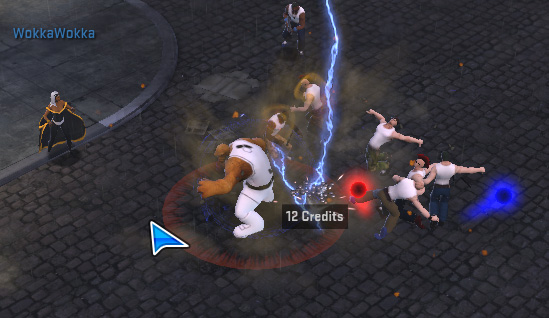
mh_leapdefeat
mh_items
Also, bad guys drop money and items on occasion. Items and money which appear on your screen from smashing bad guys or boxes are just for you–no other hero can see them. Hover your mouse cursor over anything that looks interesting on the ground; if a title pops up, it’s an item that you can pick up.

(Note: if you drop an item out of your personal inventory onto the ground, it appears on everybody’s screen. If you see another character drop something on the ground, though, PLEASE ask before you pick it up! Dropping things on the ground is the only way at the moment to give items to other players, so you could easily disrupt a gift-giving operation.)

Making Sense of the Marvel Heroes Screen

mh_screen
The above shot is a full screenshot of how a typical game screen appears. (Click on the image to open a new window in which you can see it at full size.)

Your screen contains most all the information you need to know about your character right away. For instance:

mh_leftbottombuttons
The buttons at the bottom left of the screen control, from left to right, Character information, Powers, and the In-Game Store. The big red circle shows you how much Health your character has left–here, we see that Thing has all 4,575 points of Health, because the circle is completely filled in.

mh_powertray
At the bottom center of the screen is your power tray (all the little square images are different powers); the leftmost power is activated by clicking the left mouse button, and the rightmost power is activated with the right mouse button. Between these two, each power is activated by a different key on the keyboard–the default setup is A through H on the keyboard.

Above the power tray, you’ll see a little blue bar–in this image, it’s partially filled in. This is your XP bar, showing you visually how far you’ve got to go till your next level. Here, you can see that my level 34 Thing is about 1/3 of the way toward level 35. (Bonus: the more transparent blue off to the right of the filled-in portion is your Rested XP amount. This works like Patrol XP in CoH, building up as you’re logged off the character, and it makes leveling up a little easier.)

mh_rightbottombuttons
At the bottom right of the screen, you can see the big blue circle, representing Spirit (also known as Endurance or Mana for people who’ve played other MMOs). To use most of your heroic powers, you have to use certain amounts of Spirit. To the right of the Spirit meter, you’ll see buttons for your Missions, your Hero Roster, and Game Options.

mh_missionsitems
Halfway up the right side of the screen, you’ll see your Active Mission titles displayed. Also, items that are used over time, like Rarity Boosts, XP Boosts, etc, are shown at a glance just below the Missions.

mh_chatsocial
Halfway up the left side of the screen, your Chat panel (aka the “Chatbox”) can be expanded out (like the picture) or it can fade away into the background as needed. You can open your Social panel using the top button on the Chatbox, scroll up and down in the Chatbox with the arrows, and open/close the Chatbox with the bottom button. The Chat window displays announcements by other characters, notifications of friends getting online, boss speech, and all sorts of other information.

mh_mapbodyslide
At the top right of the screen, a small map is displayed, with the name of the area you’re in and where you’re positioned on it. You can zoom in or out using the plus and minus sign buttons.

Also, the little “home” button at the very top right of the map panel is your “Bodyslider” button. This allows your character to teleport back to a safe zone (like Avengers Tower, Xavier’s School, etc.), where you can buy/sell items, craft rare items, heal up from damage, play endgame content, and travel to other zones.

Additional Information Panels
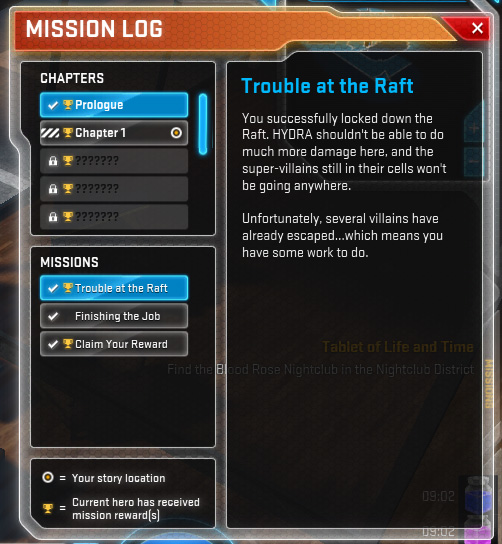
mh_missionlog
Bringing up your Mission Log shows you where in the main Story you are, and what missions you need to work on. (Story Mode contains a Prologue, 8 chapters, and then an Endgame tab where you can play harder, higher-level stuff. You have to play through Story Mode first before you can get access to Endgame content.)

One really annoying thing about the Mission Log: It is a “shared” log, meaning that all characters see the same progress. If you want to play through Story Mode again with a new character, you’ll have to reset your mission progress–you won’t lose any accomplishments on your higher-level heroes, and it’ll enable your lower-level heroes to get mission rewards. (I REALLY don’t like this; I think it should be separate mission logs for every character, but this is how it is for the moment.) The little trophy icons tell you whether your current hero has worked through various chapters of Story Mode already–for instance, I’ve already played through Story Mode with Thing, so he has little trophy icons everywhere. 😀

mh_inventory
Your Inventory shows you what items you have, plus your hero’s stats and the gear and items they have equipped. For instance, you can see that Thing is level 34, with 2,582 defense, and he’s carrying some items. He’s also got several purple items he’s wearing–wearable items in the game range from gray (really common, not really powerful) to purple (very rare, usually really powerful). Add to that the various Medals and Medallions for beating bosses, and helpful Artifacts which give your character added stats or powers, and your character can end up with a lot of item bling!

mh_powers
Here, you can see all the powers which make up Thing–all characters come with three power trees to choose from. To get a power, simply put a Power Point (from leveling up) into it, and drag it down to your power tray. As you put more points into powers, they get stronger.

mh_powertree
For instance, I’ve chosen to take three powers from the Brawler tree with Thing. One is REALLY leveled up, with 11 power points in it, and the others are moderately powered up. (Note: see the arrows connecting the three powers together? That means that you have to take the top power before you can get the middle power, and the middle power before you can get the bottom power. For all heroes, the bottom-most power in a linked chain of powers is the strongest and should be used as you get into higher levels.)

mh_roster
Your Hero Roster shows you which heroes you have access to (the brightly-colored heroes) and which heroes you would have to purchase to play (the grayed-out heroes). As you can see, I’ve played Thing and Scarlet Witch, and have just started on Hulk. 🙂

mh_socialpanel
Last but not least, your Social panel allows you to see friends, nearby players, and–yes, you guessed it–your Supergroup! (Just like Guilds on other MMOs, and exactly like City of Heroes. :’) )

How to Play

Marvel Heroes is available through Steam and MarvelHeroes.com–the Steam download seems to perform a little better than the MarvelHeroes.com download. As I said, it’s free-to-play, so give it a shot! More information can be found through the Marvel Heroes Wikipedia article.

This is Why God Says “Don’t Test Me”

Daniel 4:30-35
30 He [Nebuchadnezzar] said, “Is not this the great Babylon I have built as the royal residence, by my mighty power and for the glory of my majesty?” 31 The words were still on his lips when a voice came from heaven, “This is what is decreed for you, King Nebuchadnezzar: Your royal authority has been taken from you. 32 You will be driven away from people and will live with the wild animals; you will eat grass like cattle. Seven times will pass by for you until you acknowledge that the Most High is sovereign over the kingdoms of men and gives them to anyone he wishes.”

33 Immediately what had been said about Nebuchadnezzar was fulfilled. He was driven away from people and ate grass like cattle. His body was drenched with the dew of heaven until his hair grew like the feathers of an eagle and his nails like the claws of a bird. 34 At the end of that time, I, Nebuchadnezzar, raised my eyes toward heaven, and my sanity was restored. Then I praised the Most High; I honored and glorified him who lives forever. His dominion is an eternal dominion; his kingdom endures from generation to generation. 35 All the peoples of the earth are regarded as nothing. He does as he pleases with the powers of heaven and the peoples of the earth. No one can hold back his hand or say to him: “What have you done?”

Earlier in the Book of Daniel, we see King Nebuchadnezzar asking Daniel for an interpretation of a strange dream, in which a beautiful, fruitful tree is cut down, bound up with metal, and exposed to the wild elements for several years. Daniel interprets the dream as having specific meaning for Nebuchadnezzar himself, warning the king that if he continues on his wicked, sinful path, he will receive the same treatment as the tree, being “cut down” from his throne and humbled.

The king, however, largely disregards Daniel’s warning until about a year later, when he’s walking around on the roof of Babylon’s royal palace–verse 30 is Nebuchadnezzar’s self-congratulatory murmur. This apparently is the final straw for God, Who has put up with the Babylonian monarch’s pompousness for long enough (verse 31-32 is God’s direct response).

And, just as Daniel’s warning had said, Nebuchadnezzar is stripped of his crown and put out to pasture, living among the wild animals until “seven times” pass (either seven years or seven lengths of indeterminate time). This most humbling condition finally gets through to the king, who states in verses 34-35 that he now realizes the true omnipotence of God. No longer is Nebuchadnezzar pridefully crowing about “his” accomplishments; he realizes that God has the actual power and control.

Why Does God Give This Harsh Punishment? Pride!

God’s actions toward Nebuchadnezzar can seem overly harsh and punitive, but we have to keep in mind that the Babylonian king thought himself akin to a god in some ways. After all, he had been the one to cast Shadrach, Meshach and Abednego into the furnace for not worshipping the image of gold he had personally set up. All his actions up until this point had been self-serving and self-important, and directly contradicted God. And, in a last insult to God, he had not heeded the warning sent in a dream and interpreted by Daniel. Thus, God had to do something a little more drastic to get through to him.

We can be just as stubborn as Nebuchadnezzar sometimes. We can get all caught up in OUR big plans, OUR talents and abilities, OUR self-sufficiency, etc., and forget all about God and the fact that He is the one who really has control. So God has to discipline us, not just to show off His power, but to keep us from pride’s lofty heights, which only lead to terrifying falls (as I have experienced personally). As tough as this act of God might be to endure, the king finally learns his humble lesson, and goes on to glorify God instead of himself. We have to learn how to put aside our own pride and glorify God (rather than our own accomplishments) in the same way.

You’d Be Surprised How Psychiatrists Determine Who’s “Normal!”

A few months ago, on a whim, I checked out a book titled They Say You’re Crazy: How the World’s Most Powerful Psychiatrists Decide Who’s Normal, by Dr. Paula Caplan. The title sounded interesting, especially to a person like me who had made some forays into the study of psychology during undergrad and graduate studies. But I had no real idea of the epiphanies that I was about to read.

This book, published in 1996, covered how the APA (American Psychological Association) makes its handbook of mental disorders, called the DSM (short for Diagnostic and Statistical Manual of Mental Disorders). Caplan had worked with the mostly-male committees who made the DSM in the first place–her recountings were an insider’s perspective, and she told of the arbitrary, biased decision-making and filibustering of “unfavorable” ideas that formed this so-called “scientific” manual.

At first it was hard to believe that men of psychology could allow the process to be so political and biased. After all, they’re supposed to be held to the scientific method just like every other scientist, right? They’re supposed to form a hypothesis, test it repeatedly, and prove beyond a shadow of a doubt whether the hypothesis is true or not. But all throughout Caplan’s book, she documented experiences of exactly the opposite: mental “disorders” which were seemingly invented to marginalize the valid emotional experiences of women and minority groups.

For instance, the APA was going to outline a supposedly “new disorder” called “Self-Defeating Personality Disorder,” in which the sufferer actually invites someone else to abuse them and acts in overly submissive ways toward the other person. Um, excuse me, but when someone is being abused, the abuser is the one who chooses to actively hurt that person. And not only that, but when one is being abused, one tends to try to minimize and avoid abuse as much as possible–usually by acting submissively, trying to vanish as much as possible.

The only reason this disorder was even suggested in the first place was because all the committee members (mostly old white guys) deemed this behavior “pathological.” They could not fathom someone acting in this way, because they had never acted in that way themselves–thus, this was a “disorder.” Not really scientific reasoning at work here, even to an untrained eye like mine. And SDPD wasn’t the only “disorder” to make it into the DSM without proper testing. They Say You’re Crazy also details other cases of wrongheaded disorders being legitimized, much to the detriment of patients who were diagnosed and medicated for these ultimately nonexistent problems.

Does This Problem With the DSM Still Exist? YOU BET!

After I finished the book, I was disturbed about the huge problem Dr. Caplan had presented. “But this book was published back in ’96,” I thought. “Surely the field of psychology has matured past all this junk.” Still, I wanted to see whether Dr. Caplan had written any more books.

So, I Googled her name…and was astounded at the sheer amount of information–RECENT blog articles, petitions, Websites, and the like–which were still talking about this problem. And the most troubling part? It seemed that the APA was no closer to listening to Dr. Caplan and her allies than they were back in ’96, either.

For instance, this 2012 article by Dr. Caplan chronicles another case of harm done by misdiagnosing and overmedicating, in which a young, overworked mother was diagnosed with bipolar disorder, forcibly committed to a psych ward, and given psychiatric drugs. The woman lost friends and husband because of this misdiagnosis, ended up on permanent disability, and the drugs they gave her gave her an eye condition that could end up leaving her blind. And This WordPress.com blog archives quite a number of other informational (and eye-opening) posts about Dr. Caplan’s recent work on this issue, including a video series called “The Stories of Harm the APA Refused to Hear.”

Stories of individuals’ struggle with being misdiagnosed abound all around the Web. It’s not just average everyday people, either–military veterans have suffered with misdiagnoses too, often being given drugs that only exacerbate the problem or keep them drugged to avoid real emotional healing. Even some members of the APA have gone on record admitting that the DSM series has serious problems which must be addressed.

Yet the APA has apparently closed its ears and eyes to all of this. In a painfully honest article in May of this year, Dr. Caplan admits that even her stalwart resolve to keep talking about this problem has wavered in the face of such stony rejection and determined dismissal. But she continues to write about this in objective yet passionate tones, striving toward the goal of changing bad diagnoses and really using psychology to help people rather than just slapping on a label.

My Conclusion: This Needs Attention, Yesterday

I’m not a psychological or psychiatric expert, by far. But I have been exposed to some mental health services, especially in middle and high school, and I have experienced how a label, whether right or wrong, can have such a powerful effect on a person’s life. (I was 12 when I discovered that the “counselor” I’d been seeing in school actually worked for my county’s mental health services. I remember the hysterical question I flung at her: “So y’all all think I’m crazy?!” It was like my stories of being mercilessly teased and physically abused at school had meant nothing; I had been labeled as a “troubled child,” as if I myself were “the problem,” instead of the mean kids I had the misfortune of going to school with.)

Even just seeking therapy these days carries a social stigma, after all; imagine how a wrong mental diagnosis could wreck your career, marriage, social life, etc. How do you fight back against doctors who are telling you that you’re permanently screwed up and you’re always going to need drugs? How do you insist that you’re screwed up because of the things that have happened to you, not because of some inborn defect, when they are telling you exactly the reverse?

I for one applaud Dr. Caplan’s work, which draws attention to the need for more research and sheer SCIENCE to be applied to such a delicate problem as the human mind. We aren’t just talking about using the right medication at the right time–we’re talking about actually alleviating emotional pain rather than staving it off and avoiding it. (We in America tend to want, as Dr. Caplan says, “a quick fix and a pill for everything,” but our minds must be treated with more care.)

One last troubling thought: if the APA is more concerned with handing out drugs rather than actively treating mental illness as the serious, life-altering group of conditions that it is, then we as a society ought to be concerned that maybe their interests don’t lie in helping hurting people anymore. After all, if psychiatry has become a “science” of “diagnose somebody in 5 minutes and shove pills at them,” is it worth our money and time anymore?

Resources/Further Reading

Calls to Action/Petitions

Find They Say You’re Crazy Online

Online Articles About or By Dr. Caplan

Profiles and Archives of Dr. Caplan’s Online Work

Selected Bibliography for Dr. Caplan, from FeministVoices.com

  • Caplan, P. J. (1985). The myth of women’s masochism. New York, NY: New American Library.
  • Caplan, P. J. (1991). How do they decide who is normal? The bizarre, but true, tale of the DSM process. Canadian Psychology, 32, 162-170.
  • Caplan, P. J. (1992). Gender issues in the diagnosis of mental disorder. Women & Therapy, 12, 71-82.
  • Caplan, P.J. (1995). They say you’re crazy: How the world’s most powerful psychiatrists decide who’s normal. Jackson, MI: De Capo.
  • Caplan, P. J. (2000). Don’t blame mother: Mending the mother-daughter relationship. New York: Routledge.
  • Caplan, P. J. (2004). The debate about PMDD and Sarafem: Suggestions for therapists. Women & Therapy, 27, 55-67.
  • Caplan, P. J. & Caplan, J. (1998). Thinking critically about research on sex and gender, 2nd edition. New York: Addison-Wesley Longman.
  • Caplan, P. J. & Cosgrove, L. (Eds.).(2004). Bias in psychiatric diagnosis. Lanham, MD: Jason Aronson.

Crashed Database Table? Never Fear, PHPMyAdmin is Here!

No matter whether you’re a veteran at using databases or a novice to the world of MySQL, there is one thing you NEVER want to encounter: a vanished database. (Especially when you’ve put a lot of work into loading that database full of content!) But if you’re facing this right now, never fear! The following article, compiled from my personal experience (and some frantic Googling) will help you attempt to restore that which seems lost.

The Situation: WP_Posts for Crooked Glasses Was GONE

Early on the morning of July 22nd, I was busily editing some WordPress pages after I had uploaded one of my weekly posts. The pages, however, would not save correctly–it seemed they “forgot” all the edits I made, no matter how many times I pressed the “Update” button.

About an hour later (I was working over dialup, so things were VERY slow), I tried again to update the page, only to be told “This page does not exist.” I tried navigating to the other pages I was working on–same message. Then I tried to view my blog…and was absolutely flabbergasted at what I saw.

NOTHING.

A big fat 650-pixel-wide space of NOTHING, where all my posts should be. I logged into my WordPress site, and both the Posts and Pages counts read 0.

You can probably imagine what happened next. Over 2 years of work (work I had only limited backups of), GONE? Just like THAT?! Furious weeping, gnashing of teeth (and, admittedly, some throwing of small items across the room) ensued. I scanned through all of WordPress’ help files hosted in my dashboard, but to no avail. I had no idea what had happened, and had no idea how to fix it.

…Well, I had no idea how to fix it, until I thought of something a little outside the box.

PHPMyAdmin: The Unexpected Savior

I remembered, in between gasping for panicked breaths, that my blog was hosted on my domain, and that the databases and tables for my blog should be housed within the PHPMyAdmin bit of my host’s control panel. After all, that’s how I’d worked with databases back in the days of fanlistings and such.

Working as quickly as dialup would allow, I opened PHPMyAdmin, clicked my WordPress blog’s database name, and pulled up the “wp_posts” table from within the huge list of tables it gave me.

Immediately, I was greeted with the message that answered my question and gave me another: “This table is marked as crashed and should be repaired.”

Okay, great, it’s crashed but it can be repaired, I thought. So how do you go about DOING that?

I Googled for help (thank God for Google!), and came across a number of articles, such as this one from SiteGround, telling me to “look for a drop-down menu below the list of tables, check the one that needs repairing, and choose ‘Repair Table.'”

oddly_blankpage
Because of my dialup connection, when I tried to look at the wp_posts table, it did not load the table list, nor did it load any options at the bottom of the screen.

cantfind_repairtable
I thought perhaps that the option to “Repair Table” lay at the bottom of the sidebar, but all I saw at the very bottom of the sidebar menu was “Create Table.”

selecting_home
In desperation, I clicked the “Home” button on the sidebar…

databases_fromhomescreen
…then clicked the “Databases” button (the very top left button in the big window).

database_list
From there, I selected my WordPress blog’s database name (all of these have been obscured for security reasons).

repair_table
Selecting the database FINALLY brought up a list of the contained tables in the larger window. And there, at the bottom of the page, lay the long-sought drop-down box. HALLELUJAH! I quickly clicked the check-mark box next to “wp_posts,” then used the drop-down menu to select “Repair Table.”

fixed_database
And, a few minutes later–presto! The table was fixed!

One Small Caveat

The “Repair Table” solution usually works for most crashed database tables…but notice I said usually. Sometimes, a table crashes and you can’t get it repaired no matter what. :C I recommend doing backups of your work as often as possible, just in case.

Take 15: Rest Your Overworked Brain

We creative types can get physically overworked pretty fast if we’re not careful. Countless late nights spent revising a new story chapter, endless rehearsals of that one pesky dance step, or multiple frustrating tries at shading that picture just right can end up taxing our bodies beyond exhaustion.

But what about our brains? Even while we physically rest, sometimes we allow our brains to continue whirring away, essentially nullifying all the resting that we’re trying to do. You can’t rest really well when you’re tense and nervous about getting something done (and getting it done “just right”)!

The concept of “taking a break” while trying to complete creative work may seem counterproductive, but our creative energy does need time to recharge. Continuing to push through mental exhaustion may seem sort of effective, but all we’re really doing is banging our heads against a mental wall after a while. (Trust me, this blog week has been ALL about pushing through exhaustion and pain, and having very little to show for it. It happens to everyone!)

Thus, I have come up with the following steps to ease just about anyone’s creative exhaustion. (These REALLY work, by the way–I used them before I even drafted this post!)

1: The Next 15 Minutes are YOURS, No One Else’s

First, you need to block out at least a 15-minute window of time in which no one will bother you and nothing needs doing. If you simply must get some household chores done or call back a few people first, just so that doesn’t weigh on your brain, do so. But when all that is done, the next 15 minutes belong to you alone. Silence your phone, turn off your computer and TV–these minutes are not for them, either, unless you want them to be.

2: Find Something Soothing

“Something soothing” could take the form of a hot or cold drink, an especially soft blanket, a favorite scent, etc. Anything that delights some or all of your senses can work for this. My personal favorite thing is to get into my freshly-made bed sometime during the late afternoon, turning the lights off, and lying with a fan blowing over me, cooling both the bedding and me. I can smell the clean laundry scent, relax into the sheets and pillows…it’s all good. 🙂

3: Allow Yourself to FEEL, not Think

During this 15-minute window of time, don’t think about your to-do list. Your to-do list is anathema right now. Instead, fill your mind with what your skin is sensing, what your nose is smelling, what your tongue is tasting (hopefully something good, right?). Just enjoy this rare moment to actually sense instead of blocking out your senses in order to work more. Focus on the taste of that drink, the smell of that wonderful scent, the feel of the blanket under your fingers, as if you were gathering details to describe the experience to someone else.

I would recommend not even using your eyes or ears during this time, if possible; we use our eyes and ears so often to take in important information, so they need a bit of rest, too! An eye mask and ear plugs would be a good idea, especially if you’re having trouble settling. (Note: If you end up drifting off to sleep during this time, that can be even more beneficial than just a bit of quiet time. Don’t get mad at yourself if your 15-minute block ends up being a bit longer!)

4: Come Back to Work Gradually

Once you’re ready to start your creative work again, do it slowly. Don’t just hop right back on the mental treadmill; poke around lazily at a few ideas, perhaps ideas you had while you were taking your 15-minute break. Explore them, but not too fast just yet. Treat this as “just waking up,” even if you didn’t actually go to sleep. You’ll feel a lot less groggy and “ugh” if you allow your brain this transitional time between rest and work.

Powerful Pictures, All-In-One Fork/Spoon/Knife, Amazing Africa Pics, and The Perfect Interview

Powerful Pictures
Emotionally moving…have a tissue handy. Oh, who am I kidding, have a tissue BOX handy.

Towards a Grand Unification of Cutlery
What would happen if we finally combined fork, spoon, and knife into one utensil? This tongue-in-cheek image explores that possibility.

15 Amazing Pictures of Africa
Inspiring, somewhat shocking, and emotive pictures taken in Africa.

The Perfect Job Interview in 8 Simple Steps
I need this so much, after having bombed two interviews in a row…

2013 HeroClix Rulings Changes

The 2013 HeroClix Rulings (which are in effect as of July 1st) contain quite a few little rules changes–especially changes to the standard powers. Did you know, for instance, that Probability Control characters’ powers are limited to their range, with a minimum value of 6 if their range is 6 or lower? Or that Leap/Climb and Hypersonic characters no longer automatically break away from other characters? YEP!

To bring you this post with the most accuracy, I have consulted my favorite fair and honest HeroClix judge (also known as my awesome boyfriend).

Changes to Movement Powers

Leap/Climb and Hypersonic Speed no longer automatically break away. Instead, they both add 2 to the d6 roll to break away.

Mind Control deals 1 unavoidable damage if the successfully hit targets’ combined point value is 150 or more. Mind Control used to deal 1 unavoidable for every 100 points, totaled, of combined point values. This means the Mind Controller is taking a maximum of 1 damage of “feedback” now, as compared to potentially several points.

Plasticity now prevents opposing characters from automatically breaking away, as well as forces opponents to -2 to their d6 roll to break away. Opposing characters entering a square adjacent to a character with Plasticity must end their movement even if they would not have to do so normally. The exception to this is a character who ignores other characters for movement (such as by Phasing or the Improved Movement: Ignores Characters symbols).

Force Blast works like it used to. However, it has a new addition: when this character hits with an attack, you may choose that it generates knock back if it doesn’t already. This works with any attack: close or ranged combat.

Sidestep: One of the new pink powers, this allows you to give the character a free action to move with a locked speed value of 2.

Changes to Attack Powers

Energy Explosion’s “splash” effect no longer deals damage based on the number of times the splash hits. Energy Explosion now combos with any ranged combat action, similar to how Blades/Claws/Fangs does. It sets up what is called an “area of effect” for the splash itself, including untargeted characters adjacent to one or more hit targets. Characters in this area of effect, if they would be hit by the attack, are dealt 1 damage for each printed lightning bolt of this character’s range. A few special powers were updated in the Player’s Guide to compensate for this change.

Pulse Wave is back to ignoring all game effects before drawing lines of fire for targeting. In the most recent rules before this update, effects that blocked lines of fire from being drawn, such as the Hand or League of Assassins ATAs, would stop Pulse Wave. This has been fixed.

Super Strength now allows characters to put down objects that they are holding, just like picking them up, if they wish, but they can’t both pick up and put down objects in one turn.

Incapacitate now deals 1 penetrating damage to targets if they have 2 action tokens on them already. This can trigger Mystics or similar TAs, unlike pushing someone through the use of Incapacitate.

Smoke Cloud puts out up to 6 hindering terrain markers, now, with a minimum range of 4. Characters occupying these markers modify their attack value by -1 unless they can use Smoke Cloud or ignores hindering terrain for line of fire purposes.

Precision Strike is a new pink power. It allows attacks the character makes to not be evaded. Also, the attack’s damaged dealt can’t be reduced below 1 or transferred.

Changes to Defense Powers

Defend: The wording for Defend has been altered so that the sharing of defense can be done at any time, not just during attacks. The end result, though, is ultimately the same.

Combat Reflexes no longer allows the user to choose to take knock back. Instead, it now ignores knock back completely, just as Charge does.

Invincible is a new pink power that allows characters to ignore half of the damage they would be dealt. Round up, as always, so 3 damage attacking Invincible ignores 2 (1.5 rounds up).

Changes to Damage Powers

Ranged Combat Expert and Close Combat Expert now allow you to split the +2 bonus among just Damage, Attack and Damage, or just Attack.

Support’s wording has changed, spelling out the process of making an attack roll without ever officially calling it an attack roll. This has led to some quick discussion online about whether Critical Misses or Critical Hits still matter for Support; the ultimate call is that they do, but that the Player’s Guide will clarify this using wording that doesn’t use those terms since Support isn’t an official attack roll.

Probability Control, Outwit, and Perplex are all now equal to the character’s range, with a minimum range of 6 if range is lower than or equal to 6.

Empower is a new pink power; it is essentially the close combat version of Enhancement.

Worldly Wealth vs. Spiritual Wealth

Matthew 19:24-27
24 “Again I tell you, it is easier for a camel to go through the eye of a needle than for a rich man to enter the kingdom of God.” 25 When the disciples heard this, they were greatly astonished and asked, “Who then can be saved?” 26 Jesus looked at them and said, “With man this is impossible, but with God all things are possible.” 27 Peter answered him, “We have left everything to follow you! What then will there be for us?”

In this passage, Jesus has just finished speaking with a rich young man, who has “gone away sad” because he cannot bring himself to give away all his wealth to the poor, as Jesus had stated. No wonder, then, that Jesus remarks to the disciples that it is “easier for a camel to go through the eye of a needle” than for a rich person to get into Heaven on his own. The rich young man, just like most of us modern folks today, have a REALLY hard time giving up money and material possessions to replace them with “treasure in heaven,” which we can’t touch or see.

It is also no wonder, then, that the disciples begin to worry about “who can be saved,” if it’s so difficult to get into Heaven. Jesus’ answer to that worry is beautifully simple: a human being cannot go to heaven on his own merits, but he or she can be saved with God’s grace. (The disciples hadn’t figured out yet that Jesus was going to form the spiritual bridge between God and man, and would provide that grace to make salvation possible.)

But notice that Peter voices a little different concern in the last verse. He says that all the disciples have given up everything to follow Jesus, including material wealth…but he wants to know what kind of reward there will be for doing so. Peter, like most of us, is still thinking of “treasure” in terms of tangible wealth–obvious rewards and acclaim, etc.

We often make the same mistake when it comes to Christianity; we want to see and touch the rewards for being a faithful Christian, and we want everyone to see that we’re getting rewards. But spiritual wealth is not something we can put a price on, nor is it something which is always obvious by our lifestyle. It resides in us: it is the gift of salvation itself, which leads to eventual eternity in heaven. That grace is not a reward for good works, but for surrendering pride and personal gain to trust God fully with one’s whole being. If you’re looking for “treasure in heaven,” as Peter was, salvation and an eternity with God are the answers.

Smartphones: 4 Great Care and Usage Tips

The perks of using a smartphone are things I’m just now getting used to–being able to check my email from anywhere, stay updated on news and social media without turning on the computer, and having true mobile gaming, among many other things.

But smartphones also bring with them a new set of concerns. What do you do about scratches and shattered cases–do you try to repair or get a new phone? How do you charge the thing without feeling deprived for hours as it lies connected firmly to the wall?

While the following post is not a comprehensive list of smartphone hacks, these are all things I’ve personally used to make my smartphone-owning life a lot easier. I think these tips can help you, too.

#1: Use Airplane Mode

airplanemode
One of the greatest tricks I ever learned from the Internet was how to use Airplane Mode to charge my phone WAY faster. In Airplane Mode (found in Settings, most likely), your phone doesn’t have to use energy for data or cell phone signal, so the battery can charge super-fast. However, Airplane Mode also works great for those times when your data or wireless signal is being a little bit finicky–toggling Airplane Mode on and off in the space of about a minute is akin to resetting your wireless router.

#2: Buy a Strong, Protective Case

A case that fully covers your phone (to protect against scratches) and is strong enough to withstand drops is much better than paying for a new phone every few months. I personally use the Otterbox Defender, which has already saved my iPhone (and my sanity) several times. This article at Hongkiat.com shows a few other tough smartphone cases. These cases ARE a bit bulkier, but they do the job.

#3: Clean Your Screen

Clean your screen and any other exposed bits of your smartphone regularly with a soft cloth and spray meant for eyeglasses–I use just a little squirt of eyeglass spray on the cloth, and then wipe down the screen to get rid of collected face and fingertip grease. This helps SO much to not have to touch a dirty greasy phone every day!

#4: Shut Down and Restart Every Week

If you think that shutting down and restarting is only for your computer, think again. I’ve gotten into the practice of shutting down and restarting my phone every Sunday night–it REALLY helps the performance of my phone. After all, that smartphone you hold is a miniature computer; it needs a little rest and relaxation, too! This can really help if you’re having some weird performance issues or display bugs. (Just like with the computers, turning it off and on again can fix most things, LOL)