This helpful WordPress post gets a tidy update for today’s Redo post. Scheduling posts is still in vogue here at Crooked Glasses–click and find out why!
Tag Archives: blogging
I’m Not a Typical Blogger (and That’s OK)

As a blogger, sometimes I feel pressure to be more like the other members of my website genre. I look around on other blogs and think, “Man, I ought to be doing that–I bet I’d be more popular.” Have you ever thought that?
For instance, I see other bloggers post zillions of pics of their offline lives, and I feel guilty that I don’t take enough pictures. Or I see them post blurbs about their real lives, almost like a diary entry of sorts, and I end up feeling dumb because my real life is literally not interesting enough to write about all the time. (Trust me, I’ve tried many times to keep a journal, both offline and online, and I even bored MYSELF to death.)
Not only that, but all I’m doing is writing advice articles (most of the time) or trying to get across a philosophical point based off my own experiences. I don’t do any real “crafty” stuff that most bloggers are doing these days; I don’t make goodies for my visitors, and I don’t do giveaways…
Why Trying to “Fit In” with Other Bloggers is Wrongheaded Thinking
It’s pretty clear I’m not like other bloggers. And that is actually OK, even though I still worry about it sometimes.
After all, crafting and photos aren’t my passion, so why should I force myself into doing posts about them, even if it would make my blog more “popular” (which, considering the glut of blogs on such topics, wouldn’t likely work)? It would be as pointless as me in middle school wearing heavy makeup because all the other girls were doing it–I did it because I wanted to fit in, but I hated it and it felt fake.
Instead, why shouldn’t I focus my energy on writing posts that I thoroughly enjoy? My passion for my subject matter will come through and make my writing more compelling, and since I’m writing on topics that are fairly different from the blogger status quo, my site could even be a refreshing change for users. Just because I’m not getting a lot of comments doesn’t mean my blog is unsuccessful; just because I’m not doing what everyone else is doing doesn’t mean I’m not worthy. And the same goes for you and your blog/website.
The Takeaway: Your Blog Should Reflect YOU, Not Blog Trends
If you like to craft and you run a blog, definitely feel free to post crafting articles. If you love to take pictures, showcase them on your blog with no regrets. If you like to write about music and post songs/videos, do that to your heart’s content. And if you write about anything and everything because it interests you, go right ahead–the Internet is big enough for us all. We bloggers don’t HAVE to do anything to be popular…except post!
Promoting Your Blog: Don’t Forget the Little Guys
Writing posts, for bloggers, is often the easiest part of blogging (and that’s not saying much). Beyond writing, even beyond designing your own layout, there’s the question of promoting your little blog so that others can see the articles you labor over. Most promotion involves exchanging links with other blogs.
Most blogging experts will tell you one way to promote your blog this way. I, however, have a couple of divergent points to add, based on a few realizations I’ve had over the last few months.
What Others Say: Ally with the “Big Guys” Only
The blogging “experts” will tell you to promote your site by joining forces with the bigwig bloggers in your field–doing a Google search, for instance, for other blogs on your topic will likely bring up the most widely-known sites, as the following picture illustrates:

Checking out and sending blogroll requests to each of these sites is a valid strategy to follow, since even just the top three results pictured here provide you with a lot of link fodder.
There are additional strategies, such as the ones put forward by incomediary.com and postplanner.com, but most of them advocate purely making strategic alliances with larger, more popular blogs to get your “foot in the door,” so to speak.
What I Say: Ally with “Little” Bloggers like Yourself, Too
My two cents: Don’t get so worked up chasing after the “popular crowd” of bloggers that you end up forgetting about other beginning bloggers like yourself. Build up community with other small-time bloggers who are posting great articles, too.
Now, admittedly, you may not get the automatic prestige that you would from a link on a more popular writer’s blogroll. But you’ll get something a lot more worthwhile: credibility, humanity, and the reputation of just being a nice person to know, which counts for more than it seems. Our reputation as writers and as human beings is worth far more than a few links on somebody else’s site!
So how do you build community between fellow bloggers?
- Share links to fellow bloggers’ posts on your site; perhaps even set aside one blog post a week for just links to others’ posts, like my buddy Paula does over at Geeky Shopaholic Blog.
- Write up a post about another blogger’s site, whenever you can–give them a little extra publicity and a personal review of their site. Be honest and complimentary…and don’t forget that all-important link! (I did this for my friend Jenny’s blog, GeekyPosh.com, back in January of this year.
- Comment on other bloggers’ posts, as often as you can. This gives them encouragement–it shows them that people are reading, which is an awesome feeling! (And don’t be afraid to share a different opinion–state it politely, and you lay the groundwork for others to share theirs, too. An active comment thread is a happy comment thread!)
- Click through fellow bloggers’ blogrolls often to find new blogs you’re interested in.
- Invite bloggers to be on your blogroll, instead of waiting for them to send you invites.
IMPORTANT: I’m not saying give up on allying with the bigger blogs in your category–not at all! Just don’t forget the little guys (and gals) who are trying just as hard as you are. Support each other, and who knows–you all might end up being part of the “big blog” network yourselves!
Summary
Promoting your blog does not have to be a soulless, businesslike act–in fact, if you do it right, you can feel more like you’re part of a writing community instead of feeling like a lone voice in the wilderness.
This takes dedication and commitment; I’m certainly not doing it right yet (and I rarely have the Internet connection to do so with any regularity). But I can at least take the time every week to link to great posts by my fellow writers–and that’s a great place to start!
Crooked Glasses’ Upcoming Facelift: 3 Things to Learn
(LOL, y’all are probably thinking “IT’S ABOUT TIME!!!”)
For the last month or so, I’ve been spiffing up things behind the scenes, slowly getting things ready for a big new redesign of this little blog. As long and hard as I worked to get this original layout working, I realize it’s got a few usability problems, and I wanted to address those in the new version.
Such is the life of a webdesigner–we are always updating, always in the process of refitting so that our sites move with the Web and keep up with user demands. So, this week, I thought I’d use my current layout thought process to illustrate this point, and reveal how we webdesigners think out our design choices and put together good-looking yet usable layouts.
First: The Layout Mockup
First, I’ll give you a preview of how Crooked Glasses will look soon:

(Click on the picture to see the full size in a new window)
3 Things I Changed for the User’s Sake
I’ve kept the color scheme basically the same, since I was happy with it and no one has yet reported any visibility or usability issues with it. However, there were 3 big issues I wanted to resolve with this facelift:
A Sticky Navigation Bar

Ever since I did this blog post about an easy way to “stick” your navigation bar to the top of the page, I’ve been in love with the idea…so in this redesign, I incorporated a sticky navbar, for ease of navigation and a cleaner page look overall. Plus, it takes away the huge header image and collapses my site branding into a much more compact and tidy space.
Both these changes help readers get to my content faster without being bombarded with excess information or having to scroll up and down the page to find things. The more obstacles I can remove for the reader, the better for their stress levels–which means happier visitors!
Better Font and Lines Spaced Farther Apart
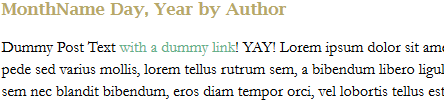
You know how your teachers always ask for your papers to be in Times New Roman and double-spaced? It’s not to make your paper twice as long–it’s for readability. I realized that in my original layout for this site, I had not taken line spacing into account, and as a result, awesome writing ended up looking like “Great Walls of Text” on people’s screens. Plus, the Arial font made body text run together more often than not, even when I was reading my own work! FAIL!
To combat that, I not only chose a larger font size and different font (Garamond 16px), but I spaced the lines 22px apart on the page. It’s not quite double-spacing, but it’s far enough apart to make each line distinct on the page. And with the new font choice, words don’t run together as easily, either. After all, if I’m writing a blog, I want users to be able to read what I’ve written as easily as possible!
Awesome New Sidebar

|
I got to thinking as I designed this layout: “I don’t want a sidebar that’s trying to do too much.” Admittedly, I filled my original layout’s sidebar with a TON of stuff, like a tag list, category lists, blogrolls, recent tweets–it was all happening up in the sidebar region, and it looked overstuffed after a while. But the stuff that should have been in the sidebar, like a welcome, proper attention paid to the blogroll, etc., was tucked away on WordPress pages. Not my smartest moment as a webdesigner, I’ll admit. But that’s the great thing about webdesign–there’s always “Undo” and “Backspace.” 😀
So, with this sidebar, I’ve included a welcome, put up a blogroll, added the “Brought to you by” links, and called it a day. (With the last choice, I eliminated the need for a footer altogether!) Plus, I spiffed up the FAQ page so that it would indeed answer any and all common questions about me and about this blog. This will keep the sidebar from looking so cluttered and stuffed with text, so that it doesn’t distract from the star of the show–my content! |
Summary
Good layout redesigns take time and thought, as well as a critical eye turned toward your own designs. As I’ve illustrated, you have to first point out what’s not working in the design you worked hard to craft, and then take steps to fix those problems so that the site works and reads better.
I’m very excited about this redesign, even though I dread the process of trying to placate WordPress to accept another layout; the last time was rife with much fist-shaking at the computer screen and words I’m trying to stop saying. xD But if these changes will help readers take in my content more easily, it’s ALL worth it!
3 Blog Networking Sites You Ought to Join
For bloggers, writing content and creating the layout are often the “easy” parts of blogging. The BIG questions are: “How do we get attention for our content? How do we attract readers?”
Part of attracting a wider audience lies in social media–using Facebook, Twitter, and any other relevant social networking sites you can think of–to share your content. But the other component is networking with other bloggers like yourself. Not only can you invite them to read your work and read theirs, but you can get feedback from them and open the door for friendly exchange of ideas. When we’re all in the business of communication, talking and sharing with others of like minds is vital!
So, I did a good bit of research and came up with the following 3 “blogger networking” sites, which can help you share your content with readers and socialize with other bloggers:

|

|

|
|---|---|---|
| BlogLovin’ has compatibility with Google Reader feeds, and it’s one of the foremost blogger networking sites at the moment. There’s more emphasis on connecting bloggers together, as well as aiding the interaction between blogger and reader. | BlogCatalog, like BlogLovin’, has feeds available for readers, but it also provides a little more in-depth blogger-to-blogger networking. Also, there’s a “VIP” feature where bloggers can pay a fee to feature their content on the site’s front page. | BlogLines is a more location-based blog feed reader/blogger networking site–it sorts blogs by physical location (city, region, state, etc.) as well as by content type. (This site is still in beta at the time of this writing, but promises to be a neat addition to blogger networking sites!) |
Check these out and join up–a little more blog publicity can’t hurt! (Trust me, I’m kind of preaching to myself here too :P)
Bloggers Aren’t Real Writers? I BEG to Differ!
Recently, I caught sight of this picture floating around the Internet, and it admittedly ruffled this little robin’s feathers:

I retrieved this picture from buzzfeed.com, but it’s all over the internet.
Now, I have censored out the language for propriety’s sake, but what I really took issue with was the last sentence or two: “Bloggers aren’t real writers.”
At the risk of opening myself up to criticism, I’d like to address this viewpoint, because it seems to be shockingly commonplace among most non-bloggers. As a writer who has picked up blogging as a hobby, I find that this acid view of blogging is overly simplistic and based in ignorance rather than truth. I seek to dispel at least some of that ignorance with this post.
#1: All Bloggers Are Not Identical
One cannot categorize “bloggers” as one solid group of people with one fixed set of interests, methods, and talents. That’s like saying “all fruits taste the same” or “all sneakers fit the same on everybody’s feet”–it’s simply not true. People blog about all sorts of things, and they blog in various ways; some use mainly pictures, some use video, and some, like myself, use mainly text to get their point across.
I could potentially understand this person’s perspective if all bloggers just used visual media as their posts; visual media does not require as much text editing and revising. But not all bloggers use pictures and video to the exclusion of all else. I’m a prime example, and I know plenty of other bloggers who produce text-heavy posts as well. Given that, how is text blogging not real writing, when it is primarily carefully-chosen words?
#2: Text Blogging Forces More Careful Editing
Blogging is a time-sensitive form of writing, produced on a schedule and conforming to content demands as well as formatting and time demands. What kind of writing does that sound like? Journalism! And, while blog articles are not always the highest of art forms, producing a good blog article DOES require a certain ruthlessness and discernment in one’s writing and editing process, which most if not all types of writers can benefit from.
For instance, I’ve noticed that I’ve become a much more concise, word-conscious writer since I began my blog in January 2011–I used to go on for days about a topic, and now I can condense that into a paragraph or two and get my point across much better. Blogging has forced me to reevaluate my writing style, and has helped me cut out some of the unnecessary verbosity as I revise and edit. My paragraphs are shorter and feel more “zingy” as a result.
Given this, how is blogging not real writing, when it requires the same amount (or often more) of typing, editing, and revising that I did while working toward my English major in college?
#3: Blogging = Written Communication = WRITING
Blogs, even and especially text-heavy blogs, communicate ideas between people, break news, and invite discussion, much as TV news stations and newspapers do. How is this not real writing, when all of these tasks are precisely what writing was first designed to do? People have been using writing as communication for over a millennium now, at least, and many forms of writing have since developed. Text-based blogging, while relatively new to the literate scene, is just as viable as any other form.
I don’t know for certain, but I have a feeling that the creator of this particular image categorizes “writing” as “creative writing” or “expository writing” only–basically, that “real writing” is only telling a fictional story or getting across an academic point. Unfortunately, that is like saying that “carrots and onions are the only real vegetables, and everything else you grow in your garden is a fake veggie;” it is a perspective that ignores every other opinion or fact as “invalid” except its own narrow, opinionated view. Writing is not only for creativity nor just for arguing points of opinion; it is also for communicating facts and discussing points, which bloggers do quite well.
In Conclusion
I don’t claim that text blogging is the be-all and end-all form of writing, but it does take time and patience to craft and complete well-thought-out articles, and it does take discipline and dedication to produce such articles on schedule every day or every week. It is no different from the other forms of writing out there, which have similar mental requirements.
Additionally, if this person and others like him/her believe blogging is so stupidly easy, I would challenge them to try keeping up a daily text-only blog for about 6 months, coming up with original articles (about 500-1000 words apiece) and fresh perspectives every day. I think their experience would teach them quite a bit about how blogging IS “real writing” if done in this way.
What to Do When You Run Out of Blog Content
No matter how long you’ve been running your blog, sometimes it happens: you end up at a loss for what to write about. I call it the “Blog Doldrums,” where any good topic you come up with is one you’ve already done, and any other topic seems not worth writing about. The Blog Doldrums kill off many good blogs before they really get started, and can cause a great blogger to suddenly go silent.
So, how do we as content creators combat this? First, by not letting these doldrums get hold of us for too long, and second, by getting a little creative with our blog topic ideas.
Approach #1: Search for Similar Books and Websites, and Present Them to Your Audience as Resources
Whatever you’ve made a blog about, likely there’s been a book (or several) written about it, and likely there are other websites which cover similar ground. Check out books at your local library (or through an e-library), and do fairly involved searches for websites (i.e., not just the first page of Google results).
Once you find books and websites that are on your particular topic, browse through them, making notes of which ones are most useful and relevant to your blog’s audience. Compile a short list of the best of the best, and write a short description of each book or website, along with relevant links (website link, place to buy the book, official book website, etc.) and any appropriate pictures (screenshots and book covers).
Example: For my Monday web design and development posts, I could do a post about some great webdesign guidebooks as well as helpful development websites, linking to each and showing my readers resources they’ve potentially never heard of.
The resulting blog post will be basically an online report about what other people are doing in your content area. Visitors will still be enriched by this post, and you can start to build a little community with other website owners and bloggers who are interested in your same topic, too!
Approach #2: Just Write Your Perspective on an Issue
Rather than trying to do a really in-depth post with TONS of information and LOTS of “expert advice,” how about just doing a blog post about your own perspective? Write about what this topic means to you, or how you interact with it on a daily basis, or even what you think about particular trends going on in your chosen topic right now.
Why bother doing this? Because you, as a blogger, have a very interesting point of view that others would like to read about, so why NOT share your opinions? This gets you writing from the most primal level–your own mindset. You can explore your own thoughts and reasoning as you choose, and can then tie it all together in an understandable way.
Example: For my Saturday creativity posts, I could write about what music has meant to me over the course of my life. Or, for my Thursday gaming posts, I could write about the current HeroClix team trends appearing in local gaming stores versus team trends at conventions.
This blog post will be virtually guaranteed to be original, new content–it came out of your head, after all! Plus, visitors will likely be intrigued by your words, and may be inspired to think differently about your topic because of your post.
Approach #3: Research Your Topic and Bring Something Obscure to Light
No matter what your topic, there are likely several unexplored corners within it, several small things most people gloss over, assuming everyone knows about it. Take time to research your chosen topic in depth, and research anything that surprises you about your topic or anything you personally have never known much about before.
Once you’ve done that, take time in a blog post to expand on one or more of these hidden gems, really digging into it and exploring it. (Don’t forget to do a lot of linking in this post to show where you found this information, and where people can go to find out more!)
Example: For my Wednesday Bible posts, I could take a Bible verse that is either not often talked about or very often misunderstood, and really delve into it, comparing and contrasting the meaning most folks take from it and the Biblical scholars’ interpretation(s).
When you publish this post, you will be bringing something very new and interesting to your audience’s attention, and your post will likely spur readers to learn even more. You might even draw attention from other bloggers and website owners who write about your same topic!
Summary
When you find yourself in the Blog Doldrums, don’t despair–there are plenty of ways to get yourself out of them AND produce a useful, worthwhile blog post at the same time!
How to Deal with Comments (Both Good and Bad)
More and more, webdesigners and developers are running sites that allow users to comment on articles (such as this blog). This provides a miniature forum experience for the users, and a valuable form of feedback for the content author.
…Well, at least it CAN be valuable, if you know how to extract useful information from those comments. But the process of dealing with comments, even if they are positive and encouraging, can be overwhelming for content authors who are new to the process.
Thus, I have a few tips for handling comments of all sorts, mainly garnered from my own experience as a content author over the last nine years.
Positive/Supportive Commentary: Do’s and Don’t’s
Do:
- Thank the commenter for their input
- Visit the commenter’s website, if they have one, and leave a positive/supportive comment on one of their articles, or in a guestbook
Don’t:
- Ignore or fail to acknowledge the positive comment at all
With positive commentary, it’s pretty easy to handle; we all like getting virtual “pats on the back” for our efforts. Most times, thanking the person and returning the comment favor on their site can be enough. (And who knows, you might find that you and the positive commenter can affiliate or link-exchange, helping to give each other a little traffic.)
Critical/Politely Disagreeing Commentary: Do’s and Don’t’s
Do:
- Thank the commenter for participating in the discussion
- Try to answer the points which are being disputed/criticized, in a polite and brief manner
- Keep the tone of your responding comment positive rather than negative
Don’t:
- Immediately leap into personal attacks on the critical commenter
- Delete the critical comment or block its author
- Bad-mouth the commenter on other websites
Despite our best intentions as content authors, when we write opinion pieces, there are always going to be people whose opinions differ from ours. Differing opinions are okay, as long as all involved parties keep it civil and stick to expanding and fleshing out the topic at hand.
When someone has taken the time to politely disagree with you, and has explained why they have a different opinion, it’s important to answer them as thoroughly as you can, and to thank them for providing a different perspective. Remember, other readers of your blog can be enriched by a balanced group of perspectives, so the critical commenter might actually be doing you a favor!
Abusive/Inflammatory Commentary: Do’s and Don’t’s
Do:
- Ask the abusive commenter politely to stop what they’re doing
- Delete their commentary, especially if it is bothering other users
- Block their IP address from accessing your site, if nothing else works
Don’t:
- Argue with the abusive commenter back and forth for too long
- Reduce yourself to their level by making abusive comments back to them
- Recruit other people to harass them, either on your site or elsewhere on the Internet
Unfortunately, there are some people in this world who thrive on a good debate…except that they define debate as “ticking off everybody on the Internet and having a good laugh at the results.” Rather than being a source for a balanced perspective or polite dissent, the abusive commenter lives to make conflict, spam hateful messages, and incite anger wherever they can.
Deal with them as politely as you can at first; do not mistake a critical commenter for an abusive one, whatever you do. But if the comments the person leaves are taking the focus completely away from the topic, or if they are just hateful spam, then you as the content author (and website owner) need to take action to ensure that everyone who visits your site has a positive overall experience. (Blocking their IP address is a drastic step, but it may be best for everyone involved.)
Summary
Writing for the web means that you’ll be getting commentary of all sorts from others. Learning how to respond to each type of commentary (supportive, critical, and abusive) can help you maintain a better relationship with your users and a better atmosphere for your site.
Tumblr: A Different Blogging Style
Have you always wanted to blog, but never known what to blog about? Have you put aside the whole idea because of not knowing how to design or code webpages? If these apply to you, let me tell you about Tumblr.
What Is Tumblr?

Tumblr is a relatively new kind of blogging platform, revolving around the concept of “reblogging.”
Reblog, verb: “to repost an item of interest from another blog to your own, with proper sources and credits already applied for you by the blogging platform.”
In short, reblogging on Tumblr is like retweeting on Twitter, or repinning on Pinterest–you only need to click a button, add comments if you wish, and voila, the reposted content is viewable to your followers (people who receive updates from your blog), with links to the source already included. This is not plagiarism; indeed, it is meant to help original content have a much wider reach and audience. If you like something enough, you can reblog it, and Tumblr will automatically give credit back to the person who originally posted it through Tumblr’s platform.
Of course, you can also create content of your own and post it through Tumblr as well; in fact, many small fansites are now run through Tumblr because of the ease of posting original content. It is an easily accessible platform to blog on–you just sign up, select a username for your Tumblr, and in mere moments, you’ll have a “yourusername.tumblr.com” address for your own blog!
More than a Blogging Platform–a Community
But reblogging is not the only thing that sets Tumblr apart from other platforms. More than on any other blogging platform I’ve tried, there is a strong sense of community between bloggers.
Much like Twitter and Pinterest, Tumblr uses the concept of “followers;” also like them, Tumblr has a sort of “news feed” of all the recent posts from blogs you follow, called a “dashboard” for short. What the Dashboard does differently is to allow commentary between bloggers that has no maximum character limit–very different from Twitter and Pinterest.
Not only that, but you can very easily find other bloggers who share your interests, and build a community with them through reblogging and messaging. I’ve only been on Tumblr since mid-July, and usually just get on at night due to dialup access, yet I’ve already experienced some of that supportive, open community. It just seems so much easier to reach out to other Tumblr users than it was to connect with other Livejournal users or other WordPress.com users.
Using Tumblr: A Crash Course

The Tumblr Dashboard, partly seen here, appears once you have logged in. It allows you to see recent posts from the blogs you follow, as well as post content yourself. The seven different-colored icons stretched across the page are your “content-posting” icons, and below them will appear a feed of the latest posts from the blogs you follow.

Each post you see on your Dashboard will have a top line that reads something like this. Usernames are quoted as “so-and-so reblogged so-and-so” or “so-and-so posted this,” as you see in the image. The number 9.054 on this image stands for the number of Tumblr users who have either liked or reblogged this particular post; the double-arrow symbol to the right is what you click to reblog, and the heart is what you click to like the post.

In this image, you can see that the heart is now red, signaling that I chose to “like” this post. The number 9,054 is now 9,055 in accordance with that.

Tumblr also provides you a quick way to see individual blogs from within the Dashboard. Hovering over the top right corner of any post on the Dash will “fold” the corner; you can then click that corner and Tumblr will open a new window with just that blog visible.

If you choose to reblog a post, this is an example of what you’ll see–content at top left, a place to comment on said content at bottom left, and places to schedule and add tags to your post. At the bottom, you can click to reblog, preview the post, or cancel if you so choose.

To look for posts about a favorite topic of yours, just type in the topic in the “Search Tags” box, and Tumblr will pull up a reverse-chronological list of posts with that tag. (This is also a great way to find new blogs to follow based on that topic choice!

|
Here, you can see my personal sidebar, off to the right of the posts on my Tumblr Dash. Yours will look a little different, but the basics are here–mostly links to help you run your blog more efficiently. Through the sidebar, you can view all the posts you’ve personally made, a list of all the blogs you follow (and all who follow you), what posts you’ve Liked, etc.
The section I’ve marked in red on this image shows my “tracked” tags. If you want to be notified every time someone on Tumblr posts something with a specific tag, all you have to do is search for that tag, then click the listing for that tag as it sits on your sidebar. Then, every time you log in, you can click that listing again to look at all recent posts with that tag. (Tracking tags is a good way to keep tabs on whatever topic you happen to be a fan of at the moment, as you can see from my personal list. LOL) |
Finding Community on Tumblr
The most tried-and-true way to build community on Tumblr is to search for various content through the Tag system, as described above. If you browse through various tags and find that you like the posts by a particular Tumblr author, then all you need to do is click their username, go to their blog, and click “Follow” in the top right corner. This is pretty much how I started following most of the blogs I follow!
From there, building community with other users can be as simple as reblogging what they’ve made and messaging them if you wish. Tumblr, like Twitter and Pinterest, lets users know when others have reblogged their content, and from there they can choose to follow you back if they want to.
You do have to be fairly active and social to find that community for yourself, but I’ve found that Tumblr is a much easier community to involve yourself in–it doesn’t feel quite so insular as other blogging platforms have felt to me. Actually, I feel freer to speak my mind than I do anywhere else online, because Tumblr seems to attract free spirits like myself. 😀
Try Tumblr for Yourself!
It’s as easy as visiting Tumblr.com and clicking “Sign Up!” 🙂
How Social Networks Killed the Personal Blog
I remember when I first began web design, personal blogs were all the rage. Yes, yes, I know, imagine me sitting in a rocker with a blanket over my knees if you wish, but I was kickin’ around the Web in the early 2000s and saw it with my own screen.
Back then, blogs had a more longform, intimate style of writing. They were how you shared your life stories and thoughts with others, mimicking the diaries so many of us likely kept–except that these “diaries” were online, and viewable by many people. Not only that, you could be an anonymous writer if you wished.
But now, the era of the “personal” blog seems to have waned. Blogs are now more for site updates, and maybe a little project tracking–they are more about topics than about lives. My own is a rare multi-topic blog, but not one of those topics is my life (and you’re much better off reading something that isn’t about my life, I assure you 😛 ). Personal blogs just aren’t as important to us anymore.
Why? I believe the answer lies in two words: “social networks.”
How Social Networks = Easier Personal Blogging
Believe it or not, early blog websites, like Diaryland, Blogger, Livejournal, and so many others, were some of the first social network sites. They allowed bloggers to talk to each other in ways that were system-constructed, with comments on blog posts and the like. So the Internet foundations of functioning social networks were already laid when networks that focused on shorter-form writing (such as FriendFeed, Myspace, Facebook, and Twitter) came along.
But these days, each of us likely writes several short textual bursts about our life in one day. We don’t all have to be gifted writers to write about our lives anymore; we don’t have to catalog what we did all day in a single, long blog entry. We can simply write about the interesting stuff that happens to us, as it happens, and not have to work it into a grand thematic short story of our day.
Why I Largely Ditched Personal Blogging for Social Media
As a creative writer who inexplicably hated keeping diaries and writing personal blogs (because my life is just that boring), I gravitated to the social network. Why? Because the social network didn’t make me JUST blog about myself to be considered “active.” I could comment on other people’s life events, like their pictures, play a few games, share a few links–all on one website. Just like big-box stores like Walmart capitalize on having “all you need at one store,” social networks like Facebook capitalize on sharing “all of your life on one site.”
But I realize that with the ease and ubiquitous nature of social networks came the inevitable waning of more “personalized” blogs. I gradually quit writing on my own Livejournal about my life after a while of being on Facebook, with this simple reasoning: “why write about my day on a personal blog, when I’ve already written a status message or two about it on Facebook and shared it with friends?”
I can imagine that many other Internet users have thought the same way, about whatever social network they prefer to visit and post on. Social networking makes it easier to post about your life, and takes less time than a blog.
There’s a Big “But” Here
Not everyone has stopped doing personal blogs, though. In fact, the number of small blogs and free blog websites has only risen in response to social networks, even though less people visit or make personal blogs these days. This trend, linked to the sheer number of topic blogs being produced, gives me hope that people aren’t completely getting away from “real” writing and longer article-driven blogs in favor of quick tweets and likes.
Though much of the Internet’s attention has been drawn away from this longform, diary-style life narrative, there still seems to be a call for it among individual users. Perhaps the demise of the personal blog is inevitable and in process, as it appears…or perhaps a new generation of Internet users will gravitate back to it.